
How To Date A Magical Girl! Art Book
Cafe Shiba · RIVER CROW STUDIO · Jan 31, 2019
Delayed observation
Observed
0
Last tracked
0
All-time peak
n/a
Δ 24h
Player count last observed
Live player data is temporarily unavailable; historical values remain visible for context.
How To Date A Magical Girl! Art Book - Steam Charts & Historical Stats
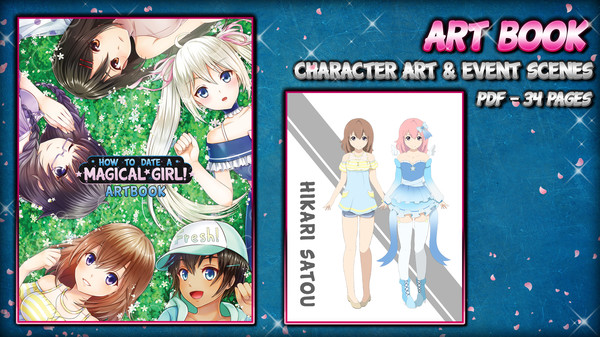
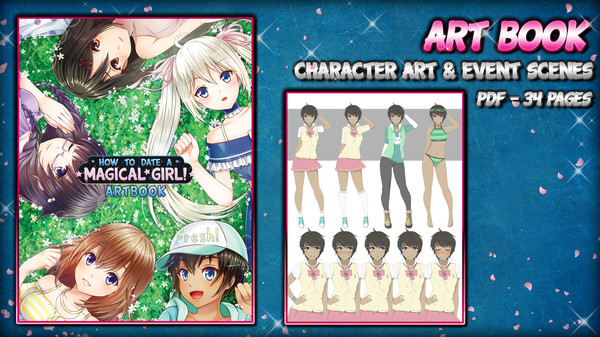
This beautiful color art book features illustrations of the characters and events from How To Date A Magical Girl! Explore historical player activity and pricing for How To Date A Magical Girl! Art Book. Player-count data was last observed May 26, 2026.
Price
$0.99
Genre
Adventure
Developer
Cafe Shiba
How To Date A Magical Girl! Art Book player count and price summary
- Current players
- Unavailable
- All-time peak
- Unavailable
- 24-hour player change
- Unavailable
- Current US price
- $0.99
Player count last observed . Values marked unavailable are not estimated.
Media gallery 3 screenshots · 0 videos
Screenshots

Game Insights
Buy Verdict
Watch — $0.99.
Decent deal at 50% off, but might drop further. Watch for better opportunities.
▲
~54 days until next sale
Value Score
Great Value — 100th percentile.
Price-to-player ratio ranks in the 100th percentile.
▲
Market pricing tier
Genre Benchmarks
Value Ratio
Top 0%
Player count
Price History
Lowest Price
$0.99
Jul 2026 across all regions
Current Price
$0.99
US region
No Recent Price History
Price history data will appear here once more pricing information becomes available.
System Requirements
Platform Support
Windows
macOS
Windows Requirements
Minimum:
Minimum:
- OS *: Windows 7/8/8.1/10 (32bit/64bit)
- Processor: Intel Core2 Duo or better
- Memory: 2 GB RAM
- Graphics: DirectX 9/OpenGL 4.1 capable GPU
- Storage: 4 GB available space
- Additional Notes: 1280 x 720 or higher display
macOS Requirements
Minimum:
Minimum:
- OS: Mac OSX 10.10 or better
- Processor: Intel Core2 Duo or better
- Memory: 2 GB RAM
- Graphics: Compatible OpenGLR
- Storage: 4 GB available space
- Additional Notes: 1280 x 720 or higher display
Pricing
Paid Game
CDN$ 2.29 (CAD)
Additional Information
Categories
Single-player
Downloadable Content
Steam Achievements
Steam Cloud
Family Sharing
Supported Languages
English
Official Website
https://rivercrow.studio
Current Pricing
💰
CDN$ 2.29
Regular Price
Historical low: $0.99
(Jul 2026)
Additional Information
🆘
Support
🎁
Purchase Options
1
package options
Developer Analytics
Loading competitors...
About This Game
This beautiful color art book features illustrations of the characters and events from How To Date A Magical Girl!
Detailed Description
This beautiful color art book features illustrations of the characters and events from How To Date A Magical Girl!
This 34 page .PDF file is not to be missed for fans of the game!
[LOCATING YOUR DLC ONCE PURCHASED & DOWNLOADED]
DLC files are downloaded to your game's Steam directory after purchase. The default location is:
\Program Files (x86)\SteamLibrary\steamapps\common\How To Date A Magical Girl!\
If this is not valid on your computer, locate your game's install directory using these instructions:
- Open the Steam client and navigate to your game library
- Right-click the entry for How To Date A Magical Girl! and select Properties
- Click the Local Files tab
- Click Browse Local Files
This will open the game's directory, and once your DLC is installed, you'll be able to view the files.
This 34 page .PDF file is not to be missed for fans of the game!
[LOCATING YOUR DLC ONCE PURCHASED & DOWNLOADED]
DLC files are downloaded to your game's Steam directory after purchase. The default location is:
\Program Files (x86)\SteamLibrary\steamapps\common\How To Date A Magical Girl!\
If this is not valid on your computer, locate your game's install directory using these instructions:
- Open the Steam client and navigate to your game library
- Right-click the entry for How To Date A Magical Girl! and select Properties
- Click the Local Files tab
- Click Browse Local Files
This will open the game's directory, and once your DLC is installed, you'll be able to view the files.
Frequently Asked Questions
Is How To Date A Magical Girl! Art Book worth buying right now?
Watch — $0.99. Decent deal at 50% off, but might drop further. Watch for better opportunities.
When does How To Date A Magical Girl! Art Book go on sale?
Decent deal at 50% off, but might drop further. Watch for better opportunities.
Is How To Date A Magical Girl! Art Book free to play?
How To Date A Magical Girl! Art Book costs $0.99 on Steam.
What genre is How To Date A Magical Girl! Art Book?
How To Date A Magical Girl! Art Book is a Adventure, Casual, Simulation game.
Who developed How To Date A Magical Girl! Art Book?
How To Date A Magical Girl! Art Book was developed by Cafe Shiba and published by RIVER CROW STUDIO.
What platforms does How To Date A Magical Girl! Art Book support?
Available on Steam for Windows, macOS.