Game overview
Simplode Suite - Borderless Fullscreen
Includes the Borderless Fullscreen feature, which allows you to force some programs and games which normally would not support a borderless full screen mode to become borderless full screen. This feature is also available as a selection in Free Select package.
- Last tracked players
- 0
- All-time peak
- Unavailable
- 24-hour change
- Unavailable
Delayed observation · last tracked . Values marked unavailable are not estimated.
About this game Read the full description
Includes the Borderless Fullscreen feature, which allows you to force some programs and games which normally would not support a borderless full screen mode to become borderless full screen. This feature is also available as a selection in Free Select package.
This product is available natively in English, but it has automated translations for most major languages.
Contents: Borderless Fullscreen (⇱⇲)
This product is available natively in English, but it has automated translations for most major languages.
Contents: Borderless Fullscreen (⇱⇲)
Borderless Fullscreen (⇱⇲)
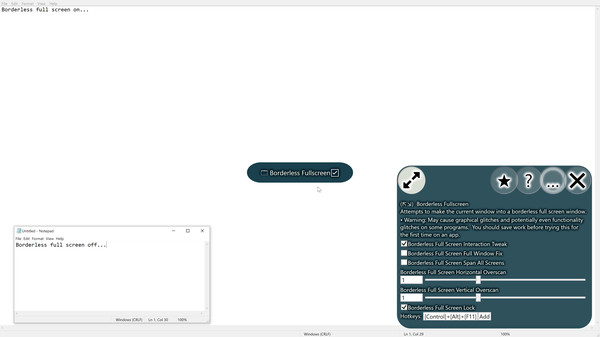
Attempts to make the current window into a borderless full screen window.- Warning: May cause graphical glitches and potentially even functionality glitches on some programs. You should save work before trying this for the first time on an app.
- Borderless Full Screen Interaction Tweak (Default: True)
Some programs try to get smart and do things when they detect they are in borderless full screen mode. In my experiences, these things are usually detrimental. This tweak will set the pixels off by one, which can avoid this in the cases I saw. If the programs you are using behave fine without this tweak, maybe keep it off to get a bit closer to pixel perfection. - Borderless Full Screen Full Window Fix (Default: False)
When enabled, borderless full screen will not attempt to remove the borders, but instead will try size the program in such a way that the borders would be outside of your screen. Some programs try to fight the normal mode, but will work with this enabled. - Borderless Full Screen Span All Screens (Default: False)
Span all screens when using the borderless full screen feature. - Borderless Full Screen Horizontal Overscan (Default: 1)
When switching to borderless full screen, attempt to overscan/underscan horizontally by this ratio. Some programs may resist overscan, but underscan should work more often. - Borderless Full Screen Vertical Overscan (Default: 1)
When switching to borderless full screen, attempt to overscan/underscan vertically by this ratio. Some programs may resist overscan, but underscan should work more often. - Borderless Full Screen Lock (Default: True)
When enabled, programs that have been set to borderless full screen will automatically reset to full screen if changed. This is helpful for some applications which change their sizes and positions for strange reasons. You will need to toggle the borderless full screen off for it to unlock.
Media gallery 1 screenshots · 0 videos

Screenshots
Player activity
Concurrent players over the last 48 hours.
Loading player history?
System requirements Windows
Windows
Minimum
Minimum:- OS: Windows 10
Game details Languages, features & support
- Publisher
- Simplode LLC
- Brazilian rating
- l
- Features
- Downloadable Content
- Languages
- English, French, Italian, German, Spanish - Spain, Arabic, Bulgarian, Czech, Danish, Dutch, Finnish, Greek, Hungarian, Japanese, Korean, Norwegian, Polish, Portuguese - Portugal, Portuguese - Brazil, Romanian, Russian, Simplified Chinese, Spanish - Latin America, Swedish, Thai, Traditional Chinese, Turkish, Ukrainian, Vietnamese
- Website
- Official website ↗
- Support
- Support site ↗
More analysis Activity patterns, updates & developer tools
Game Insights
Buy Verdict
Watch — $1.99.
Decent deal at 0% off, but might drop further. Watch for better opportunities.
▲
~41 days until next sale
Value Score
Great Value — 100th percentile.
Price-to-player ratio ranks in the 100th percentile.
▲
Market pricing tier
Genre Benchmarks
Value Ratio
Top 0%
Developer Analytics
Loading competitors...
Frequently Asked Questions
Is Simplode Suite - Borderless Fullscreen worth buying right now?
Watch — $1.99. Decent deal at 0% off, but might drop further. Watch for better opportunities.
When does Simplode Suite - Borderless Fullscreen go on sale?
Decent deal at 0% off, but might drop further. Watch for better opportunities.
Is Simplode Suite - Borderless Fullscreen free to play?
Simplode Suite - Borderless Fullscreen costs $1.99 on Steam.
What genre is Simplode Suite - Borderless Fullscreen?
Simplode Suite - Borderless Fullscreen is a Casual, Utilities game.
Who developed Simplode Suite - Borderless Fullscreen?
Simplode Suite - Borderless Fullscreen was developed by Simplode LLC and published by Simplode LLC.
What platforms does Simplode Suite - Borderless Fullscreen support?
Available on Steam for Windows.