
Game overview
Simplode Suite - Color Grabber
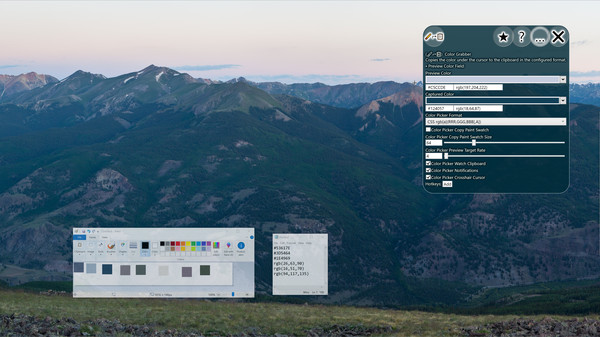
The Color Grabber package simply enables you to quickly grab color information from pixels on screen and access this information in various formats or copy directly to clipboard. You can also quickly copy a single pixel or color swatch of configurable size as an image.
- Last tracked players
- 0
- All-time peak
- Unavailable
- 24-hour change
- Unavailable
Delayed observation · last tracked . Values marked unavailable are not estimated.
About this game Read the full description
The Color Grabber package simply enables you to quickly grab color information from pixels on screen and access this information in various formats or copy directly to clipboard. You can also quickly copy a single pixel or color swatch of configurable size as an image.
This product is available natively in English, but it has automated translations for most major languages.
Contents: Color Grabber (🖌⮣📋)
This product is available natively in English, but it has automated translations for most major languages.
Contents: Color Grabber (🖌⮣📋)
Color Grabber (🖌⮣📋)
Copies the color under the cursor to the clipboard in the configured format.- Preview Color Field:
- Color Picker Format (Default: Hex #[AA]RRGGBB)
This is the format that the Color Picker will use when copying color information to your clipboard.
- Hex #[AA]RRGGBB: A compact hexadecimal color format. The alpha transparency (if included) is incompatible with many older web browsers.
- CSS rgb[a](RRR,GGG,BBB[,A]): A color format with general compatibility with all browsers' CSS implementations, including alpha transparency support. - Color Picker Copy Paint Swatch (Default: False)
If enabled, copies a paint swatch to the clipboard instead of the color string. - Color Picker Copy Paint Swatch Size (Default: 64)
Controls the size of the paint swatch that the color picker will put on the clipboard. - Color Picker Preview Target Rate (Default: 4)
This is the target rate at which the color grabber preview will try to update itself when visible, in frames per second. Setting the rate to 0 will disable the feature. - Color Picker Watch Clipboard (Default: True)
If enabled, the color grabber window will watch the clipboard for valid colors and update the captured color accordingly. This is useful for quickly converting color information from decimal to hexadecimal or from hexadecimal to decimal. - Color Picker Notifications (Default: True)
If enabled, the color picker will create a visible notification of the color found. - Color Picker Crosshair Cursor (Default: True)
The crosshair cursor is supposed to be better for pixel accurate selection. When enabled, the system crosshair cursor will be used when grabbing a color. If you use the secondary action or a hotkey, however, the cursor will not change, as this setting only impacts the two-step selection process where you click the button and then click your target.
Media gallery 1 screenshots · 0 videos
Screenshots
Player activity
Concurrent players over the last 48 hours.
Loading player history?
System requirements Windows
Windows
Minimum
Minimum:- OS: Windows 10
Game details Languages, features & support
- Publisher
- Simplode LLC
- Brazilian rating
- l
- Features
- Downloadable Content
- Languages
- English, French, Italian, German, Spanish - Spain, Arabic, Bulgarian, Czech, Danish, Dutch, Finnish, Greek, Hungarian, Japanese, Korean, Norwegian, Polish, Portuguese - Portugal, Portuguese - Brazil, Romanian, Russian, Simplified Chinese, Spanish - Latin America, Swedish, Thai, Traditional Chinese, Turkish, Ukrainian, Vietnamese
- Website
- Official website ↗
- Support
- Support site ↗
More analysis Activity patterns, updates & developer tools
Game Insights
Buy Verdict
Watch — $0.99.
Decent deal at 0% off, but might drop further. Watch for better opportunities.
▲
~41 days until next sale
Value Score
Great Value — 100th percentile.
Price-to-player ratio ranks in the 100th percentile.
▲
Market pricing tier
Genre Benchmarks
Value Ratio
Top 0%
Developer Analytics
Loading competitors...
Frequently Asked Questions
Is Simplode Suite - Color Grabber worth buying right now?
Watch — $0.99. Decent deal at 0% off, but might drop further. Watch for better opportunities.
When does Simplode Suite - Color Grabber go on sale?
Decent deal at 0% off, but might drop further. Watch for better opportunities.
Is Simplode Suite - Color Grabber free to play?
Simplode Suite - Color Grabber costs $0.99 on Steam.
What genre is Simplode Suite - Color Grabber?
Simplode Suite - Color Grabber is a Casual, Design & Illustration, Utilities game.
Who developed Simplode Suite - Color Grabber?
Simplode Suite - Color Grabber was developed by Simplode LLC and published by Simplode LLC.
What platforms does Simplode Suite - Color Grabber support?
Available on Steam for Windows.