Game overview
Simplode Suite - Task Menu
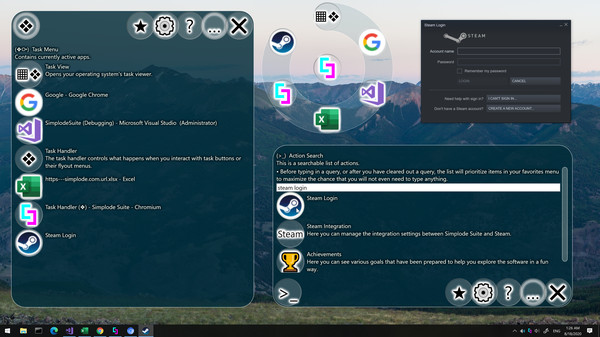
The Task Menu is like your task bar. Currently open apps will appear in the Task Menu, where you can access them with the ring menu system. Your open programs will also be searchable, allowing you to find an open window by window title, useful for power users with dozens of windows open.
- Last tracked players
- 0
- All-time peak
- Unavailable
- 24-hour change
- Unavailable
Delayed observation · last tracked . Values marked unavailable are not estimated.
About this game Read the full description
The Task Menu can perform duties similar to your task bar. Currently open programs will appear in the Task Menu, where you can quickly access them with the ring menu system. Your open programs will also be searchable using the Action Search feature, allowing you to quickly find an open window by window title, which can come in especially handy for power users who may have dozens of windows open simultaneously.
This product is available natively in English, but it has automated translations for most major languages.
Contents: Task Menu (❖⧂), Task View (▦❖), Task Handler (❖)
Settings:
This product is available natively in English, but it has automated translations for most major languages.
Contents: Task Menu (❖⧂), Task View (▦❖), Task Handler (❖)
Task Menu (❖⧂)
Contains currently active apps.Settings:
- Task Ring Focus Ordering (Default: True)
If enabled, the most recently focused app will always be moved to the last position in the task ring and task menu. - Task Ring Include Task View (Default: True)
If enabled, task view action will be available in the task ring. The task view action will open your operating system's task viewer, if available. - Dirty Chromium Icon Integration (Default: False)
When enabled, it checks the URLs of your Chrome windows to retrieve individual icons for them. Beware that this feature inspects the URLs you are visiting and requests the icon from the associated website. - Dirty Chromium Icon Integration Page Specific (Default: False)
Tries to parse contents of URLs from Chrome windows to find page specific icons for them. Beware that this feature inspects the URLs you are visiting and requests the page and the icon from the associated page. Sometimes Chrome does not react well to the integration, so if Chrome starts freezing up on you, you should try to turn this off and see if it improves.
Task View (▦❖)
Opens your operating system's task viewer.- Only works on operating systems that have a built-in task viewer.
- Simply sends [❖]+[Tab], which is the default operating system hotkey for opening its task viewer.
- Task Ring Include Task View (Default: True)
If enabled, task view action will be available in the task ring. The task view action will open your operating system's task viewer, if available.
Task Handler (❖)
The task handler controls what happens when you interact with task buttons or their flyout menus.- When single clicking a task handler button, it will bring the associated task to the foreground.
- A secondary action is available when you press and hold the task handler button and then right click anywhere on the screen. The secondary action will bring the associated task to the foreground and also center it on the cursor, which may be extra helpful on excessively large monitors or multiple monitor systems.
- The Window Menu (🗔⧂) action available in the task handler flyout is bound to the associated task, which will be automatically targeted by any of the actions within. This provides an easy way to make any of the adjustments available within the window menu to a window even if it is not visible or not clickable.
Media gallery 1 screenshots · 0 videos
Screenshots
Player activity
Concurrent players over the last 48 hours.
Loading player history?
System requirements Windows
Windows
Minimum
Minimum:- OS: Windows 10
Game details Languages, features & support
- Publisher
- Simplode LLC
- Brazilian rating
- l
- Features
- Downloadable Content, Steam Achievements
- Languages
- English, French, Italian, German, Spanish - Spain, Arabic, Bulgarian, Czech, Danish, Dutch, Finnish, Greek, Hungarian, Japanese, Korean, Norwegian, Polish, Portuguese - Portugal, Portuguese - Brazil, Romanian, Russian, Simplified Chinese, Spanish - Latin America, Swedish, Thai, Traditional Chinese, Turkish, Ukrainian, Vietnamese
- Website
- Official website ↗
- Support
- Support site ↗
More analysis Activity patterns, updates & developer tools
Game Insights
Value Score
Fair Value — 50th percentile.
Price-to-player ratio ranks in the 50th percentile.
▬
Market pricing tier
Developer Analytics
Loading competitors...
Frequently Asked Questions
Is Simplode Suite - Task Menu free to play?
Yes, Simplode Suite - Task Menu is free to play on Steam.
What genre is Simplode Suite - Task Menu?
Simplode Suite - Task Menu is a Casual, Utilities game.
Who developed Simplode Suite - Task Menu?
Simplode Suite - Task Menu was developed by Simplode LLC and published by Simplode LLC.
What platforms does Simplode Suite - Task Menu support?
Available on Steam for Windows.