Game overview
Pop up Blaster
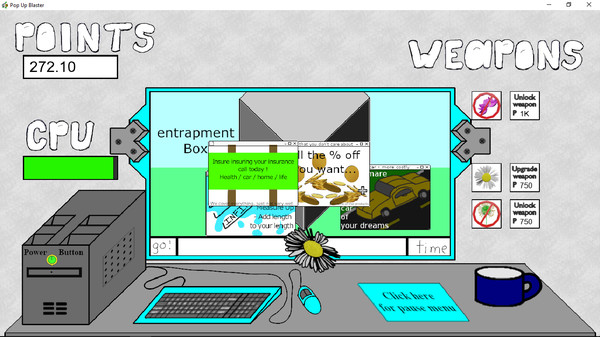
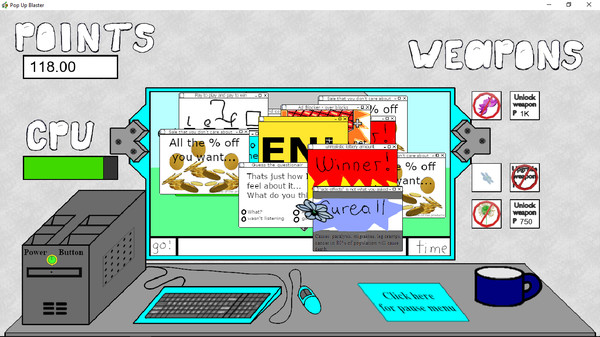
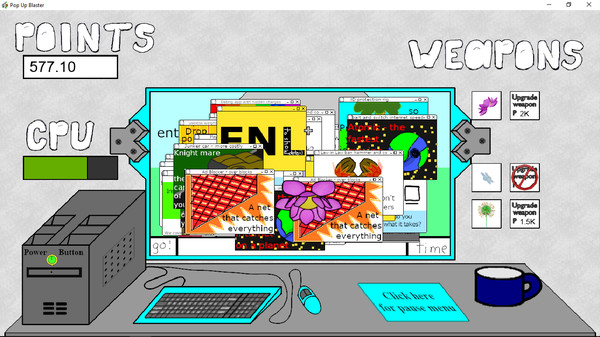
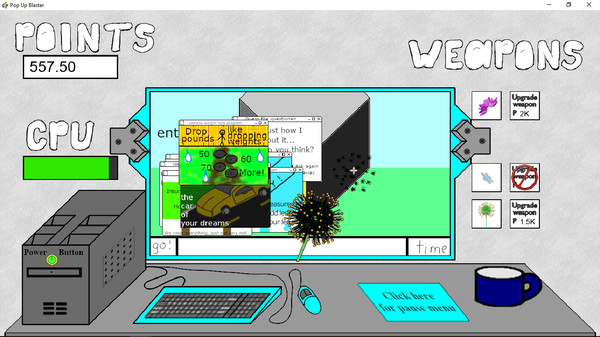
Pop up Blaster is a game that allows you to shoot popups with guns, and lob grenades and dynamite at them as well. If you do not like guns, you can shoot popups with flowers instead. If you do not like the realistic sounds, you can change them as well. All of the settings can be saved.
- Last tracked players
- 0
- All-time peak
- Unavailable
- 24-hour change
- Unavailable
Delayed observation · last tracked . Values marked unavailable are not estimated.
About this game Read the full description
Pop up Blaster is a game that allows you to shoot popups with guns, and has various options that allow you to change everything from how hard the game is, to how the game looks and sounds. In total, there are seven different settings, if you include difficulty.
----- How to play -----
----- starting a round -----
With the cursor, left click the power button on the in game computer. To instantly end a round, you can left click on the power button again, if your score is at least higher than the lowest high score, it will be saved
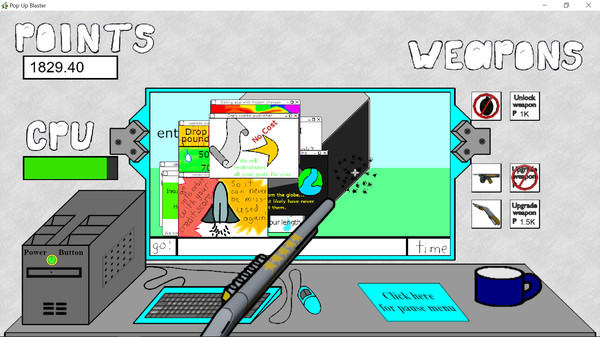
When you start a round, you will only have access to a hand gun, however as you gain points from shooting pop ups, you will be able to upgrade it to an auto hand gun, and then to a machine gun. You can also unlock a shot gun as well as explosives, the explosives will destroy all the pop ups on the screen at the same time, with the upgrade being a faster reload time.
----- Attacking -----
When you move the cursor far enough into the in game screen, your current weapon will appear, left click anywhere in the screen to use your current weapon.
Each weapon has a different rate that it can constantly fire at, with the slowest being the shot gun, and the fastest being the machine gun.
You can hold down the left mouse button to fire continuously, or press and release it to fire a single shot.
The grenade and dynamite work differently than the other weapons, both have a delay between the time that you use the weapon, and the time that the weapon detonates. You can switch to another weapon and shoot popups while they are flying through the air.
----- reloading -----
For the exception of the grenade and dynamite, each weapon has a maximum amount of ammo, when they run out you have to reload them.
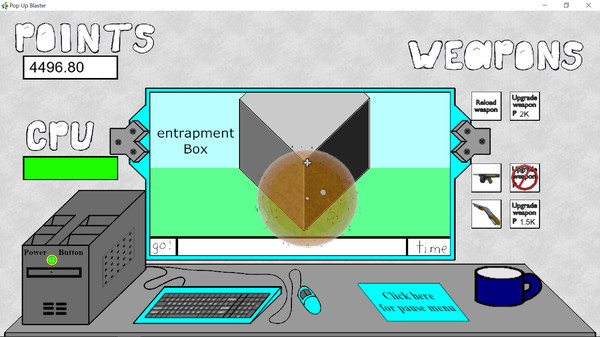
When they run out of ammo, their icon will change to "reload weapon", and "reload weapon" will appear above the in game screen.
Left click on the "reload weapon" icon and a reload animation will start. When the animation completes, the weapon will be reloaded. You can switch your current weapon while you wait for the weapon to reload.
When the weapon is reloaded you can switch back to it, or use your current weapon until it runs out of ammo, and then reload it and switch back.
You can not switch to a weapon that needs to be reloaded, nor can you upgrade the weapon, even if you have enough points to do so.
The grenade and dynamite are both one shot weapons and have to be reloaded every time that you use them. (The reason being that if you throw the grenade you are holding, you are therefore, no longer holding a grenade)
----- unlocking and upgrading -----
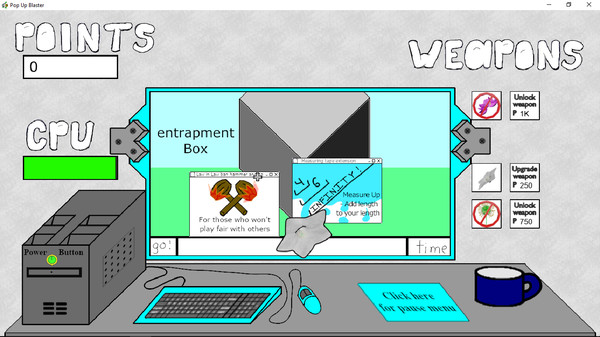
When the round starts, you will only have access to a hand gun, to unlock the other weapons, click the unlock weapon button that is next to their icon.
To upgrade a weapon, click the upgrade weapon button that is next to its icon. For the exception of the grenade and dynamite, when you unlock, or upgrade a weapon, you will automatically switch to that weapon.
When a weapon can no longer be upgraded, the upgrade button for that weapon will be crossed out.
When the cursor is hovering over an upgrade button, it will become highlighted to show that it can be activated.
----- switching weapons -----
The weapon icons as well as the unlock and upgrade buttons are to the right of the in game screen.
You can switch to a weapon as long as it is unlocked, and does not need to be reloaded.
To switch to a weapon, left click on its icon with the cursor. When the cursor is hovering over a weapon icon, it will become highlighted to show that it can be selected.
----- options and pause menu -----
To access the pause menu, click on the pause button on the desk below the in game screen.
The pause screen has three main tabs, "information and credits", "sound and visualization", and "Technician log" to switch between the tabs, click on them with the cursor.
to return to the game, click on the "click to return" button.
All the buttons in the pause menu will highlight when the curser hovers over them, and are activated by left clicking, for the exception of the volume and cursor option, which can also be changed by scrolling the mouse wheel.
All of the game options are found in the "sound and visualization" tab of the pause menu, for the exception of the difficulty setting, which is found in the "information and credits tab".
All of the options can be saved and the game will load them from one session to the next.
All of the options are in the order that follows:
Gun visual - (realistic or cartoonish)
Sounds - (realistic or cartoonish)
Weapon volume - (0 - 5) which is scaled so that 5 Represents 100%
Target - (visible or hidden)
Attack radius - (visible or hidden)
Mouse style - (1 - 6) the visual style of the cursor)
----- Round Over -----
The current round will end if the health of the CPU falls to 0, If the score is at least higher than the lowest score on the high score table, it will be saved.
The High score table is available in the pause menu, and the game does not instantly take you there so you an quickly start the next round if you want to. The high scores are saved every time a round ends, if you want, you can reset all the high scores to 0.
I miss the Game Maker 7 high score table feature... oh well, at least I go to use it when I could.
Media gallery 13 screenshots · 0 videos

Screenshots

And 5 more screenshots...
Player activity
Concurrent players over the last 48 hours.
Loading player history?
System requirements Windows
Windows
Minimum
Minimum:- OS: Windows 10
- Processor: Intell I3 processor or better
- Memory: 4 GB RAM
- Graphics: an integrated graphics card
- Storage: 70 MB available space
- Sound Card: an integrated sound card
Game details Languages, features & support
- Publisher
- Jason Dale Swisher
- Brazilian rating
- l
- Steam Germany rating
- 0
- Features
- Single-player, Family Sharing
- Languages
- English*
*languages with full audio support - Support
- [email protected]
More analysis Activity patterns, updates & developer tools
Game Insights
Buy Verdict
Watch — $5.99.
Decent deal at 0% off, but might drop further. Watch for better opportunities.
▲
~17 days until next sale
Value Score
Fair Value — 100th percentile.
Price-to-player ratio ranks in the 100th percentile. Priced as Premium at $5.99.
▲
Premium pricing tier
Genre Benchmarks
Value Ratio
Top 0%
Activity Heatmap
UTC+0 (Your Timezone)
0
Peak Activity
0
Avg Activity
0
Active Hours
6%
Sample coverage
Less Active
More Active
0
1
2
3
4
5
6
7
8
9
10
11
12
13
14
15
16
17
18
19
20
21
22
23
Sun
Sunday 0:00
No samples
No samples
Sunday 1:00
No samples
No samples
Sunday 2:00
No samples
No samples
Sunday 3:00
No samples
No samples
Sunday 4:00
No samples
No samples
Sunday 5:00
No samples
No samples
Sunday 6:00
No samples
No samples
Sunday 7:00
No samples
No samples
Sunday 8:00
No samples
No samples
Sunday 9:00
No samples
No samples
Sunday 10:00
No samples
No samples
Sunday 11:00
No samples
No samples
Sunday 12:00
No samples
No samples
Sunday 13:00
No samples
No samples
Sunday 14:00
No samples
No samples
Sunday 15:00
No samples
No samples
Sunday 16:00
No samples
No samples
Sunday 17:00
No samples
No samples
Sunday 18:00
No samples
No samples
Sunday 19:00
No samples
No samples
Sunday 20:00
No samples
No samples
Sunday 21:00
0 players · 1 samples
0 players · 1 samples
Sunday 22:00
No samples
No samples
Sunday 23:00
No samples
No samples
Mon
Monday 0:00
0 players · 1 samples
0 players · 1 samples
Monday 1:00
No samples
No samples
Monday 2:00
No samples
No samples
Monday 3:00
No samples
No samples
Monday 4:00
No samples
No samples
Monday 5:00
No samples
No samples
Monday 6:00
No samples
No samples
Monday 7:00
No samples
No samples
Monday 8:00
No samples
No samples
Monday 9:00
No samples
No samples
Monday 10:00
No samples
No samples
Monday 11:00
No samples
No samples
Monday 12:00
No samples
No samples
Monday 13:00
No samples
No samples
Monday 14:00
No samples
No samples
Monday 15:00
No samples
No samples
Monday 16:00
No samples
No samples
Monday 17:00
No samples
No samples
Monday 18:00
No samples
No samples
Monday 19:00
No samples
No samples
Monday 20:00
No samples
No samples
Monday 21:00
No samples
No samples
Monday 22:00
No samples
No samples
Monday 23:00
No samples
No samples
Tue
Tuesday 0:00
No samples
No samples
Tuesday 1:00
No samples
No samples
Tuesday 2:00
No samples
No samples
Tuesday 3:00
0 players · 1 samples
0 players · 1 samples
Tuesday 4:00
No samples
No samples
Tuesday 5:00
No samples
No samples
Tuesday 6:00
No samples
No samples
Tuesday 7:00
No samples
No samples
Tuesday 8:00
No samples
No samples
Tuesday 9:00
0 players · 1 samples
0 players · 1 samples
Tuesday 10:00
No samples
No samples
Tuesday 11:00
No samples
No samples
Tuesday 12:00
No samples
No samples
Tuesday 13:00
No samples
No samples
Tuesday 14:00
No samples
No samples
Tuesday 15:00
No samples
No samples
Tuesday 16:00
No samples
No samples
Tuesday 17:00
No samples
No samples
Tuesday 18:00
No samples
No samples
Tuesday 19:00
No samples
No samples
Tuesday 20:00
No samples
No samples
Tuesday 21:00
No samples
No samples
Tuesday 22:00
No samples
No samples
Tuesday 23:00
No samples
No samples
Wed
Wednesday 0:00
No samples
No samples
Wednesday 1:00
No samples
No samples
Wednesday 2:00
No samples
No samples
Wednesday 3:00
No samples
No samples
Wednesday 4:00
No samples
No samples
Wednesday 5:00
No samples
No samples
Wednesday 6:00
No samples
No samples
Wednesday 7:00
No samples
No samples
Wednesday 8:00
No samples
No samples
Wednesday 9:00
No samples
No samples
Wednesday 10:00
No samples
No samples
Wednesday 11:00
No samples
No samples
Wednesday 12:00
No samples
No samples
Wednesday 13:00
No samples
No samples
Wednesday 14:00
0 players · 2 samples
0 players · 2 samples
Wednesday 15:00
No samples
No samples
Wednesday 16:00
No samples
No samples
Wednesday 17:00
No samples
No samples
Wednesday 18:00
No samples
No samples
Wednesday 19:00
No samples
No samples
Wednesday 20:00
No samples
No samples
Wednesday 21:00
No samples
No samples
Wednesday 22:00
No samples
No samples
Wednesday 23:00
No samples
No samples
Thu
Thursday 0:00
No samples
No samples
Thursday 1:00
No samples
No samples
Thursday 2:00
No samples
No samples
Thursday 3:00
No samples
No samples
Thursday 4:00
No samples
No samples
Thursday 5:00
No samples
No samples
Thursday 6:00
No samples
No samples
Thursday 7:00
No samples
No samples
Thursday 8:00
No samples
No samples
Thursday 9:00
No samples
No samples
Thursday 10:00
No samples
No samples
Thursday 11:00
No samples
No samples
Thursday 12:00
No samples
No samples
Thursday 13:00
No samples
No samples
Thursday 14:00
No samples
No samples
Thursday 15:00
No samples
No samples
Thursday 16:00
0 players · 1 samples
0 players · 1 samples
Thursday 17:00
No samples
No samples
Thursday 18:00
No samples
No samples
Thursday 19:00
No samples
No samples
Thursday 20:00
No samples
No samples
Thursday 21:00
No samples
No samples
Thursday 22:00
No samples
No samples
Thursday 23:00
No samples
No samples
Fri
Friday 0:00
No samples
No samples
Friday 1:00
No samples
No samples
Friday 2:00
0 players · 1 samples
0 players · 1 samples
Friday 3:00
No samples
No samples
Friday 4:00
No samples
No samples
Friday 5:00
No samples
No samples
Friday 6:00
No samples
No samples
Friday 7:00
0 players · 1 samples
0 players · 1 samples
Friday 8:00
No samples
No samples
Friday 9:00
No samples
No samples
Friday 10:00
No samples
No samples
Friday 11:00
No samples
No samples
Friday 12:00
No samples
No samples
Friday 13:00
No samples
No samples
Friday 14:00
No samples
No samples
Friday 15:00
No samples
No samples
Friday 16:00
No samples
No samples
Friday 17:00
No samples
No samples
Friday 18:00
No samples
No samples
Friday 19:00
No samples
No samples
Friday 20:00
No samples
No samples
Friday 21:00
No samples
No samples
Friday 22:00
No samples
No samples
Friday 23:00
No samples
No samples
Sat
📍
Saturday 0:00
No samples
No samples
Saturday 1:00
No samples
No samples
Saturday 2:00
No samples
No samples
Saturday 3:00
No samples
No samples
Saturday 4:00
No samples
No samples
Saturday 5:00
No samples
No samples
Saturday 6:00
No samples
No samples
Saturday 7:00
No samples
No samples
Saturday 8:00
No samples
No samples
Saturday 9:00
No samples
No samples
Saturday 10:00
0 players · 1 samples
0 players · 1 samples
Saturday 11:00
No samples
No samples
Saturday 12:00
No samples
No samples
Saturday 13:00
No samples
No samples
Saturday 14:00
No samples
No samples
Saturday 15:00
No samples
No samples
Saturday 16:00
0 players · 1 samples
0 players · 1 samples
Saturday 17:00
No samples
No samples
Saturday 18:00
No samples
No samples
Saturday 19:00
No samples
No samples
Saturday 20:00
No samples
No samples
Saturday 21:00
No samples
No samples
Saturday 22:00
No samples
No samples
Saturday 23:00
No samples
No samples
Developer Analytics
Loading competitors...
Frequently Asked Questions
Is Pop up Blaster worth buying right now?
Watch — $5.99. Decent deal at 0% off, but might drop further. Watch for better opportunities.
When does Pop up Blaster go on sale?
Decent deal at 0% off, but might drop further. Watch for better opportunities.
Is Pop up Blaster free to play?
Pop up Blaster costs $5.99 on Steam.
What genre is Pop up Blaster?
Pop up Blaster is a Indie game.
Who developed Pop up Blaster?
Pop up Blaster was developed by Jason Dale Swisher and published by Jason Dale Swisher.
What platforms does Pop up Blaster support?
Available on Steam for Windows.