Pixel Game Maker MV - Falling Blocks Puzzle Sample
polytanQ, PLAYISM · Gotcha Gotcha Games · Aug 2, 2021
Delayed observation
Observed
0
Last tracked
0
All-time peak
n/a
Δ 24h
Player count last observed
Live player data is temporarily unavailable; historical values remain visible for context.
Pixel Game Maker MV - Falling Blocks Puzzle Sample - Steam Charts & Historical Stats
This sample is a puzzle game with falling blocks. Explore historical player activity and pricing for Pixel Game Maker MV - Falling Blocks Puzzle Sample. Player-count data was last observed May 1, 2026.
Price
$4.99
Genre
Action
Developer
polytanQ
Pixel Game Maker MV - Falling Blocks Puzzle Sample player count and price summary
- Current players
- Unavailable
- All-time peak
- Unavailable
- 24-hour player change
- Unavailable
- Current US price
- $4.99
Player count last observed . Values marked unavailable are not estimated.
Media gallery 3 screenshots · 0 videos
Screenshots
Game Insights
Buy Verdict
Watch — $4.99.
Decent deal at 0% off, but might drop further. Watch for better opportunities.
▲
~61 days until next sale
Value Score
Great Value — 100th percentile.
Price-to-player ratio ranks in the 100th percentile.
▲
Market pricing tier
Genre Benchmarks
Value Ratio
Top 0%
Player count
Price History
Lowest Price
$4.99
May 2026 across all regions
Current Price
$4.99
US region
No Recent Price History
Price history data will appear here once more pricing information becomes available.
System Requirements
Platform Support
Windows
Windows Requirements
Minimum:
Minimum:
- OS: Windows 10 (64bit)
- Processor: Intel Core2 Duo 2.0GHz or better
- Memory: 4 GB RAM
- Graphics: DirectX 9/OpenGL 4.1 capable GPU
- Storage: 1 GB available space
Controller Support
full
Pricing
Paid Game
Sale: 30% off
CDN$ 6.49 CDN$ 4.54
CDN$ 6.49 CDN$ 4.54
Additional Information
Categories
Downloadable Content
Full controller support
Supported Languages
English, Japanese, Simplified Chinese
Official Website
https://tkool.jp/act/
Current Pricing
🏷️
30% OFF SALE!
CDN$ 6.49
CDN$ 4.54
Additional Information
🇧🇷
DEJUS Rating
l
Brazilian rating
🆘
Support
🎁
Purchase Options
1
package options
Developer Analytics
Loading competitors...
About This Game
This sample is a puzzle game with falling blocks. It includes a single-player score attack mode and a two-player versus mode.
Detailed Description
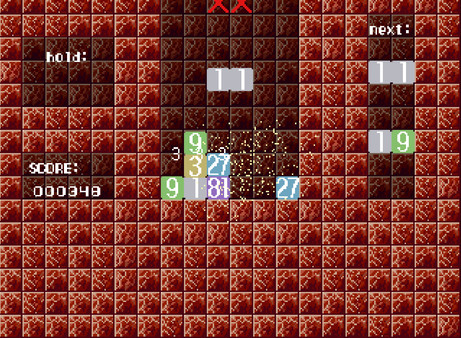
This sample is a puzzle game with falling blocks.
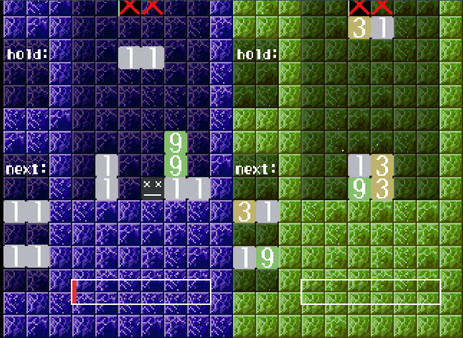
It includes a single-player score attack mode and a two-player versus mode.
To play with keyboard, select drop_obj, titlemenu, start, and then set the controller ID to "0".
Each Mino block has a numerical value written on it (the numbers are either 1, or a factor of 3).
You can rotate or move the Mino Blocks as they fall.
You can make the Mino Blocks fall faster by pressing up or down.
When you align 3 Mino Blocks with the same numerical value, they combine into one Mino Block with the combined numerical value. The higher the combined numberical value, the higher the score.
①①①→③
A bonus (refer below) occurs when you align 4 Mino Blocks with the same numerical value in the shape of a square
①①
①①→③③
You can choose to hold a Mino Block (i.e. when the block has an undesirable numerical value). If there is already a held Mino Block, the next Mino Block you hold will be swapped with the one already held. You cannot hold two Mino Blocks at the same time.
The game ends when the Mino Blocks reach the "X" sign on the top of the screen.
When the game ends, you can press B to retry, or A to return to the title screen.
The player whose Mino Blocks reach the "X" sign first loeses the game.
Aligning Mino Blocks will fill up the opponent's "obstruction gauge".
When your own "obstruction gauge" is fully or partially filled, you can reduce it by aligning Mino Blocks.
While your own "obstruction gauge" is fully or partially filled, placing Mino Blocks (without aligning) will result in obstruction blocks falling from the top of the screen. The fuller your "obstruction gauge", the more obstruction blocks will fall.
Obstruction blocks will not disappear by themselves.
However, when you align Mino Blocks, the surrounding obstruction blocks will disappear.
Down: Make Mino Block fall faster
Up: Make Mino Block fall even faster ("hard drop")
B: Rotate Mino Block
A: Rotate Mino Block (counter rotate)
R1: Hold Mino Block
Menu
A: Confirm, return to title screen (when game has ended)
B: Retry (when game has ended)
Left, right cursor keys: Move Mino Block
Down cursor key: Make Mino Block fall faster
Up cursor key: Make Mino Block fall even faster ("hard drop")
D: Rotate Mino Block
A: Rotate Mino Block (counter rotate)
Q: Hold Mino Block
Menu
Enter: Confirm, return to title screen (when game has ended)
Space: Retry (when game has ended)
It includes a single-player score attack mode and a two-player versus mode.
● Controls
You can play this game with the default "Controller 1" and "Controller 2" settings.To play with keyboard, select drop_obj, titlemenu, start, and then set the controller ID to "0".
● Basic Rules (Single-player Mode)
2 Mino Blocks will fall from the top of the screen at one time.Each Mino block has a numerical value written on it (the numbers are either 1, or a factor of 3).
You can rotate or move the Mino Blocks as they fall.
You can make the Mino Blocks fall faster by pressing up or down.
When you align 3 Mino Blocks with the same numerical value, they combine into one Mino Block with the combined numerical value. The higher the combined numberical value, the higher the score.
①①①→③
A bonus (refer below) occurs when you align 4 Mino Blocks with the same numerical value in the shape of a square
①①
①①→③③
You can choose to hold a Mino Block (i.e. when the block has an undesirable numerical value). If there is already a held Mino Block, the next Mino Block you hold will be swapped with the one already held. You cannot hold two Mino Blocks at the same time.
The game ends when the Mino Blocks reach the "X" sign on the top of the screen.
When the game ends, you can press B to retry, or A to return to the title screen.
● Basic Rules (Versus Mode)
The rules are the same as single-player mode.The player whose Mino Blocks reach the "X" sign first loeses the game.
Aligning Mino Blocks will fill up the opponent's "obstruction gauge".
When your own "obstruction gauge" is fully or partially filled, you can reduce it by aligning Mino Blocks.
While your own "obstruction gauge" is fully or partially filled, placing Mino Blocks (without aligning) will result in obstruction blocks falling from the top of the screen. The fuller your "obstruction gauge", the more obstruction blocks will fall.
Obstruction blocks will not disappear by themselves.
However, when you align Mino Blocks, the surrounding obstruction blocks will disappear.
● How Mino Blocks Behave
Please refer to the "rule" section of the video for more information.● Description and Comments on How the Game was Created
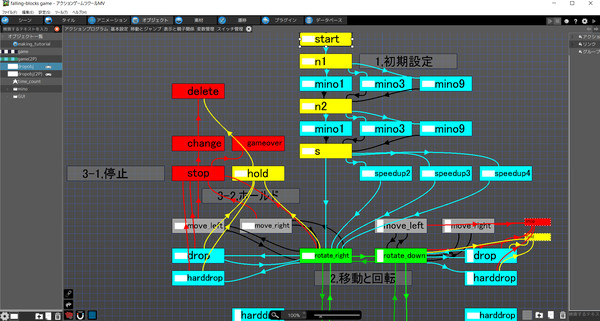
Please refer to "making_tutorial".● Controls (XInput-supported Controller)
Left, right: Move Mino BlockDown: Make Mino Block fall faster
Up: Make Mino Block fall even faster ("hard drop")
B: Rotate Mino Block
A: Rotate Mino Block (counter rotate)
R1: Hold Mino Block
Menu
A: Confirm, return to title screen (when game has ended)
B: Retry (when game has ended)
● Controls (Keyboard)
*To play with keyboard, select drop_obj, titlemenu, start, and then set the controller ID to "0".Left, right cursor keys: Move Mino Block
Down cursor key: Make Mino Block fall faster
Up cursor key: Make Mino Block fall even faster ("hard drop")
D: Rotate Mino Block
A: Rotate Mino Block (counter rotate)
Q: Hold Mino Block
Menu
Enter: Confirm, return to title screen (when game has ended)
Space: Retry (when game has ended)
Frequently Asked Questions
Is Pixel Game Maker MV - Falling Blocks Puzzle Sample worth buying right now?
Watch — $4.99. Decent deal at 0% off, but might drop further. Watch for better opportunities.
When does Pixel Game Maker MV - Falling Blocks Puzzle Sample go on sale?
Decent deal at 0% off, but might drop further. Watch for better opportunities.
Is Pixel Game Maker MV - Falling Blocks Puzzle Sample free to play?
Pixel Game Maker MV - Falling Blocks Puzzle Sample costs $4.99 on Steam.
What genre is Pixel Game Maker MV - Falling Blocks Puzzle Sample?
Pixel Game Maker MV - Falling Blocks Puzzle Sample is a Action, Casual, Indie, Design & Illustration, Education, Utilities, Web Publishing, Game Development game.
Who developed Pixel Game Maker MV - Falling Blocks Puzzle Sample?
Pixel Game Maker MV - Falling Blocks Puzzle Sample was developed by polytanQ and published by Gotcha Gotcha Games.
What platforms does Pixel Game Maker MV - Falling Blocks Puzzle Sample support?
Available on Steam for Windows.