
Pixel Game Maker MV - Tower Defense Game
PolytanQ, PLAYISM · Gotcha Gotcha Games · Nov 25, 2021
Delayed observation
Observed
0
Last tracked
0
All-time peak
n/a
Δ 24h
Player count last observed
Live player data is temporarily unavailable; historical values remain visible for context.
Pixel Game Maker MV - Tower Defense Game - Steam Charts & Historical Stats
This sample is a tower defense game. Explore historical player activity and pricing for Pixel Game Maker MV - Tower Defense Game. Player-count data was last observed May 1, 2026.
Price
$4.99
Genre
Action
Developer
PolytanQ
Pixel Game Maker MV - Tower Defense Game player count and price summary
- Current players
- Unavailable
- All-time peak
- Unavailable
- 24-hour player change
- Unavailable
- Current US price
- $4.99
Player count last observed . Values marked unavailable are not estimated.
Media gallery 2 screenshots · 0 videos
Screenshots
Game Insights
Buy Verdict
Watch — $4.99.
Decent deal at 0% off, but might drop further. Watch for better opportunities.
▲
~3 days until next sale
Value Score
Great Value — 100th percentile.
Price-to-player ratio ranks in the 100th percentile.
▲
Market pricing tier
Genre Benchmarks
Value Ratio
Top 0%
Player count
Price History
Lowest Price
$4.99
May 2026 across all regions
Current Price
$4.99
US region
No Recent Price History
Price history data will appear here once more pricing information becomes available.
System Requirements
Platform Support
Windows
Windows Requirements
Minimum:
Minimum:
- Requires a 64-bit processor and operating system
- OS *: WindowsR 8/8.1/10 (64bit)
- Processor: Intel Core2 Duo以上かつ2.0GHz 以上
- Memory: 4 GB RAM
- Graphics: Intel Core2 Duo以上かつ2.0GHz 以上
- Storage: 1 GB available space
Recommended:
Recommended:
- Requires a 64-bit processor and operating system
Pricing
Paid Game
Sale: 30% off
CDN$ 6.49 CDN$ 4.54
CDN$ 6.49 CDN$ 4.54
Additional Information
Categories
Downloadable Content
Remote Play Together
Supported Languages
English, Japanese
Official Website
https://tkool.jp/act/
Current Pricing
🏷️
30% OFF SALE!
CDN$ 6.49
CDN$ 4.54
Additional Information
🇧🇷
DEJUS Rating
l
Brazilian rating
🆘
Support
🎁
Purchase Options
1
package options
Developer Analytics
Loading competitors...
About This Game
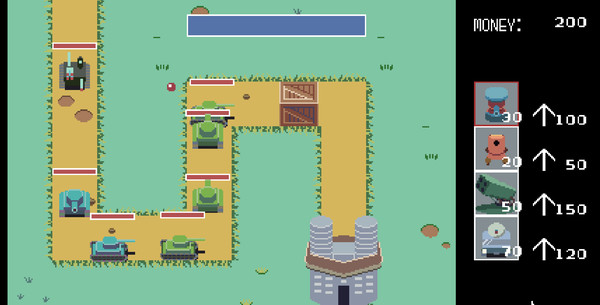
This sample is a tower defense game.
Detailed Description
This sample is a tower defense game.
If they touch your fortress then it will take damage, once the health of your fortress drops to zero it is game over.
You must defeat all the enemies to clear the stage.
You can select units from the menu on the right side.
Once you select the unit you want to build, clicking the field or pressing B will place the unit on the field at the cost of money.
Units will automatically attack enemies within line of sight.
You can upgrade units with money by clicking the upward arrow next to the unit.
Left Click: Select Unit, Upgrade Unit, Place Unit
XInput Controller
B button: Select Unit, Upgrade Unit, Place Unit
●Basic Rules
Once you start the game enemies will advance towards your fortress.If they touch your fortress then it will take damage, once the health of your fortress drops to zero it is game over.
You must defeat all the enemies to clear the stage.
You can select units from the menu on the right side.
Once you select the unit you want to build, clicking the field or pressing B will place the unit on the field at the cost of money.
Units will automatically attack enemies within line of sight.
You can upgrade units with money by clicking the upward arrow next to the unit.
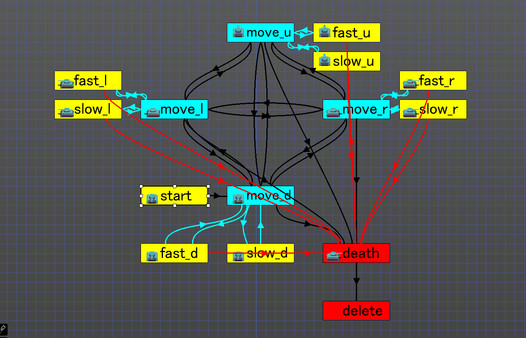
●For instructions on how to use the data and build this game please refer to the Tutorial in Objects.
●Controls
MouseLeft Click: Select Unit, Upgrade Unit, Place Unit
XInput Controller
B button: Select Unit, Upgrade Unit, Place Unit
Frequently Asked Questions
Is Pixel Game Maker MV - Tower Defense Game worth buying right now?
Watch — $4.99. Decent deal at 0% off, but might drop further. Watch for better opportunities.
When does Pixel Game Maker MV - Tower Defense Game go on sale?
Decent deal at 0% off, but might drop further. Watch for better opportunities.
Is Pixel Game Maker MV - Tower Defense Game free to play?
Pixel Game Maker MV - Tower Defense Game costs $4.99 on Steam.
What genre is Pixel Game Maker MV - Tower Defense Game?
Pixel Game Maker MV - Tower Defense Game is a Action, Casual, Indie, Design & Illustration, Education, Utilities, Web Publishing, Game Development game.
Who developed Pixel Game Maker MV - Tower Defense Game?
Pixel Game Maker MV - Tower Defense Game was developed by PolytanQ and published by Gotcha Gotcha Games.
What platforms does Pixel Game Maker MV - Tower Defense Game support?
Available on Steam for Windows.