
Game overview
Focus Timer
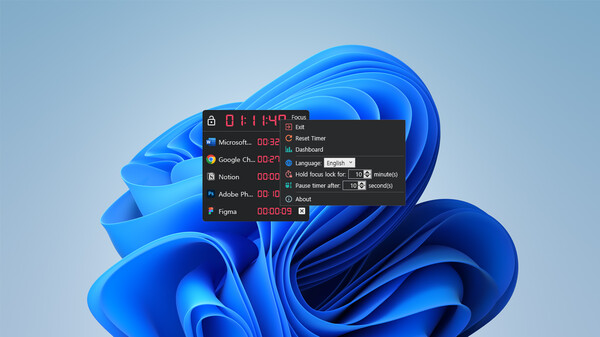
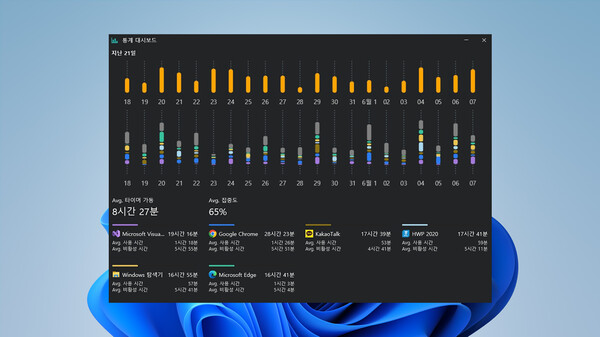
Use Focus Timer to see how much time you spend in programs in Windows. See which programs you've used and for how long, and learn what you're focusing on. You can also revisit your logs from the last few days.
- Last tracked players
- 3
- All-time peak
- 3
- 24-hour change
- Unavailable
- Steam reviews
- 100% positive 2 reviews · via SteamSpy
Delayed observation · last tracked . Values marked unavailable are not estimated.
About this game Read the full description
There's a lot of media out there to tempt us.
We have mountains of to-do's, but why is time flying by....
Why are YouTube and Netflix so entertaining?
Why do we turn back on games when we're stressed?
Doesn't it matter if I spend time on social media writing about how I'm feeling right now, because it's still short?
No, actually, isn't this not play, but a rational break to work more effectively and efficiently?
So, what do you think?
Do you realize how much you find yourself darting off to any medium while you're working?
For those of you who want to live a more organized and efficient day, here's a gift.
Something that's always enough if you use it well.
Something that, if lost, will never come back.
The most valuable thing known to man.
Gold.
Every word you use to describe your time is a step in the direction of positivity.
You need to know what you're spending your time on.
A mountain out of a molehill. This adage applies to time as well as money.
When you add up all the time you spend doing a little bit of everything, it adds up to a lot!
You've probably realized this yourself, but you're not sure how much.
The next thing you know, the year has flown by and you're repeating the experience over and over again.
It's time for us to take stock of our own time.
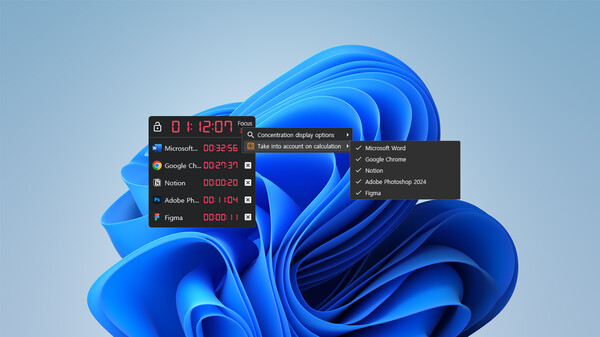
[Focus Timer] lets you know immediately which programs you're using and how much.
The timer only runs when you're using that program, and if you launch or click on something else, the timer stops.
What's unique is that it reacts on a per-program basis, so if you have multiple windows open in the same program, the same amount of time will pass.
You set it once, and you don't have to set it again every time you kill the program!
Because sometimes you need to work across multiple files!
What if you could see a measure of effort, like experience points in games?
There are many reasons why games are fun, but one of the most important is the immediate feedback on effort.
If you put in the time, your experience goes up, your combat power goes up, and your character gets stronger!
Unfortunately, this isn't a game, so there are no "leveling up rewards", but you can see how much effort and focus you've put in.
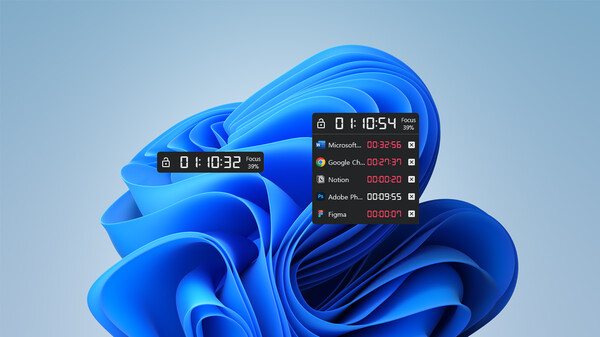
Your "concentration" will slowly increase as you continue to use the programs you've signed up for, and will slowly decrease as you distract yourself.
Use these numbers, which sync in real time, as a source of persistence!
When you get tired, ask yourself, what did I do yesterday?
It's no good if tomorrow's version of you forgets.
Focus Timer gives you a bird's eye view of how you've spent your time in the past, and what you've spent it on.
Become a better version of yourself today than you were yesterday!
That "plan for tomorrow" you promise yourself every night when you go to bed, did you stick to it today?
What other things did you start because you got sidetracked... Hmm, what time is it?
I just got a KakaoTalk notification.
It's not my favorite song.
I remembered an unchecked email.
We unconsciously break our focus for a variety of reasons.
And when we do get interrupted, it's been said that it takes 23 minutes to get back to the task at hand and give it our full attention.
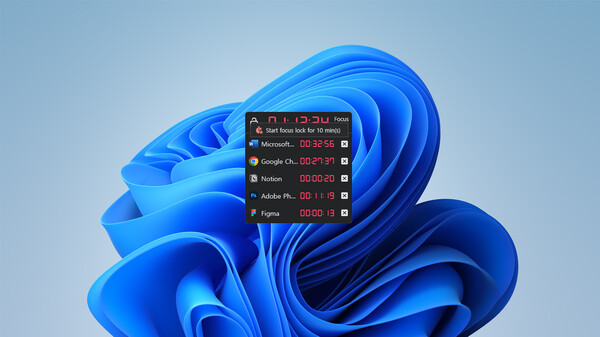
Window Lock prevents those "little distractions".
If you try to do something other than the program you're enrolled in, that red border will forcefully lock the screen to your work program.
If it's really urgent, you can unlock and leave, but you might as well finish what you're doing!
I'm on a deadline and I can't control myself...
Do you have something you need to do right now, but you're having a hard time focusing?
Is your deadline only 5 hours away?
Ten missed calls from your contact?
And you keep reaching for another window?
That's a really tough situation and one that shouldn't come up, but if it does, try this feature!
"Deadline Mode" will never unlock a window for the time you set.
Unless you crash your computer, that is!
We have mountains of to-do's, but why is time flying by....
Why are YouTube and Netflix so entertaining?
Why do we turn back on games when we're stressed?
Doesn't it matter if I spend time on social media writing about how I'm feeling right now, because it's still short?
No, actually, isn't this not play, but a rational break to work more effectively and efficiently?
So, what do you think?
Do you realize how much you find yourself darting off to any medium while you're working?
For those of you who want to live a more organized and efficient day, here's a gift.
Something that's always enough if you use it well.
Something that, if lost, will never come back.
The most valuable thing known to man.
Gold.
Every word you use to describe your time is a step in the direction of positivity.
You need to know what you're spending your time on.
A mountain out of a molehill. This adage applies to time as well as money.
When you add up all the time you spend doing a little bit of everything, it adds up to a lot!
You've probably realized this yourself, but you're not sure how much.
The next thing you know, the year has flown by and you're repeating the experience over and over again.
It's time for us to take stock of our own time.
[Focus Timer] lets you know immediately which programs you're using and how much.
The timer only runs when you're using that program, and if you launch or click on something else, the timer stops.
What's unique is that it reacts on a per-program basis, so if you have multiple windows open in the same program, the same amount of time will pass.
You set it once, and you don't have to set it again every time you kill the program!
Because sometimes you need to work across multiple files!
What if you could see a measure of effort, like experience points in games?
There are many reasons why games are fun, but one of the most important is the immediate feedback on effort.
If you put in the time, your experience goes up, your combat power goes up, and your character gets stronger!
Unfortunately, this isn't a game, so there are no "leveling up rewards", but you can see how much effort and focus you've put in.
Your "concentration" will slowly increase as you continue to use the programs you've signed up for, and will slowly decrease as you distract yourself.
Use these numbers, which sync in real time, as a source of persistence!
When you get tired, ask yourself, what did I do yesterday?
It's no good if tomorrow's version of you forgets.
Focus Timer gives you a bird's eye view of how you've spent your time in the past, and what you've spent it on.
Become a better version of yourself today than you were yesterday!
That "plan for tomorrow" you promise yourself every night when you go to bed, did you stick to it today?
What other things did you start because you got sidetracked... Hmm, what time is it?
I just got a KakaoTalk notification.
It's not my favorite song.
I remembered an unchecked email.
We unconsciously break our focus for a variety of reasons.
And when we do get interrupted, it's been said that it takes 23 minutes to get back to the task at hand and give it our full attention.
Window Lock prevents those "little distractions".
If you try to do something other than the program you're enrolled in, that red border will forcefully lock the screen to your work program.
If it's really urgent, you can unlock and leave, but you might as well finish what you're doing!
I'm on a deadline and I can't control myself...
Do you have something you need to do right now, but you're having a hard time focusing?
Is your deadline only 5 hours away?
Ten missed calls from your contact?
And you keep reaching for another window?
That's a really tough situation and one that shouldn't come up, but if it does, try this feature!
"Deadline Mode" will never unlock a window for the time you set.
Unless you crash your computer, that is!
Media gallery 5 screenshots · 0 videos

Screenshots
Player activity
Concurrent players over the last 48 hours.
Loading player history?
System requirements Windows
Windows
Minimum
Minimum:- OS: Microsoft Windows 10 version 1607+
- Processor: 1 GHz
- Memory: 512 MB RAM
- Graphics: -
- Storage: 4500 MB available space
- Sound Card: -
- VR Support: -
- Additional Notes: -
Recommended
Recommended:- OS: Microsoft Windows 10 version 1607+
- Processor: 1 GHz
- Memory: 512 MB RAM
- Graphics: -
- Network: Broadband Internet connection
- Storage: 4500 MB available space
- Sound Card: -
- VR Support: -
- Additional Notes: -
Game details Languages, features & support
- Publisher
- Lampas Software
- Brazilian rating
- l
- Steam Germany rating
- 0
- Languages
- English, Korean, French, Italian, German, Spanish - Spain, Japanese, Romanian, Russian, Simplified Chinese, Traditional Chinese
- Website
- Official website ↗
- Support
- [email protected] Support site ↗
More analysis Activity patterns, updates & developer tools
Game Insights
Buy Verdict
Watch — $9.99.
Decent deal at 0% off, but might drop further. Watch for better opportunities.
▲
~45 days until next sale
Value Score
Great Value — 100th percentile.
Price-to-player ratio ranks in the 100th percentile. Priced as Market at $9.99.
▲
Market pricing tier
Genre Benchmarks
Player Count
Top 0%
Value Ratio
Top 0%
Activity Heatmap
UTC+0 (Your Timezone)
2
Peak Activity
0
Avg Activity
45
Active Hours
61%
Sample coverage
Less Active
More Active
0
1
2
3
4
5
6
7
8
9
10
11
12
13
14
15
16
17
18
19
20
21
22
23
Sun
Sunday 0:00
0 players · 2 samples
0 players · 2 samples
Sunday 1:00
1 players · 1 samples
1 players · 1 samples
Sunday 2:00
No samples
No samples
Sunday 3:00
1 players · 2 samples
1 players · 2 samples
Sunday 4:00
2 players · 1 samples
2 players · 1 samples
Sunday 5:00
No samples
No samples
Sunday 6:00
1 players · 3 samples
1 players · 3 samples
Sunday 7:00
No samples
No samples
Sunday 8:00
No samples
No samples
Sunday 9:00
0 players · 3 samples
0 players · 3 samples
Sunday 10:00
No samples
No samples
Sunday 11:00
No samples
No samples
Sunday 12:00
0 players · 2 samples
0 players · 2 samples
Sunday 13:00
1 players · 1 samples
1 players · 1 samples
Sunday 14:00
No samples
No samples
Sunday 15:00
0 players · 2 samples
0 players · 2 samples
Sunday 16:00
1 players · 1 samples
1 players · 1 samples
Sunday 17:00
No samples
No samples
Sunday 18:00
0 players · 2 samples
0 players · 2 samples
Sunday 19:00
No samples
No samples
Sunday 20:00
1 players · 1 samples
1 players · 1 samples
Sunday 21:00
No samples
No samples
Sunday 22:00
0 players · 2 samples
0 players · 2 samples
Sunday 23:00
0 players · 1 samples
0 players · 1 samples
Mon
Monday 0:00
No samples
No samples
Monday 1:00
0 players · 2 samples
0 players · 2 samples
Monday 2:00
No samples
No samples
Monday 3:00
1 players · 1 samples
1 players · 1 samples
Monday 4:00
0 players · 2 samples
0 players · 2 samples
Monday 5:00
No samples
No samples
Monday 6:00
1 players · 1 samples
1 players · 1 samples
Monday 7:00
0 players · 2 samples
0 players · 2 samples
Monday 8:00
No samples
No samples
Monday 9:00
0 players · 2 samples
0 players · 2 samples
Monday 10:00
0 players · 1 samples
0 players · 1 samples
Monday 11:00
No samples
No samples
Monday 12:00
0 players · 1 samples
0 players · 1 samples
Monday 13:00
0 players · 2 samples
0 players · 2 samples
Monday 14:00
No samples
No samples
Monday 15:00
No samples
No samples
Monday 16:00
0 players · 3 samples
0 players · 3 samples
Monday 17:00
No samples
No samples
Monday 18:00
No samples
No samples
Monday 19:00
0 players · 1 samples
0 players · 1 samples
Monday 20:00
0 players · 2 samples
0 players · 2 samples
Monday 21:00
No samples
No samples
Monday 22:00
No samples
No samples
Monday 23:00
0 players · 2 samples
0 players · 2 samples
Tue
Tuesday 0:00
0 players · 1 samples
0 players · 1 samples
Tuesday 1:00
No samples
No samples
Tuesday 2:00
1 players · 1 samples
1 players · 1 samples
Tuesday 3:00
2 players · 2 samples
2 players · 2 samples
Tuesday 4:00
No samples
No samples
Tuesday 5:00
2 players · 1 samples
2 players · 1 samples
Tuesday 6:00
2 players · 2 samples
2 players · 2 samples
Tuesday 7:00
No samples
No samples
Tuesday 8:00
2 players · 1 samples
2 players · 1 samples
Tuesday 9:00
2 players · 2 samples
2 players · 2 samples
Tuesday 10:00
0 players · 1 samples
0 players · 1 samples
Tuesday 11:00
2 players · 1 samples
2 players · 1 samples
Tuesday 12:00
0 players · 1 samples
0 players · 1 samples
Tuesday 13:00
No samples
No samples
Tuesday 14:00
0 players · 1 samples
0 players · 1 samples
Tuesday 15:00
2 players · 2 samples
2 players · 2 samples
Tuesday 16:00
0 players · 1 samples
0 players · 1 samples
Tuesday 17:00
0 players · 1 samples
0 players · 1 samples
Tuesday 18:00
0 players · 1 samples
0 players · 1 samples
Tuesday 19:00
No samples
No samples
Tuesday 20:00
0 players · 2 samples
0 players · 2 samples
Tuesday 21:00
No samples
No samples
Tuesday 22:00
0 players · 1 samples
0 players · 1 samples
Tuesday 23:00
No samples
No samples
Wed
Wednesday 0:00
0 players · 2 samples
0 players · 2 samples
Wednesday 1:00
No samples
No samples
Wednesday 2:00
No samples
No samples
Wednesday 3:00
0 players · 2 samples
0 players · 2 samples
Wednesday 4:00
1 players · 1 samples
1 players · 1 samples
Wednesday 5:00
No samples
No samples
Wednesday 6:00
0 players · 2 samples
0 players · 2 samples
Wednesday 7:00
1 players · 1 samples
1 players · 1 samples
Wednesday 8:00
No samples
No samples
Wednesday 9:00
1 players · 2 samples
1 players · 2 samples
Wednesday 10:00
1 players · 1 samples
1 players · 1 samples
Wednesday 11:00
No samples
No samples
Wednesday 12:00
No samples
No samples
Wednesday 13:00
0 players · 2 samples
0 players · 2 samples
Wednesday 14:00
No samples
No samples
Wednesday 15:00
No samples
No samples
Wednesday 16:00
0 players · 1 samples
0 players · 1 samples
Wednesday 17:00
0 players · 2 samples
0 players · 2 samples
Wednesday 18:00
No samples
No samples
Wednesday 19:00
No samples
No samples
Wednesday 20:00
No samples
No samples
Wednesday 21:00
0 players · 2 samples
0 players · 2 samples
Wednesday 22:00
0 players · 1 samples
0 players · 1 samples
Wednesday 23:00
0 players · 1 samples
0 players · 1 samples
Thu
Thursday 0:00
1 players · 1 samples
1 players · 1 samples
Thursday 1:00
No samples
No samples
Thursday 2:00
1 players · 1 samples
1 players · 1 samples
Thursday 3:00
2 players · 2 samples
2 players · 2 samples
Thursday 4:00
No samples
No samples
Thursday 5:00
2 players · 2 samples
2 players · 2 samples
Thursday 6:00
1 players · 2 samples
1 players · 2 samples
Thursday 7:00
0 players · 1 samples
0 players · 1 samples
Thursday 8:00
No samples
No samples
Thursday 9:00
0 players · 2 samples
0 players · 2 samples
Thursday 10:00
0 players · 1 samples
0 players · 1 samples
Thursday 11:00
No samples
No samples
Thursday 12:00
0 players · 2 samples
0 players · 2 samples
Thursday 13:00
0 players · 1 samples
0 players · 1 samples
Thursday 14:00
No samples
No samples
Thursday 15:00
0 players · 1 samples
0 players · 1 samples
Thursday 16:00
1 players · 3 samples
1 players · 3 samples
Thursday 17:00
No samples
No samples
Thursday 18:00
No samples
No samples
Thursday 19:00
0 players · 2 samples
0 players · 2 samples
Thursday 20:00
0 players · 1 samples
0 players · 1 samples
Thursday 21:00
No samples
No samples
Thursday 22:00
No samples
No samples
Thursday 23:00
0 players · 3 samples
0 players · 3 samples
Fri
Friday 0:00
No samples
No samples
Friday 1:00
No samples
No samples
Friday 2:00
1 players · 3 samples
1 players · 3 samples
Friday 3:00
No samples
No samples
Friday 4:00
No samples
No samples
Friday 5:00
1 players · 3 samples
1 players · 3 samples
Friday 6:00
No samples
No samples
Friday 7:00
No samples
No samples
Friday 8:00
2 players · 2 samples
2 players · 2 samples
Friday 9:00
0 players · 1 samples
0 players · 1 samples
Friday 10:00
No samples
No samples
Friday 11:00
0 players · 2 samples
0 players · 2 samples
Friday 12:00
0 players · 1 samples
0 players · 1 samples
Friday 13:00
No samples
No samples
Friday 14:00
1 players · 1 samples
1 players · 1 samples
Friday 15:00
1 players · 2 samples
1 players · 2 samples
Friday 16:00
0 players · 1 samples
0 players · 1 samples
Friday 17:00
No samples
No samples
Friday 18:00
0 players · 2 samples
0 players · 2 samples
Friday 19:00
No samples
No samples
Friday 20:00
0 players · 1 samples
0 players · 1 samples
Friday 21:00
0 players · 1 samples
0 players · 1 samples
Friday 22:00
1 players · 1 samples
1 players · 1 samples
Friday 23:00
0 players · 1 samples
0 players · 1 samples
Sat
📍
Saturday 0:00
1 players · 1 samples
1 players · 1 samples
Saturday 1:00
No samples
No samples
Saturday 2:00
2 players · 1 samples
2 players · 1 samples
Saturday 3:00
1 players · 2 samples
1 players · 2 samples
Saturday 4:00
No samples
No samples
Saturday 5:00
0 players · 1 samples
0 players · 1 samples
Saturday 6:00
0 players · 2 samples
0 players · 2 samples
Saturday 7:00
No samples
No samples
Saturday 8:00
1 players · 1 samples
1 players · 1 samples
Saturday 9:00
0 players · 2 samples
0 players · 2 samples
Saturday 10:00
No samples
No samples
Saturday 11:00
2 players · 1 samples
2 players · 1 samples
Saturday 12:00
1 players · 1 samples
1 players · 1 samples
Saturday 13:00
0 players · 1 samples
0 players · 1 samples
Saturday 14:00
2 players · 2 samples
2 players · 2 samples
Saturday 15:00
1 players · 1 samples
1 players · 1 samples
Saturday 16:00
0 players · 1 samples
0 players · 1 samples
Saturday 17:00
2 players · 1 samples
2 players · 1 samples
Saturday 18:00
1 players · 1 samples
1 players · 1 samples
Saturday 19:00
No samples
No samples
Saturday 20:00
1 players · 2 samples
1 players · 2 samples
Saturday 21:00
1 players · 1 samples
1 players · 1 samples
Saturday 22:00
No samples
No samples
Saturday 23:00
No samples
No samples
Developer Analytics
Loading competitors...
Frequently Asked Questions
Is Focus Timer worth buying right now?
Watch — $9.99. Decent deal at 0% off, but might drop further. Watch for better opportunities.
When does Focus Timer go on sale?
Decent deal at 0% off, but might drop further. Watch for better opportunities.
Is Focus Timer free to play?
Focus Timer costs $9.99 on Steam.
What genre is Focus Timer?
Focus Timer is a Utilities game.
Who developed Focus Timer?
Focus Timer was developed by Potados and published by Lampas Software.
What platforms does Focus Timer support?
Available on Steam for Windows.
Related Games
3 tags in common
001 Game Creator
10 last tracked
3 tags in common
3D Earth Time Lapse PC Live Wallpaper
4 last tracked
3 tags in common
AENTITY
0 last tracked
2 tags in common
-KLAUS-
0 last tracked
2 tags in common
100 Hidden Animalnaults - Felicat & Laika
0 last tracked
2 tags in common
1001 Jigsaw World Tour: Europe
0 last tracked
2 tags in common
1001 Jigsaw. 6 Magic Elements (拼图)
0 last tracked
2 tags in common
1001 Jigsaw. Home Sweet Home
0 last tracked