BETA: iVRy Driver for SteamVR DEMO (PSVR2 Lite Edition) (AppID: 2772740)
BETA: iVRy Driver for SteamVR DEMO (PSVR2 Lite Edition) - Steam Analytics & Details
Use your Sony PSVR2 as a VR Headset for your PC. Explore pricing history and player statistics for BETA: iVRy Driver for SteamVR DEMO (PSVR2 Lite Edition).
Media Gallery

Screenshots
System Requirements
- Requires a 64-bit processor and operating system
- OS *: Windows 7
- Processor: Intel® i5-4590 / AMD FX 8350 equivalent or greater
- Memory: 8 GB RAM
- Graphics: AMD Radeon™ RDNA, RDNA2 or RDNA3. nVidia 2000-series or later. Intel Arc.
- DirectX: Version 11
- Storage: 40 MB available space
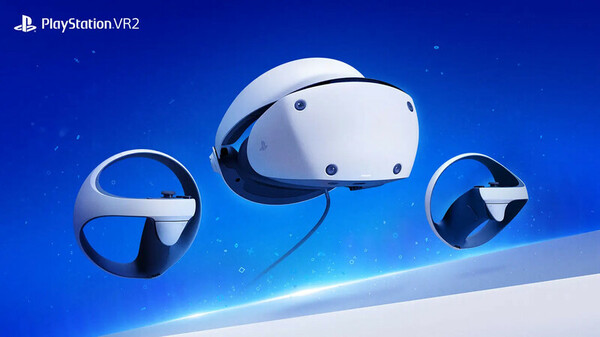
- Additional Notes: Sony Playstation VR2 Headset required. GPU with VirtualLink port or VirtualLink/PSVR2 adapter REQUIRED.
- Requires a 64-bit processor and operating system
- OS: Windows 10
- Processor: Intel® i5-4590 / AMD FX 8350 equivalent or greater
- Memory: 8 GB RAM
- Graphics: AMD Radeon™ RDNA, RDNA2 or RDNA3. nVidia 2000-series or later. Intel Arc.
- DirectX: Version 11
- Storage: 40 MB available space
- Additional Notes: Sony Playstation VR2 Headset required. GPU with VirtualLink port or VirtualLink/PSVR2 adapter REQUIRED.
Additional Information
Additional Information
Developer Analytics
Loading competitors...
About This Game
Use your Sony PSVR2 as a VR Headset for your PC. Lets you run SteamVR & Oculus Rift PC VR titles using your PSVR2 headset.
Detailed Description
PlayStation VR2 Connection
The PlayStation VR2 MUST be connected to a VirtualLink port on your desktop GPU or to DisplayLink1.4 and USB3 ports via a VirtualLink/PSVR2 adapter. If the PSVR2 is not able to be powered on, then the system is NOT hardware compatible.
The PlayStation VR2 MUST be updated to the firmware supplied with PlayStation 5 System Software 9.0 or later, or it WILL NOT be possible to use this driver without a DisplayPort AUX emulator adapter.
Demo
This is the DEMO ("Lite") version of the iVRy Driver for SteamVR with PSVR2 support. It has all of the features of "Premium" edition, but will start to reduce color saturation after being connected for more than 10 minutes. To remove this limitation upgrade to the "Premium" version:
iVRy Driver for SteamVR (PSVR2 Premium Edition)
BETA Limitations
Functionality such as PS Sense controller support, haptic feedback, eye tracking, play-space setup etc. is still under development. Therefore, the Beta does not contain any of these elements, it is a headset only SteamVR driver that provides 6DOF headset tracking.
Without controller support, you will mainly be limited to VR titles that use conventional controllers (gamepad, steering wheels, joysticks etc.). The current beta also supports Lighthouse controller, NoloVR controllers, and controllers supported with software like Driver4VR.
For tracking, stand or sit in the center of your playing area, and hold the button on the headset (bottom right of visor). You can adjust the playing height in the "SteamVR" section in iVRy Settings.
As a beta tester you may experience issues. If so, please report them via email, making sure to include all information detailed here:
Before requesting support
SteamVR
To use the iVRy Driver for SteamVR, you MUST first install SteamVR from the Steam Store:
SteamVR
Before you start
IMPORTANT:
When using the iVRy Driver for SteamVR for the first time, it MUST be started from the "Launch" button, to ensure any additional services and drivers it requires get installed.Using Playstation VR2
The following mappings are used for the headset button (bottom-right side of visor):
- Single click - Laser Mouse click
- Double click - Recenter
- Long press - Reset tracking orientation/position
About the Game
What is the iVRy Driver for SteamVR (PSVR2 Lite Edition) DLC?
• It is the DEMO version of the iVRy Driver for SteamVR with PSVR2 support.What is iVRy (PSVR2 Edition)?
• iVRy is a Virtual Reality headset driver for SteamVR for your Sony PSVR2 headset.What does that mean?
• Want to play PC VR* (Virtual Reality) titles without having to buy another VR headset?
• With iVRy and a Sony PSVR2 headset you can!
• Supports PSVR2 90H/120Hz 4000x2040 display mode without additional tweaking.
• User configurable quality and performance options.
• Integrates with SteamVR, so no 'manager' / 'server' apps or additional configuration required.
• Includes SteamVR Dashboard overlay, to change driver settings in VR.
• Built-in support for Sony PSVR2 6DOF integrated tracking.
• Built-in support for NoloVR 6DOF tracking and motion controllers.
• Built-in support for Valve Lighthouse 6DOF tracking and motion controllers.
• Compatible with most HTC Vive and Oculus Rift** titles.
• Upgrade to "Premium" edition via Steam DLC to remove the limitations of the "Lite" edition.
* Valve OpenVR/SteamVR. Requires Valve Steam & SteamVR on Windows 7 or later.
** Oculus Rift titles require Valve SteamVR, Oculus Home & 3rd party 'LibreVR Revive' software.
About the Game
What is the iVRy Driver for SteamVR (PSVR2 Lite Edition) DLC?
• It is the DEMO version of the iVRy Driver for SteamVR with PSVR2 support.
What is iVRy (PSVR2 Edition)?
• iVRy is a Virtual Reality headset driver for SteamVR for your Sony PSVR2 headset.
What does that mean?
• Want to play PC VR* (Virtual Reality) titles without having to buy another VR headset?
• With iVRy and a Sony PSVR2 headset you can!
• Supports PSVR2 90H/120Hz 4000x2040 display mode without additional tweaking.
• User configurable quality and performance options.
• Integrates with SteamVR, so no 'manager' / 'server' apps or additional configuration required.
• Includes SteamVR Dashboard overlay, to change driver settings in VR.
• Built-in support for Sony PSVR2 6DOF integrated tracking.
• Built-in support for NoloVR 6DOF tracking and motion controllers.
• Built-in support for Valve Lighthouse 6DOF tracking and motion controllers.
• Compatible with most HTC Vive and Oculus Rift** titles.
• Upgrade to "Premium" edition via Steam DLC to remove the limitations of the "Lite" edition.
* Valve OpenVR/SteamVR. Requires Valve Steam & SteamVR on Windows 7 or later.
** Oculus Rift titles require Valve SteamVR, Oculus Home & 3rd party 'LibreVR Revive' software.