
Driver4VR Puppeteer: Full Body Estimation
Frankly Dog · Frankly Dog · Apr 16, 2024
Delayed observation
Observed
0
Last tracked
0
All-time peak
n/a
Δ 24h
Player count last observed
Live player data is temporarily unavailable; historical values remain visible for context.
Driver4VR Puppeteer: Full Body Estimation - Steam Charts & Historical Stats
Puppeteer Mode leverages VR headset and controllers, enabling immersive full-body tracking controlled solely by hand movements. Explore historical player activity and pricing for Driver4VR Puppeteer: Full Body Estimation. Player-count data was last observed Apr 22, 2026.
Genre
Free To Play
Developer
Frankly Dog
Driver4VR Puppeteer: Full Body Estimation player count and price summary
- Current players
- Unavailable
- All-time peak
- Unavailable
- 24-hour player change
- Unavailable
- Current US price
- Price unavailable
Player count last observed . Values marked unavailable are not estimated.
Media gallery 2 screenshots · 1 videos
Screenshots
Videos
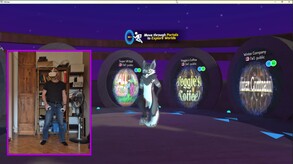
Driver4VR Puppeteer: Full Body Estimation Demo
Player count
System Requirements
Platform Support
Windows
Windows Requirements
Minimum:
Minimum:
- Requires a 64-bit processor and operating system
- OS: Windows 10
- Processor: Intel® i5-4590 / AMD FX 8350 equivalent
- Memory: 8 GB RAM
- Graphics: NVIDIA GeForce® GTX 970 / AMD Radeon™ R9 290 equivalent
Recommended:
Recommended:
- Requires a 64-bit processor and operating system
- OS: Windows 10
- Processor: Intel® i5-4590 / AMD FX 8350 equivalent
- Memory: 8 GB RAM
- Graphics: NVIDIA GeForce® GTX 970 / AMD Radeon™ R9 290 equivalent
Pricing
Free to Play
Additional Information
Categories
Downloadable Content
Supported Languages
English
Official Website
https://www.driver4vr.com
Additional Information
🇧🇷
DEJUS Rating
l
Brazilian rating
🇩🇪
Steam Germany
0
German classification
🆘
Support
Developer Analytics
Loading competitors...
About This Game
Puppeteer Mode leverages VR headset and controllers, enabling immersive full-body tracking controlled solely by hand movements. No extra hardware is needed, optimizing for low CPU usage. Experience seamless control in virtual environments!
Detailed Description
Overview
Puppeteer Mode allows users to directly control their VR avatar's movements through the controllers. By holding the grip, users can manipulate their avatar's feet with precision just like a Puppet Master, enabling detailed and complex movements. When Puppeteer Mode is not active, the system continues to estimate points of your body that are not currently tracked, ensuring a continuous and seamless VR experience, even when not directly controlling the avatar. Use Puppeteer Mode when precise movements are necessary, such as during specific interactions, dances, or maneuvers depending on the situation.Quick Video Overview of the Puppeteer Mode
Key Features
- Puppeteer Mode: Control your feet with hand controllers like a Puppet Master.
- Dynamic Pose Estimation: Real-time calculation of body positions and movements.
- Low CPU Usage: Optimized for efficiency, minimizing impact on device performance.
- No Dedicated Hardware Required: Works with existing VR headset and controllers, eliminating the need for extra devices.
Setup Guide
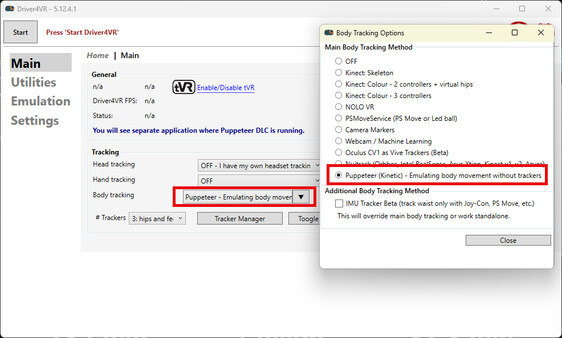
Here’s a streamlined setup guide for your Driver4VR Puppeteer DLC:- Choose 'Puppeteer' from the Body Tracking options and download the DLC. After launching Driver4VR, the Puppeteer application will automatically start. Verify that your avatar responds correctly.
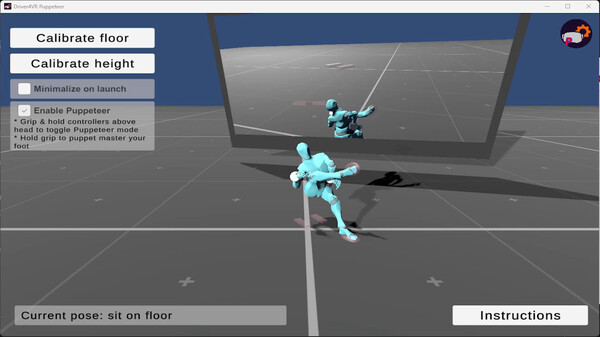
- To calibrate the floor, press the 'Calibrate Floor' button and place the controllers on the floor. Wait for the process to complete, which will be signaled by an applause sound.
- Next, press 'Calibrate Height'.
- Enjoy :)
Controlling Puppeteer
Use your controllers to control the feet pose:- Enable Puppeteer mode by holding your hands above your head and holding the grip.
- Activate the grip to enable precise and responsive foot movement.
- Once the grip is released, the foot will return to its estimated pose.
Frequently Asked Questions
Is Driver4VR Puppeteer: Full Body Estimation free to play?
Yes, Driver4VR Puppeteer: Full Body Estimation is free to play on Steam.
What genre is Driver4VR Puppeteer: Full Body Estimation?
Driver4VR Puppeteer: Full Body Estimation is a Free To Play, Utilities game.
Who developed Driver4VR Puppeteer: Full Body Estimation?
Driver4VR Puppeteer: Full Body Estimation was developed by Frankly Dog and published by Frankly Dog.
What platforms does Driver4VR Puppeteer: Full Body Estimation support?
Available on Steam for Windows.