MAGIX PC Check & Tuning 2015 (AppID: 325100)
Type: advertising
Genre:
Developer: simplitec GmbH
Publisher: MAGIX Software GmbH
Release Date: Nov 2014
MAGIX PC Check & Tuning 2015 - Steam Analytics & Details
MAGIX PC Check & Tuning 2015 has 0 current players.
Total Players
0
Developer
simplitec GmbH
Media Gallery

Screenshots
Videos

PC Check & Tuning 2015 INT
Game Insights
Value Score
Fair Value — 50th percentile.
Price-to-player ratio ranks in the 50th percentile.
▬
Market pricing tier
Latest News
MAGIX PC Check & Tuning 2015 Updated
📝 Update
Jan 19, 2015 at 10:34 UTC
Read More
Nov 03, 2014 at 12:20 UTC
Read More
System Requirements
Platform Support
Windows
Windows Requirements
Minimum:
Minimum:
- OS *: Microsoft Windows XP | Vista | 7 | 8 | 8.1
- Processor: 400 MHz
- Memory: 250 MB RAM
- Graphics: Onboard, 1024 x 768 resolution
- Storage: 90 MB available space
- Additional Notes: An Internet connection is required to use some program features.
Pricing
Paid Game
Additional Information
Supported Languages
English, French, Italian, German, Spanish - Spain, Dutch, Polish, Portuguese - Portugal, Russian
Official Website
http://www.magix.com
Pricing Information
❓
Price Unavailable
Pricing information not currently available
Additional Information
🆘
Support
Developer Analytics
Loading competitors...
About This Game
Packed with power for games and multimedia projects! Improve the speed of your games with automatic optimizations for Windows, driver updates, Steam Boost and tons of other optimization features.
Detailed Description
MAGIX PC Check & Tuning 2015 has more to offer than other tuning programs and freeware when it comes to keeping your computer fast and powerful: It automatically finds weak points and problems in your system, removes the causes, and optimizes performance. This way you can enjoy top performance and speed for gaming.
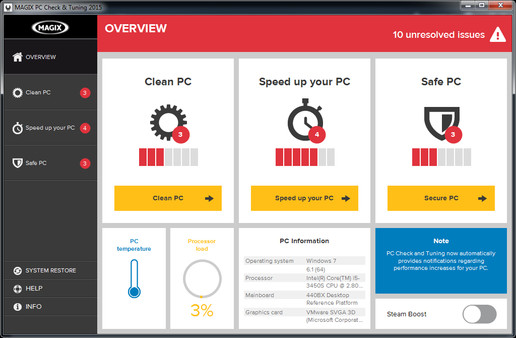
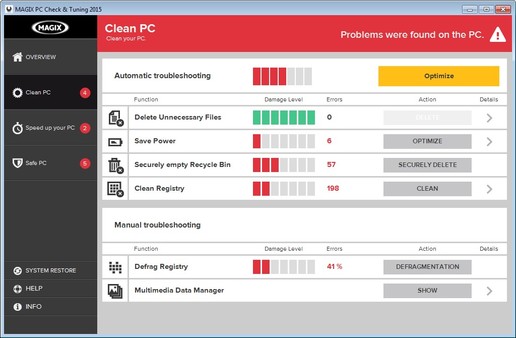
Clean up your PC: Clean your registry and free up storage space by locating storage hogs and deleting unnecessary and particularly large files.
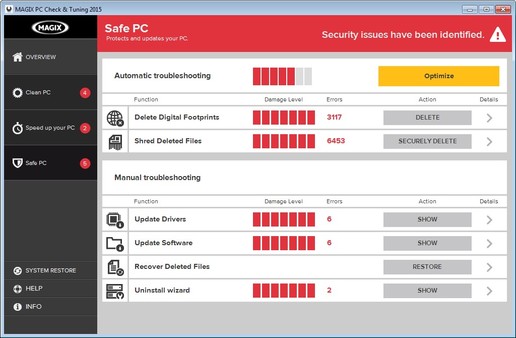
Secure your PC:Update your software and drivers, delete digital footprints, find and uninstall unused programs, and recover accidentally deleted files.
Thanks to the new, more intuitive program interface, you can find all features at a glance and start permanently improving your PC's performance.
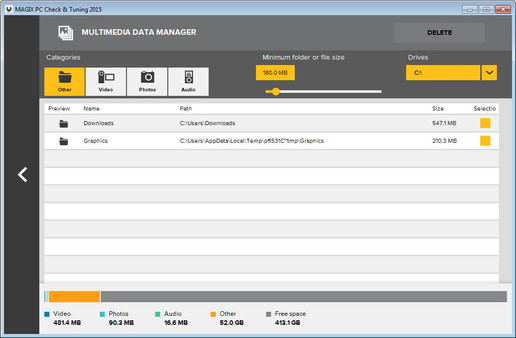
Multimedia Data Manager
Videos, photos and audio material take up large amounts of space on your PC. The data manager finds the largest folders and storage hogs on your hard drive and sorts them according to media type. This makes it possible to target and delete unnecessary files and free up disk space.
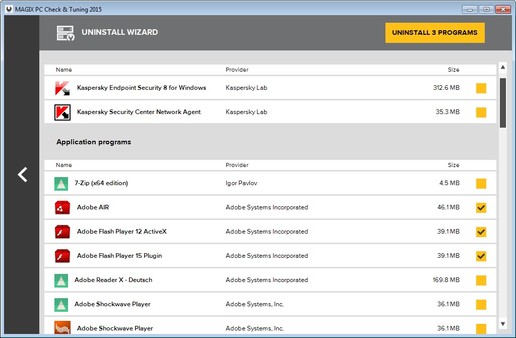
Uninstall Wizard
Unused programs unnecessarily take up space and can slow down your PC. The wizard identifies unnecessary software and allows you to uninstall several programs at once.
Monitor PC temperature
An overheated processor is a common cause of crashes. MAGIX PC Check & Tuning lets you monitor processor temperature and warns you before high temps damage your PC.
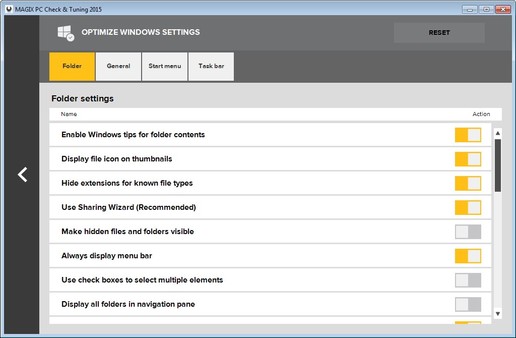
Optimize Windows settings
Optimizing Windows settings can accelerate the display of screen contents. An overview of the most important Windows settings lets you customize your system the way you want.
A better gaming experience!
We all love games, and we all hate when they don't play smoothly or crash. How can MAGIX PC Check & Tuning improve your gaming experience?- Updating drivers: The latest games and hardware require the latest drivers. Graphics card manufacturers optimize their drivers specifically for new games. Maximum performance is only possible with up-to-date graphics card drivers. You also gain the benefit of new driver features such as GPU over-clocking and running multiple displays.
- Ending processes: Unnecessary processes eat up your system's resources and slow down your games. MAGIX PC Check & Tuning prevents processes, services and startup programs from loading. You can also end additional superfluous programs by activating Steam Boost to give your games top priority and full power.
- Network acceleration: Automatically optimizing your broadband network settings improves performance for multiplayer games and gives you an advantage when milliseconds stand between you and victory.
3 steps to make your PC faster and more stable:
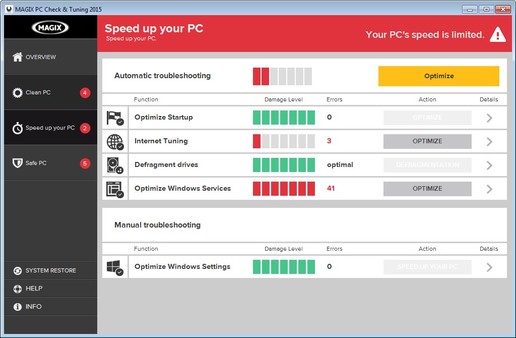
Accelerate your PC: Defrag your hard drive, optimize Windows settings and startup, and get more performance with energy saving settings.Clean up your PC: Clean your registry and free up storage space by locating storage hogs and deleting unnecessary and particularly large files.
Secure your PC:Update your software and drivers, delete digital footprints, find and uninstall unused programs, and recover accidentally deleted files.
The most important features:
- Steam boost: Ends all unnecessary background processes and services in one click for maximum gaming performance and the perfect Steam experience
- Performance boost: Removes unnecessary startup processes and deactivates unimportant services
- Update drivers: Keeps your graphics card and sound card drivers up to date and automatically searches for new updates.
- Update software: Automatic update of more than 2000 software titles
- Clean hard drive and registry: Accelerates hard drive access, deletes unnecessary files, and stabilizes your system
- Smart hard drive defragmentation: Uses intelligent file categorization to get the most out of your hard drive
- Internet Tuning: Optimizes web services and browser settings for faster surfing and protects your privacy online.
New in this version:
Modern user interfaceThanks to the new, more intuitive program interface, you can find all features at a glance and start permanently improving your PC's performance.
Multimedia Data Manager
Videos, photos and audio material take up large amounts of space on your PC. The data manager finds the largest folders and storage hogs on your hard drive and sorts them according to media type. This makes it possible to target and delete unnecessary files and free up disk space.
Uninstall Wizard
Unused programs unnecessarily take up space and can slow down your PC. The wizard identifies unnecessary software and allows you to uninstall several programs at once.
Monitor PC temperature
An overheated processor is a common cause of crashes. MAGIX PC Check & Tuning lets you monitor processor temperature and warns you before high temps damage your PC.
Optimize Windows settings
Optimizing Windows settings can accelerate the display of screen contents. An overview of the most important Windows settings lets you customize your system the way you want.
Frequently Asked Questions
How many players are currently playing MAGIX PC Check & Tuning 2015?
0 players are currently in-game on Steam.
Is MAGIX PC Check & Tuning 2015 free to play?
Yes, MAGIX PC Check & Tuning 2015 is free to play on Steam.
Who developed MAGIX PC Check & Tuning 2015?
MAGIX PC Check & Tuning 2015 was developed by simplitec GmbH and published by MAGIX Software GmbH.
What platforms does MAGIX PC Check & Tuning 2015 support?
Available on Steam for Windows.