
Game overview
Movavi Video Suite 2025 Steam Edition
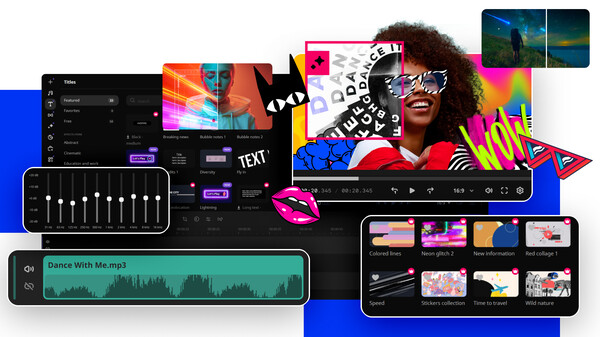
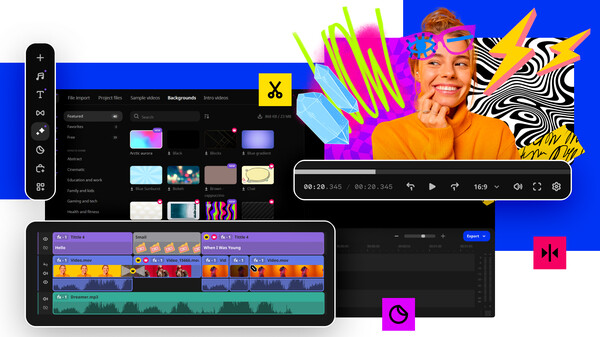
Your do-it-all video-making bundle: a video editor, media converter, screen recorder, and more. Handy video editing, file conversion, and screen recording. One-click AI tools: auto subtitles, noise removal, and more. Hundreds of filters, transitions, titles, overlays.
- Last tracked players
- 23
- Recorded peak
- 30
- 24-hour change
- Unavailable
- Steam reviews
- 68.4% positive 19 reviews · via SteamSpy
Delayed observation · last tracked . Values marked unavailable are not estimated. Recorded peak is the highest player count observed by SteamIQHQ; earlier records may be outside our coverage.
About this game Read the full description
Easily tackle any video project, whether it’s a highlight reel from your latest stream, a gameplay showcase for your team, or a collection of your most memorable in-game moments! Edit on the intuitive timeline, add auto subtitles in a click, record screencasts with full audio, and convert media files at blazing speeds. Take your videos to the next level with AI-powered tools and create content you’ll be excited to share.


Effortlessly capture your screens and the attention of your viewers. Create engaging video tutorials, craft epic game walkthroughs and strategy guides. Record super-clear how-to videos for your teammates and capture must-see live streams. Make your screencasts extra informative: highlight mouse and keyboard clicks, draw on videos in real time, and add a webcam feed to show who the real hero is.
Forget about fussing with formats: convert your videos, music, and images from and to any format in the blink of an eye. Compress large videos with no loss of quality to save space on your hard drive. Easily find and add subtitles for your favorite flicks. Upscale the resolution of your videos with AI to enjoy them on bigger screens.
What’s new
- Create automatic subtitles in one click
- Hover to preview anything
- Enjoy smoother editing
- Seamlessly blend videos and photos
- Edit faster with cutting-edge tech
- Other improvements and fixed issues
Highlights
- Enjoy fast and smooth video creation
- Polish your content with awesome effects
- Power up with AI
- Automatic subtitle creation saves loads of time by generating captions for you in almost any language.
- The AI denoiser automatically cleans up background noise in your audio, so you get clear sound without any hassle.
- If you need to remove background, AI does it in just a few clicks – no green screen required!
- With motion tracking, you can easily follow objects or people through your footage, making it a breeze to add text, effects, or animations that stay locked onto your moving subject.
Effortlessly capture your screens and the attention of your viewers. Create engaging video tutorials, craft epic game walkthroughs and strategy guides. Record super-clear how-to videos for your teammates and capture must-see live streams. Make your screencasts extra informative: highlight mouse and keyboard clicks, draw on videos in real time, and add a webcam feed to show who the real hero is.
Forget about fussing with formats: convert your videos, music, and images from and to any format in the blink of an eye. Compress large videos with no loss of quality to save space on your hard drive. Easily find and add subtitles for your favorite flicks. Upscale the resolution of your videos with AI to enjoy them on bigger screens.
Media gallery 11 screenshots · 0 videos

Screenshots


And 3 more screenshots...
Player activity
Concurrent players over the last 48 hours.
Loading player history?
System requirements Windows
Windows
Minimum
Minimum:- Requires a 64-bit processor and operating system
- OS *: Microsoft® Windows® 7/8/10/11 with up-to-date patches and service packs installed
- Processor: Intel®, AMD®, or compatible dual-core processor, 1.5 GHz
- Memory: 2 GB RAM
- Graphics: Intel® HD Graphics 2000, NVIDIA® GeForce® series 8 and 8M, Quadro FX 4800, Quadro FX 5600, AMD Radeon™ R600, Mobility Radeon™ HD 4330, Mobility FirePro™ series, Radeon™ R5 M230 or higher graphics card with up-to-date drivers
- Storage: 1350 MB available space
- Additional Notes: 1280 × 768 screen resolution, 32-bit color
Recommended
Recommended:- Requires a 64-bit processor and operating system
Game details Languages, features & support
- Publisher
- Movavi
- Brazilian rating
- l
- Steam Germany rating
- 0
- Languages
- English, French, Italian, German, Spanish - Spain, Dutch, Japanese, Korean, Polish, Portuguese - Brazil, Russian, Simplified Chinese, Traditional Chinese, Turkish
- Support
- Support site ↗
More analysis Activity patterns, updates & developer tools
Genre Benchmarks
Player Count
Top 0%
Value Ratio
Top 6%
Developer Analytics
Loading competitors...
Frequently Asked Questions
What is the recorded Steam price for Movavi Video Suite 2025 Steam Edition?
The last observed Steam price for Movavi Video Suite 2025 Steam Edition is $43.99. Check Steam for current pricing and availability.
What genre is Movavi Video Suite 2025 Steam Edition?
Movavi Video Suite 2025 Steam Edition is a Animation & Modeling, Audio Production, Design & Illustration, Education, Software Training, Utilities, Video Production, Web Publishing game.
Who developed Movavi Video Suite 2025 Steam Edition?
Movavi Video Suite 2025 Steam Edition was developed by Movavi and published by Movavi.
What platforms does Movavi Video Suite 2025 Steam Edition support?
Available on Steam for Windows.
Related Games
8 tags in common
001 Game Creator
10 last tracked
6 tags in common
A.K.O
0 last tracked
5 tags in common
3D Coat Demo
4 tags in common
3D PrintMaster Simulator
0 last tracked
4 tags in common
A-Train9 TRAIN CONSTRUCTION
12 last tracked
4 tags in common
AENTITY
0 last tracked
4 tags in common
Alive Paint
0 last tracked
3 tags in common
3DF Zephyr Lite Steam Edition
0 last tracked