
Game overview
Maestro VR - Level Editor
Maestro VR - Level Editor allows you to create and customize your own virtual symphony orchestra and design rhythmic levels within Maestro VR. Create, play, and take your passion for music to the next level!
- Last tracked players
- Unavailable
- All-time peak
- Unavailable
- 24-hour change
- Unavailable
Player data unavailable. Values marked unavailable are not estimated.
About this game Read the full description
Maestro VR - Level Editor is the perfect addition to Maestro VR, allowing you to create and customize your own virtual symphony orchestra and design rhythmic levels within the game.
Start creating, playing, and sharing with Maestro VR - Level Editor and take your passion for music to the next level!
- Create Your Virtual Symphony Orchestra: Edit each instrument track by track, assigning them audio files that will be placed in the 3D space corresponding to each musician. Mix your orchestra's audio to experience a unique musical journey. Each concert hall has its own reverberation, adding realism and depth to your performances.
- Synchronize Animations with Your Music: Watch your virtual orchestra perform your compositions in real time, synchronizing the musicians' animations with your audio tracks.
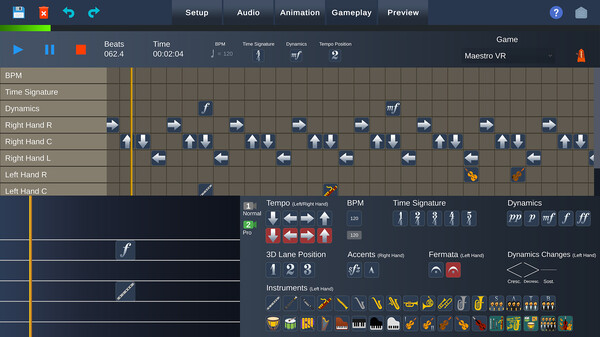
- Design Personalized Levels for Maestro VR: Create custom levels within Maestro VR. With an intuitive interface, drag and drop icons onto the lanes to design your own symphonic rhythm game.
- Share and Enjoy Your Creations: Immerse yourself in a unique experience that combines musical creativity with the entertainment of video games. Share your concerts and levels with the community and enjoy creations from other players.
- Ideal for Composers and Musicians: With Maestro VR - Level Editor, you can simulate a concert of your musical piece, creating a personalized symphony orchestra within virtual reality. It's an excellent tool for composers and musicians who wish to see and hear their works performed by a virtual orchestra.
Start creating, playing, and sharing with Maestro VR - Level Editor and take your passion for music to the next level!
Media gallery 7 screenshots · 0 videos

Screenshots


Player activity
Concurrent players over the last 48 hours.
Loading player history?
System requirements Windows
Windows
Minimum
Minimum:- OS: Windows 10
- Processor: Intel Core i5-4590 / AMD FX 8350
- Memory: 8 GB RAM
- Graphics: VIDIA GeForce GTX 970 / AMD Radeon R9 290
Recommended
Recommended:- OS: Windows 10
- Processor: Intel Core i7-7700K / AMD Ryzen 7 2700X
- Memory: 16 GB RAM
- Graphics: NVIDIA GeForce GTX 1080 / AMD Radeon RX Vega 64
Game details Languages, features & support
- Publisher
- Symphonic Games
- Brazilian rating
- l
- Steam Germany rating
- 0
- Features
- Single-player, Downloadable Content, Tracked Controller Support, Steam Cloud, Includes level editor, Family Sharing
- Languages
- English*, French*, Italian*, German*, Spanish - Spain*, Japanese*, Korean*, Portuguese - Brazil*
*languages with full audio support - Website
- Official website ↗
- Support
- [email protected] Support site ↗
More analysis Activity patterns, updates & developer tools
Developer Analytics
Loading competitors...
Frequently Asked Questions
Is Maestro VR - Level Editor free to play?
Yes, Maestro VR - Level Editor is free to play on Steam.
What genre is Maestro VR - Level Editor?
Maestro VR - Level Editor is a Indie, Simulation, Free To Play game.
Who developed Maestro VR - Level Editor?
Maestro VR - Level Editor was developed by Symphonic Games and published by Symphonic Games.
What platforms does Maestro VR - Level Editor support?
Available on Steam for Windows.