
CivIdle - Cross Platform Cloud Save
Fish Pond Studio
Delayed observation
Observed
0
Last tracked
0
All-time peak
n/a
Δ 24h
Player count last observed
Live player data is temporarily unavailable; historical values remain visible for context.
CivIdle - Cross Platform Cloud Save - Steam Charts & Historical Stats
Cross Platform Cloud Save allows you to link your account to another platform (e. Explore historical player activity and pricing for CivIdle - Cross Platform Cloud Save. Player-count data was last observed Apr 22, 2026.
Price
$1.99
Genre
Indie
Developer
Fish Pond Studio
CivIdle - Cross Platform Cloud Save player count and price summary
- Current players
- Unavailable
- All-time peak
- Unavailable
- 24-hour player change
- Unavailable
- Current US price
- $1.99
Player count last observed . Values marked unavailable are not estimated.
Media gallery 2 screenshots · 0 videos
Screenshots

Genre Benchmarks
Value Ratio
Top 0%
Player count
Price History
Lowest Price
$1.99
May 2026 across all regions
Current Price
$1.99
US region
No Recent Price History
Price history data will appear here once more pricing information becomes available.
System Requirements
Platform Support
Windows
Linux
Windows Requirements
Minimum:
Minimum:
- Requires a 64-bit processor and operating system
Recommended:
Recommended:
- Requires a 64-bit processor and operating system
Linux Requirements
Minimum:
Minimum:
Recommended:
Recommended:
Pricing
Paid Game
Additional Information
Categories
Single-player
Multi-player
Downloadable Content
Steam Achievements
Steam Cloud
Supported Languages
English, Russian, Simplified Chinese, French, German, Korean, Portuguese - Brazil, Traditional Chinese, Czech, Dutch, Spanish - Spain, Turkish
Official Website
https://cividle.com/
Pricing Information
❓
Price Unavailable
Pricing information not currently available
Additional Information
🇧🇷
DEJUS Rating
l
Brazilian rating
🇩🇪
Steam Germany
12
German classification
🆘
Support
Developer Analytics
Loading competitors...
About This Game
Cross Platform Cloud Save allows you to link your account to another platform (e.g. iOS, Android) and sync your save (progress, account rank, etc.) across. You only need this if you want to sync with a different platform
Detailed Description
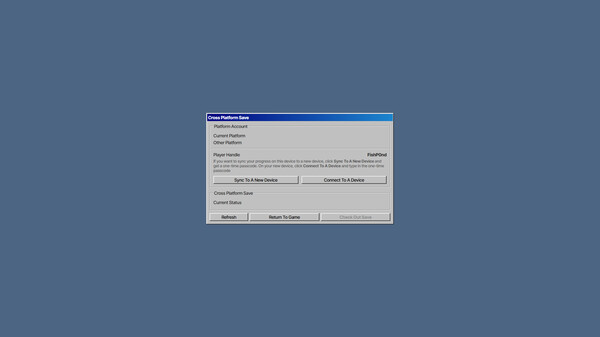
Cross Platform Cloud Save allows you to link your account to another platform (e.g. iOS, Android) and sync your save (progress, account rank, etc.) across.
You only need this if you want to sync with a different platform. CivIdle has Steam Cloud enabled and will sync your save across different devices that runs Steam without this DLC. However, if you want to sync your save to another platform (e.g. iOS, Android), which Steam Cloud does not support, you will need to purchase this DLC.
This DLC enables Cross Platform Cloud Save and does not add any content to the game. The price of this DLC is used to cover the server cost of hosting and syncing your save across platforms.
You only need this if you want to sync with a different platform. CivIdle has Steam Cloud enabled and will sync your save across different devices that runs Steam without this DLC. However, if you want to sync your save to another platform (e.g. iOS, Android), which Steam Cloud does not support, you will need to purchase this DLC.
This DLC enables Cross Platform Cloud Save and does not add any content to the game. The price of this DLC is used to cover the server cost of hosting and syncing your save across platforms.
How to Sync Save Across Platforms
- Purchase this DLC and restart your game
- Go to Options -> Manage Save and click Sync To A New Device to generate a passcode
- On a new device (iOS/Android), go to Options -> Manage Save and click Connect To A Device. Type in your player handle and the passcode
- You can now check in your save on one platform and check it out on another. To avoid save conflict, you can only check out your save on one platform at a time
Frequently Asked Questions
Is CivIdle - Cross Platform Cloud Save free to play?
CivIdle - Cross Platform Cloud Save costs $1.99 on Steam.
What genre is CivIdle - Cross Platform Cloud Save?
CivIdle - Cross Platform Cloud Save is a Indie, Simulation, Strategy, Free To Play game.
Who developed CivIdle - Cross Platform Cloud Save?
CivIdle - Cross Platform Cloud Save was developed by Fish Pond Studio.
What platforms does CivIdle - Cross Platform Cloud Save support?
Available on Steam for Windows, Linux.