VR-Reader (AppID: 3668710)

VR-Reader - Steam Analytics & Details
VR-Reader has 0 current players. Currently priced at $0.13, it represents green value compared to similar Utilities games.
Media Gallery

Screenshots



Videos
VR-Reader 2nd trailer
Game Insights
Buy Verdict
Decent deal at 0% off, but might drop further. Watch for better opportunities.
Value Score
Price-to-player ratio ranks in the 100th percentile.
Frequently Asked Questions
Is VR-Reader worth buying right now?
When does VR-Reader go on sale?
Genre Benchmarks
Price History
System Requirements
- OS: Windows 10
- Processor: Intel i3-6100/AMD Ryzen 3 1200
- Memory: 8 GB RAM
- Graphics: NVIDIA GTX 970/AMD Radeon R9
- DirectX: Version 12
- Storage: 500 MB available space
- VR Support: OpenXR supported headsets and OpenXR Toolkit supported controllers: Meta Quest 1, Meta Quest 2, Meta Quest 3, Meta Quest Pro, HTC Vive, Valve Index, Oculus Rift, WMR headsets
- Additional Notes: Works in AMD Ryzen 5 3550H, 8GB, Nvidia 1050 laptop with Meta Quest 2 via Steam Link
- OS: Windows 10, Windows 11
- Processor: Intel i5-4590/AMD Ryzen 5 1500X
- Memory: 16 GB RAM
- Graphics: NVIDIA GTX 1060/AMD Radeon RX 480
- DirectX: Version 12
- Storage: 500 MB available space
- VR Support: OpenXR supported headsets and OpenXR Toolkit supported controllers: Meta Quest 1, Meta Quest 2, Meta Quest 3, Meta Quest Pro, HTC Vive, Valve Index, Oculus Rift, WMR headsets
Additional Information
Current Pricing
Additional Information
Developer Analytics
Loading competitors...
About This Game
Read manga, magazines and photos in VR. Intuitive controls and zoomable pages are designed for reading small text.
Detailed Description
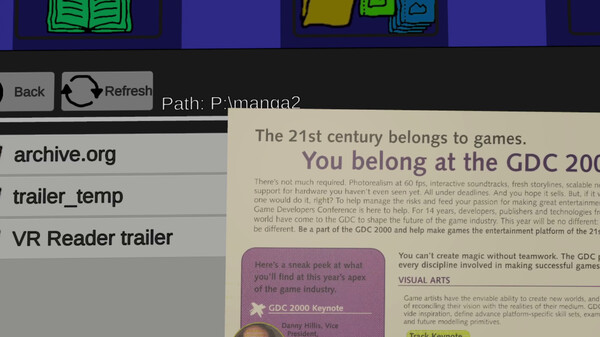
Read manga, comics, magazines and photos from your harddrive in VR.
Zoomable and grabbable pages
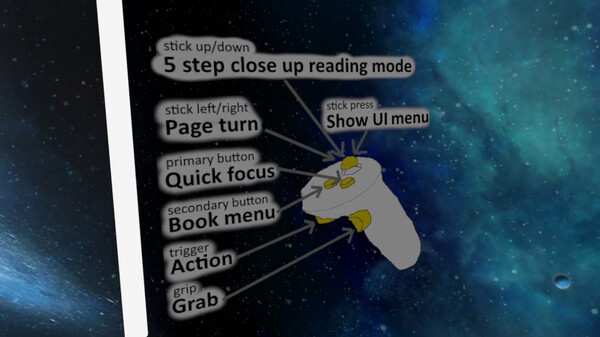
Intuitive controls designed for manga/comics and small text
Close reading mode
Quick focus
Page tilting
Great resolution & image compression
Supported files in early access: pdf, cbz, zip, jpg, jpeg, png
No advertising or other hidden costs
No online store, you have to have the content in your PC
Low system requirements. Tested on an older laptop with an AMD Ryzen 5 3550H, 8GB RAM, and an Nvidia GTX 1050, using a Meta Quest 2 via Steam Link.
Handling the pages and reading in VR works a little differently than in real life. Here are two ways I've found it to be better and more enjoyable in VR than in real life.
FULL PAGE MODE
Focus the page
Zoom so you see the whole page at once
Turn tilting toggle on from book settings
Press left/right to turn the whole page normally and use Focus when necessary
CLOSE READING MODE
Turn tilting off from book settings
Use focus to center the page
Pressing up/down keeps the page in close, and pulls it from up to down
Day 1 update v0.8.3: Analog stick deadzone slider, and early keyboard support. More info in Community Hub (button on upper side of the Steam page).
2025.9.29 Update v0.8.5: Update for VR controller's deadzone
2025.10.8: Quick security patch fix.