Format Converter Tsar (AppID: 3686110)
Format Converter Tsar - Steam Analytics & Details
Format Converter Tsar has 0 current players.
Media Gallery

Screenshots
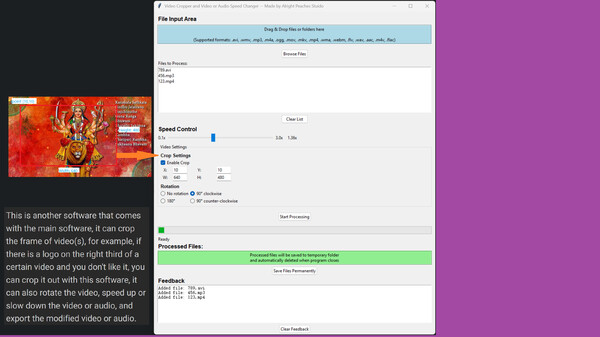
Videos
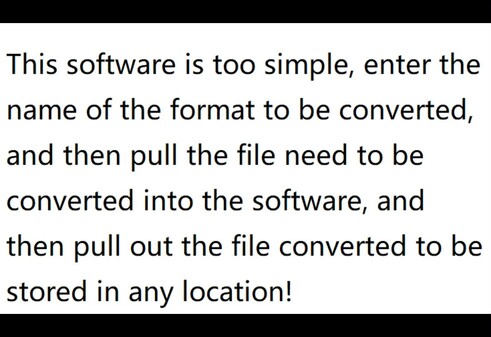
whatItCanDo
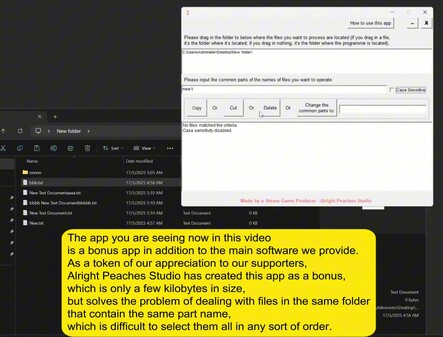
secondAppAsAGiftOfTheMainApp
Game Insights
Value Score
Price-to-player ratio ranks in the 50th percentile.
System Requirements
- OS *: Windows 7
- Processor: Intel Core i5-6300HQ or AMD A10-8700P
- Memory: 4 GB RAM
- Graphics: Intel HD Graphics 6000 or AMD Radeon R6 Graphics
- Storage: 285 MB available space
- OS: Windows 11
- Processor: Intel Core Ultra 7 155H or AMD Ryzen 7 8845H
- Memory: 32 GB RAM
- Graphics: GeForce RTX 4060 or Radeon RX 7600M XT
- Storage: 285 MB available space
Additional Information
*languages with full audio support
Current Pricing
Additional Information
Developer Analytics
Loading competitors...
About This Game
This software can convert between most compatible formats. Simply enter the target file extension, drag a file or folder into the interface, and once the conversion is complete, drag the converted file or folder to any location to save. Dragging in a folder will batch convert files in it.
Detailed Description
This software is a versatile multimedia file converter that supports extensive format conversions for videos, audio, images, documents, and entire folder conversion. It handles daily office tasks (Word, Excel, PPT, PDF, ICO, audio, video, images) with professional precision and performs lossless audio/video conversions effortlessly. Key features include batch processing with preserved folder structures (folder to folder batch conversion), PDF-to-image conversion, PPT embedded image extraction, multi-size icon (ICO) generation, Office files (doc, docx, ppt, pptx) to PDF conversions, and it supports 37 languages in its interface. No complex steps required—achieve results with just one step - 'drag in'!
Core Features:
Drag-and-Drop Simplicity:
Step1: Enter the target format’s extension.
Step2: Drag a file or folders in, to start conversion.
Step3: Move converted file or folder to anywhere you want to save after completion.
📂Folder Support: If you drag a folder in, then it will convert all files which can be converted in that folder and its subfolders and it will retain the original structure, and return you a folder as well, it calls batch conversion.
🎥Video Conversion:
Convert between 29 video formats or extract audio from videos, or convert to or from a Gif
Supported Video Formats:
mp4, avi, mkv, mov, ogv, rm, rmvb, webm, m4s, flv, ts, m2ts, wmv, vob, 3gp, gif, !mv, asf, m4v, mxf, swf, mpg, h264, h265, m2v, divx, hevc, 3g2, mpeg
🔊Audio Conversion:
Convert freely between 25 audio formats.
Supported Audio Formats:
mp3, wav, aac, flac, ogg, m4a, wma, aiff, opus, ac3, dts, amr, ape, alac, au, mka, tta, mid, midi, spx, thd, dff, dsf, mlp, dtshd
🖼️Image & Creative Tools:
Convert between 32 image formats or turn images into videos.
Supported Image Formats:
jpg, jpeg, png, bmp, webp, tiff, yuv, raw, gif, jp2, pbm, pgm, ppm, tga, exr, dpx, psd, svg, pcx, sgi, rgb, xpm, xbm, pam, avif, heif, heic, jxl, qoi, ico, icns (Mac icon), pdf
Notes: raw: Requires manual pixel format input.
psd: One-way conversion to JPG/PNG.
ico: Generate multi-resolution icons.
📄Document Conversion:
Supported Document Formats
Word Documents
Input Formats: doc, docx, rtf, txt, pdf
Output Formats: doc, docx, rtf, txt, pdf
Excel Spreadsheets
Input Formats: xls, xlsx, csv
Output Formats: xls, xlsx, csv, txt, pdf
PowerPoint Presentations
Input Formats: ppt, pptx
Output Formats: ppt, pptx, txt, pdf
PDF Files
Input Formats: pdf
Output Formats: txt, doc, docx, rtf, ppt, pptx, jpg, png, bmp, etc.
Text Files
Input Formats: txt
Output Formats: pdf, doc, docx
Advanced Functions:
Convert Images to different sizes ICO (e.g., a single PNG in, a folder with different size ICO files out)
Extract an ICO or ICNS all frames (Sometimes, an ICO/ICNS includes different frames to display in different places, this app can extract all frames, and convert them to the format you want, for example, an ICO/ICNS in, a folder with different sizes PNG or other format image files out.)
Extract GIF/MP4 and other videos' all frames to an image format (PNG, JPG, BMP and etc.) and save all extracted image files to a folder.
PDF to Images: Export pages as JPG/PNG/BMP.
Convert PDFs to editable formats such as DOCX, DOC, RTF, TXT, PPTX, and image-based PPT. By default, PPT conversions result in image-based slides. If you need editable text, first convert to PPTX, then to PPT. To obtain an image-based PPTX, convert to PPT first, then to PPTX. These formats can also be converted back to PDF.
PPT, PPTX Embedded Images: Extract PNG/JPG/BMP files.
CSV Detection: Auto-detect CSV/XLS/XLSX formats.