
Live Translate
Live Translate - Steam Analytics & Details
Live Translate maintains a green-rated player base. Currently priced at $14.99, it represents green value compared to similar Audio Production games.
Live Translate player count and price summary
- Current players
- 1
- All-time peak
- 6
- 24-hour player change
- 0%
- Current US price
- $14.99
Player count observed . Values marked unavailable are not estimated.
Media gallery 25 screenshots · 2 videos
Screenshots


Videos

Live Translate
Screen Translate
Players Now
All-Time Peak
Estimated Owners
Game Insights
Buy Verdict
Wait for upcoming sale in ~3 days for potentially better pricing.
Player Health
Stable player base with low churn risk.
Value Score
Price-to-player ratio ranks in the 100th percentile.
Genre Benchmarks
Activity Heatmap
1 players · 1 samples
1 players · 1 samples
0 players · 1 samples
No samples
2 players · 1 samples
2 players · 1 samples
No samples
2 players · 2 samples
No samples
2 players · 1 samples
3 players · 1 samples
No samples
6 players · 1 samples
3 players · 1 samples
No samples
3 players · 1 samples
No samples
5 players · 2 samples
No samples
No samples
4 players · 2 samples
No samples
6 players · 1 samples
1 players · 1 samples
No samples
5 players · 1 samples
1 players · 1 samples
3 players · 1 samples
No samples
1 players · 1 samples
4 players · 1 samples
No samples
4 players · 2 samples
No samples
3 players · 1 samples
3 players · 1 samples
No samples
4 players · 1 samples
3 players · 1 samples
No samples
4 players · 1 samples
No samples
4 players · 2 samples
No samples
No samples
4 players · 2 samples
No samples
No samples
2 players · 2 samples
No samples
0 players · 1 samples
2 players · 1 samples
0 players · 1 samples
No samples
3 players · 1 samples
0 players · 1 samples
No samples
1 players · 2 samples
No samples
No samples
1 players · 2 samples
No samples
2 players · 1 samples
2 players · 1 samples
No samples
4 players · 1 samples
5 players · 1 samples
No samples
3 players · 1 samples
No samples
1 players · 1 samples
3 players · 1 samples
No samples
No samples
2 players · 2 samples
No samples
No samples
2 players · 2 samples
No samples
1 players · 1 samples
2 players · 1 samples
3 players · 1 samples
No samples
3 players · 1 samples
3 players · 1 samples
No samples
2 players · 1 samples
1 players · 1 samples
No samples
1 players · 1 samples
2 players · 1 samples
No samples
No samples
2 players · 2 samples
No samples
No samples
0 players · 1 samples
2 players · 1 samples
No samples
1 players · 1 samples
1 players · 1 samples
No samples
0 players · 1 samples
1 players · 1 samples
1 players · 1 samples
No samples
1 players · 1 samples
2 players · 1 samples
No samples
1 players · 1 samples
1 players · 1 samples
No samples
No samples
3 players · 1 samples
3 players · 1 samples
No samples
5 players · 1 samples
1 players · 1 samples
No samples
No samples
1 players · 1 samples
1 players · 1 samples
No samples
1 players · 1 samples
2 players · 1 samples
No samples
1 players · 1 samples
1 players · 1 samples
4 players · 1 samples
1 players · 1 samples
2 players · 2 samples
No samples
2 players · 2 samples
2 players · 1 samples
No samples
3 players · 2 samples
2 players · 1 samples
3 players · 1 samples
No samples
3 players · 1 samples
2 players · 2 samples
No samples
2 players · 2 samples
No samples
1 players · 1 samples
2 players · 1 samples
No samples
2 players · 2 samples
No samples
No samples
1 players · 2 samples
No samples
2 players · 1 samples
1 players · 1 samples
No samples
3 players · 1 samples
3 players · 1 samples
4 players · 1 samples
No samples
1 players · 1 samples
3 players · 1 samples
No samples
No samples
2 players · 2 samples
No samples
1 players · 1 samples
3 players · 1 samples
No samples
Price History
System Requirements
- Requires a 64-bit processor and operating system
- OS: Windows 10 64-bit
- Processor: Intel Core i5-8400 / AMD Ryzen 5 3600 or equivalent
- Memory: 8 GB RAM
- Graphics: NVIDIA GeForce GTX 1080 / RTX 2060 / AMD Radeon RX 6600 (8 GB VRAM minimum)
- DirectX: Version 12
- Storage: 40 GB available space
- Sound Card: Standard sound card with microphone support
- Additional Notes: Runs 100% offline. Requires .NET 8 Runtime (auto-installed by Steam). 8 GB VRAM runs the standard translation model - usable, but AI-heavy features will be slow, and you should not expect to translate while a demanding game is running. 12 GB or more is strongly recommended. NVIDIA (CUDA) is significantly faster than AMD/Intel at the same VRAM tier. Steam Deck is not supported.
- Requires a 64-bit processor and operating system
- OS: Windows 11 64-bit
- Processor: Intel Core i7-12700K / AMD Ryzen 7 5800X or better
- Memory: 16 GB RAM
- Graphics: NVIDIA GeForce RTX 4070 / AMD Radeon RX 7800 XT (12 GB+ VRAM, NVIDIA recommended for best speed)
- DirectX: Version 12
- Storage: 60 GB available space
- Sound Card: DirectX compatible sound card
- Additional Notes: NVIDIA RTX cards use NVENC hardware video encoding; AMD uses AMF; Intel uses QuickSync. SSD storage dramatically improves model loading times. Fully offline — no internet, no cloud APIs, no telemetry.
Additional Information
Player-to-Price Ratio
Current Pricing
Additional Information
Developer Analytics
Loading competitors...
About This Game
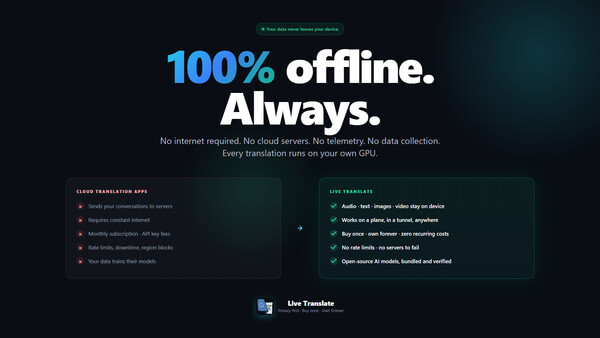
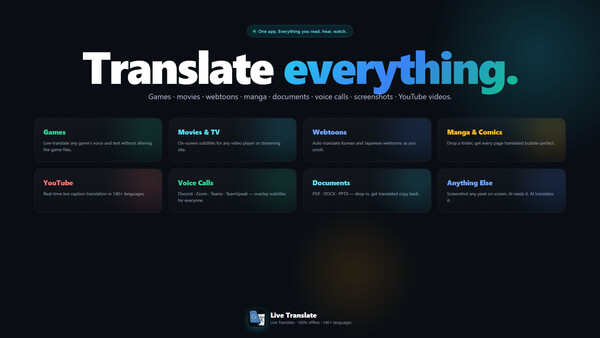
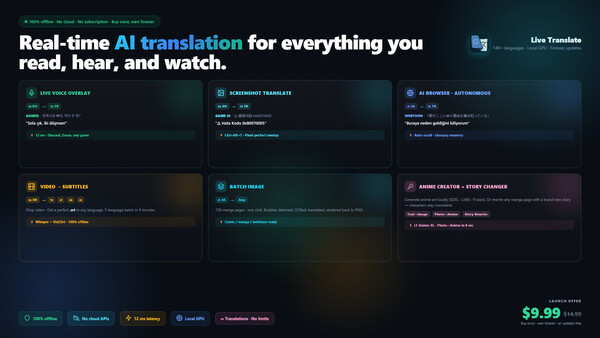
100% offline AI translation in 140+ languages, running on your own GPU. Live voice captions, screenshot and image translation, video subtitles plus burned-in subtitle extraction, and web page translation. No cloud, no subscription. Needs a capable GPU (8 GB+ VRAM).
Detailed Description
New Feature: Explore the Visual World with In-Place Screen Translation
Meet the groundbreaking In-Place Screen Translation feature added to our application! Now, you can translate not only audio but also the text on your screen in real-time. With a single press of a hotkey, you can have the text on your screen replaced with its translated versions while preserving their original positions.
How does this feature work?
When you press the hotkey, our application takes a snapshot of the entire screen, intelligently detects all the text on it, translates it to the target language, and then erases the original text to place the translations in their spot. This way, you'll feel as if the content was in your language from the very beginning.
Unlimited Use Cases:
In-Game Translation: Understand game menus, character dialogues, inventory descriptions, and more instantly in your language.
Film and Video Translation: Easily comprehend on-screen text in foreign films or documentaries without subtitles.
Webtoons, Manga, and Comics: Follow your favorite visual stories without language barriers.
Applications and Software: Use the interfaces of foreign programs effortlessly.
Press your hotkey and step into a new world where every text on your screen instantly makes sense!
About the Software
PLEASE READ BEFORE BUYING
Live Translate runs entirely on your own PC. There is no cloud - your graphics card does all the work. Please check these points before you buy:- Expect 1-3 seconds of delay on live captions. This is local AI, not a cloud service, so it is not instant.
- It does not replace text inside games. Translations appear in a separate overlay or subtitle window, not painted over the game's own interface.
- 8 GB VRAM runs the small model. Translating while a demanding game is running realistically needs 12 GB or more.
- About 40 GB of disk space. Every AI model ships with the app - nothing is downloaded later and nothing is streamed.
- NVIDIA (CUDA) is the fastest. AMD and Intel cards work through Vulkan but are slower. Steam Deck is not supported.
- If your PC is below the recommended specs, please wait rather than buy disappointed. Performance improves with every update.
NEW - Extract subtitles that are burned into the video
Some videos have subtitles baked permanently into the picture, with no subtitle file to load. Live Translate can now read them with AI OCR, turn them into a real subtitle file, translate them into any supported language, and export or burn them back into the video. It works even on videos with no audio track, it removes channel logos and site watermarks automatically, and you can scan just a section of a video instead of the whole file.Fully offline, real-time AI translation. Runs entirely on your own GPU. No cloud. No subscription. Buy once, own forever — every future update is free.
Buy once. Own forever.
Live Translate is a single one-time purchase. Every future update and every new feature is free for existing owners. As open AI technology advances, your copy advances with it — no subscription, no recurring fees, no paywalled features.
Early Access — built together with you
Live Translate is in Early Access and receives regular updates. Your feedback directly shapes what we build next — if something does not work or you are missing a feature, tell us in the Steam Community discussions. We read everything and we answer. Early Access pricing rewards early supporters: as new features arrive, the price may increase. Buy today, and every future feature is yours at today's price.
IMPORTANT — PLEASE READ BEFORE BUYING
Optimization improves with every update — a feature that pushes your hardware today will run faster on less tomorrow. Owning it today is preparing for the future: your copy gets faster and more capable with every update.
Real-Time Audio Translation
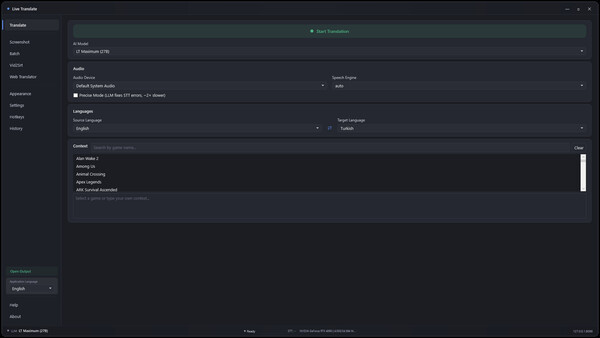
Capture system audio (games, movies, online meetings) or your microphone and watch the conversation appear translated on a customizable on-screen overlay. Powered by an on-device AI translation model with offline speech recognition through multiple interchangeable engines. The app auto-picks the best one for your source language.
- Live translation overlay — drag, resize, recolor, set opacity and font
- Speaker identification separates voices in multi-speaker dialogue
- Precise Mode lets the AI clean up noisy speech-to-text before translating
- 140+ target languages, 28 user-interface languages
- Smart cache — repeated phrases translate instantly
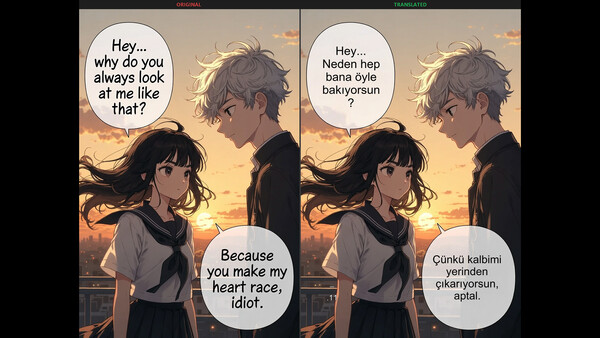
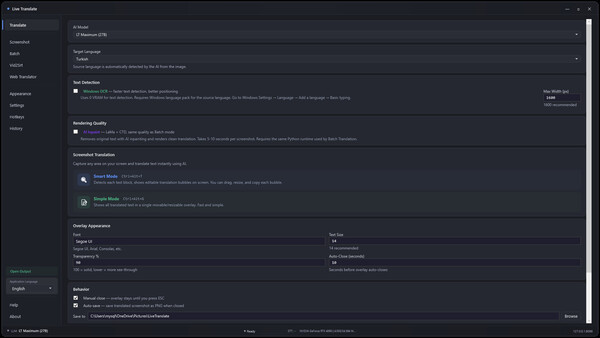
Screenshot Translation
Press a global hotkey to capture any region of your screen.
- Inpaint mode — the original text is automatically removed and the translation is rendered in the exact same spot, matching the original layout
- Legacy mode — original and translation shown side-by-side
Batch Image Translation
Drop an entire folder of images and translate them all at once. Designed for manga chapters, comic collections, scanned documents, and screenshot archives. Input and output folder selection, optional sub-folder scanning, side-by-side preview, per-file progress.
Video to Subtitles (Vid2Srt)
Drop any video file and Live Translate produces a polished SRT in your target language. The pipeline:
- High-accuracy transcription with built-in hallucination filtering
- Two-pass AI translation — per-segment first, then a full-script coherence review
- Word-level diff highlighting shows exactly what the AI corrected
- Reading-speed targeted segmentation (42 characters × 2 lines, broadcast standard)
- Translate one transcription into multiple target languages without re-running speech recognition
- Hard-burn into the video with GPU acceleration — NVIDIA NVENC, AMD AMF or Intel QuickSync auto-detected, with CPU fallback
- Quality report after each run: coverage, average reading speed, gap detection
100% Offline and Private
- No cloud APIs and no third-party AI service dependencies
- No telemetry, no analytics, no account login, no required internet connection after install
- Audio, prompts, images and translations never leave your device
- Runs locally on your CPU and GPU
Supported Platforms
Windows 10 and Windows 11 (64-bit). Multi-language interface in 28 languages.
About the Game
PLEASE READ BEFORE BUYING
Live Translate runs entirely on your own PC. There is no cloud - your graphics card does all the work. Please check these points before you buy:- Expect 1-3 seconds of delay on live captions. This is local AI, not a cloud service, so it is not instant.
- It does not replace text inside games. Translations appear in a separate overlay or subtitle window, not painted over the game's own interface.
- 8 GB VRAM runs the small model. Translating while a demanding game is running realistically needs 12 GB or more.
- About 40 GB of disk space. Every AI model ships with the app - nothing is downloaded later and nothing is streamed.
- NVIDIA (CUDA) is the fastest. AMD and Intel cards work through Vulkan but are slower. Steam Deck is not supported.
- If your PC is below the recommended specs, please wait rather than buy disappointed. Performance improves with every update.
NEW - Extract subtitles that are burned into the video
Some videos have subtitles baked permanently into the picture, with no subtitle file to load. Live Translate can now read them with AI OCR, turn them into a real subtitle file, translate them into any supported language, and export or burn them back into the video. It works even on videos with no audio track, it removes channel logos and site watermarks automatically, and you can scan just a section of a video instead of the whole file.Fully offline, real-time AI translation. Runs entirely on your own GPU. No cloud. No subscription. Buy once, own forever — every future update is free.
Buy once. Own forever.
Live Translate is a single one-time purchase. Every future update and every new feature is free for existing owners. As open AI technology advances, your copy advances with it — no subscription, no recurring fees, no paywalled features.
Early Access — built together with you
Live Translate is in Early Access and receives regular updates. Your feedback directly shapes what we build next — if something does not work or you are missing a feature, tell us in the Steam Community discussions. We read everything and we answer. Early Access pricing rewards early supporters: as new features arrive, the price may increase. Buy today, and every future feature is yours at today's price.
IMPORTANT — PLEASE READ BEFORE BUYING
Optimization improves with every update — a feature that pushes your hardware today will run faster on less tomorrow. Owning it today is preparing for the future: your copy gets faster and more capable with every update.
Real-Time Audio Translation
Capture system audio (games, movies, online meetings) or your microphone and watch the conversation appear translated on a customizable on-screen overlay. Powered by an on-device AI translation model with offline speech recognition through multiple interchangeable engines. The app auto-picks the best one for your source language.
- Live translation overlay — drag, resize, recolor, set opacity and font
- Speaker identification separates voices in multi-speaker dialogue
- Precise Mode lets the AI clean up noisy speech-to-text before translating
- 140+ target languages, 28 user-interface languages
- Smart cache — repeated phrases translate instantly
Screenshot Translation
Press a global hotkey to capture any region of your screen.
- Inpaint mode — the original text is automatically removed and the translation is rendered in the exact same spot, matching the original layout
- Legacy mode — original and translation shown side-by-side
Batch Image Translation
Drop an entire folder of images and translate them all at once. Designed for manga chapters, comic collections, scanned documents, and screenshot archives. Input and output folder selection, optional sub-folder scanning, side-by-side preview, per-file progress.
Video to Subtitles (Vid2Srt)
Drop any video file and Live Translate produces a polished SRT in your target language. The pipeline:
- High-accuracy transcription with built-in hallucination filtering
- Two-pass AI translation — per-segment first, then a full-script coherence review
- Word-level diff highlighting shows exactly what the AI corrected
- Reading-speed targeted segmentation (42 characters × 2 lines, broadcast standard)
- Translate one transcription into multiple target languages without re-running speech recognition
- Hard-burn into the video with GPU acceleration — NVIDIA NVENC, AMD AMF or Intel QuickSync auto-detected, with CPU fallback
- Quality report after each run: coverage, average reading speed, gap detection
100% Offline and Private
- No cloud APIs and no third-party AI service dependencies
- No telemetry, no analytics, no account login, no required internet connection after install
- Audio, prompts, images and translations never leave your device
- Runs locally on your CPU and GPU
Supported Platforms
Windows 10 and Windows 11 (64-bit). Multi-language interface in 28 languages.