Artificial Player (AppID: 3822550)
Artificial Player - Steam Analytics & Details
An advanced tool that lets you create and run artificial intelligence agents that control games like a human, using the mouse and keyboard. Explore pricing history and player statistics for Artificial Player.
Media Gallery

Screenshots



Videos

Artificial Player Trailer

Artificial Player
System Requirements
- Requires a 64-bit processor and operating system
- OS: Windows 10
- Processor: 64-bit procesor and operating system
- Memory: 16 GB RAM
- Storage: 15 GB available space
- Requires a 64-bit processor and operating system
- OS: Windows 10
- Processor: 64-bit procesor and operating system
- Memory: 16 GB RAM
- Graphics: NVIDIA GPU with CUDA 4GB VRAM
- Storage: 30 GB available space
Additional Information
Pricing Information
Additional Information
Developer Analytics
Loading competitors...
About This Game
An advanced tool that lets you create and run artificial intelligence agents that control games like a human, using the mouse and keyboard. No game engine integration. All it needs is the screen. The agent “sees” what you see and reacts: it moves, aims, presses buttons — autonomously, in real time.
Detailed Description
Artificial Player
Artificial Player is an advanced tool that lets you create and run artificial intelligence agents that control games like a human would — using the mouse and keyboard.
You don’t need any game engine integration or code access. All it needs is the screen.
The agent “sees” what you see and reacts: it moves, aims, presses buttons — autonomously, in real time.
What is Artificial Player, really?
It’s a platform for experimenting with intelligent input control in games and applications.
It works with any 3D environment that supports mouse and keyboard input — whether it’s a classic FPS, a sandbox world, or your own educational project.
Thanks to advanced visual analysis and customizable behavior algorithms, you can create an AI player that:
navigates game maps,
recognizes enemies or objects,
reacts to the environment,
follows commands (like “find this” or “shoot that”).
And it does all this — without writing a single line of code.
Key Features:
AI-controlled player with real input
Artificial intelligence uses the mouse and keyboard like a human — no overlays, or game files integration.
Fully customizable behavior
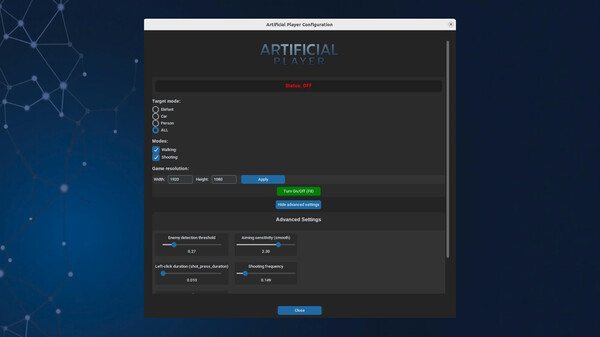
Adjust movement logic, targeting priorities, reactions, sensitivity, delays, and more — all through a simple UI.
Works with any mouse + keyboard 3D game
Unity, Roblox, Minecraft, emulators, retro FPS games, and custom engines — just run it and let it play.
Test and QA modes
Run the agent in automated test loops, validate level flow, or repeat tasks without lifting a finger.
Accessibility support
Let AI assist users with reduced mobility — such as single-button setups.
Visual analysis and monitoring
Track decisions, movement heatmaps, aiming accuracy, and more — all visualized in real time.
Community & Prebuilt Models
Artificial Player is more than a tool — it’s a growing community platform.
The built-in Community Hub allows you to:
Browse, download, and run prebuilt AI models created by other users
Learn how to train your own agents
Share configurations and test scenarios
Get inspired and develop your own unique AI playstyle
⚠️ Usage Notice
Artificial Player is designed for offline, educational, and experimental use.
It is not intended for use in online multiplayer games with anti-cheat systems (e.g. Valorant, Apex Legends, Fortnite).
Using it in such games may result in account or hardware bans.
Users are solely responsible for how they use this application.
Who is Artificial Player for?
Game developers who want to test levels
QA testers automating gameplay
Educators teaching computer vision, reinforcement learning, or AI
AI enthusiasts and hobbyists
Creative players looking for new ways to interact with games
Artificial Player bridges gameplay and technology, creativity and control — connecting the human with the machine.
Are you ready to build your own player?