Mulmiyac for 3D Motion Sickness
Mulmiyac for 3D Motion Sickness - Steam Charts & Historical Stats
[The world’s FIRST and BEST overlay utility to prevent 3D motion sickness]Find the ideal settings to reduce your 3D motion sickness. Explore historical player activity and pricing for Mulmiyac for 3D Motion Sickness. Player-count data was last observed Oct 4, 2026.
Mulmiyac for 3D Motion Sickness player count and price summary
- Current players
- Unavailable
- All-time peak
- 74
- 24-hour player change
- Unavailable
- Current US price
- $2.49
Player count last observed . Values marked unavailable are not estimated.
Media gallery 8 screenshots · 2 videos
Screenshots
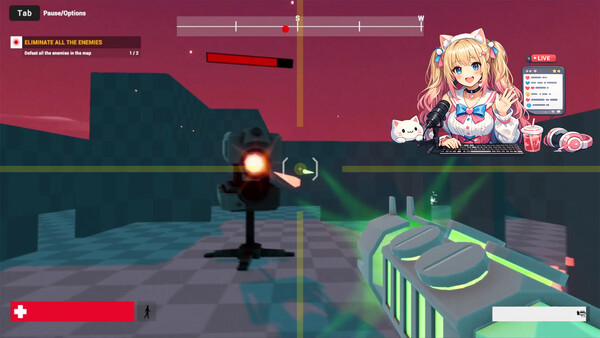
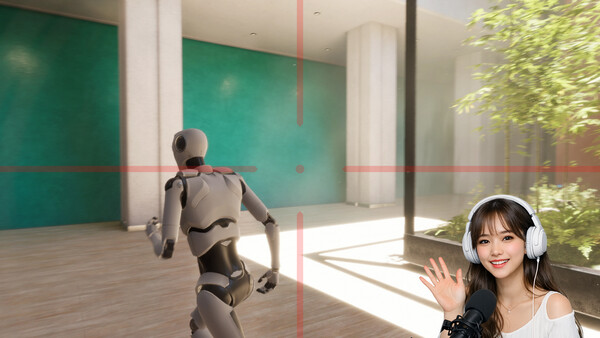
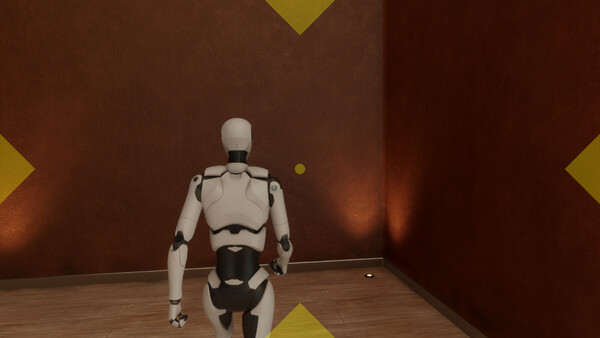
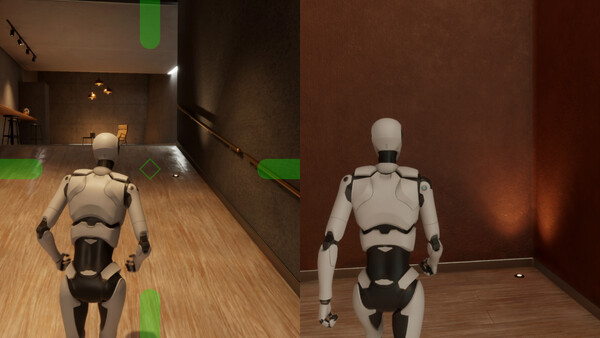

Videos
Trailer 2026

Trailer 2025
Last Tracked Players
All-Time Peak
Estimated Owners
Game Insights
Buy Verdict
Decent deal at 50% off, but might drop further. Watch for better opportunities.
Value Score
Price-to-player ratio ranks in the 100th percentile.
Genre Benchmarks
Activity Heatmap
14 players · 1 samples
27 players · 1 samples
20 players · 4 samples
No samples
36 players · 1 samples
31 players · 2 samples
38 players · 1 samples
40 players · 2 samples
48 players · 1 samples
54 players · 2 samples
38 players · 1 samples
47 players · 1 samples
63 players · 2 samples
45 players · 1 samples
64 players · 2 samples
31 players · 1 samples
36 players · 1 samples
30 players · 1 samples
18 players · 1 samples
18 players · 2 samples
16 players · 1 samples
16 players · 1 samples
16 players · 2 samples
17 players · 1 samples
15 players · 1 samples
22 players · 1 samples
20 players · 2 samples
24 players · 2 samples
No samples
23 players · 3 samples
29 players · 1 samples
No samples
30 players · 2 samples
26 players · 2 samples
36 players · 2 samples
No samples
46 players · 2 samples
59 players · 1 samples
57 players · 1 samples
40 players · 2 samples
31 players · 1 samples
No samples
23 players · 2 samples
22 players · 2 samples
No samples
12 players · 1 samples
14 players · 3 samples
12 players · 1 samples
No samples
18 players · 2 samples
16 players · 2 samples
No samples
21 players · 3 samples
27 players · 1 samples
No samples
21 players · 3 samples
24 players · 1 samples
30 players · 1 samples
32 players · 2 samples
38 players · 2 samples
No samples
44 players · 1 samples
49 players · 3 samples
No samples
29 players · 1 samples
21 players · 2 samples
25 players · 1 samples
16 players · 1 samples
7 players · 1 samples
12 players · 1 samples
16 players · 1 samples
12 players · 2 samples
11 players · 1 samples
22 players · 1 samples
18 players · 2 samples
19 players · 1 samples
22 players · 2 samples
31 players · 1 samples
27 players · 1 samples
23 players · 2 samples
31 players · 1 samples
24 players · 2 samples
No samples
39 players · 1 samples
48 players · 2 samples
No samples
56 players · 1 samples
40 players · 2 samples
No samples
26 players · 1 samples
19 players · 3 samples
No samples
No samples
No samples
11 players · 3 samples
No samples
No samples
13 players · 3 samples
No samples
No samples
20 players · 3 samples
No samples
No samples
26 players · 3 samples
No samples
25 players · 2 samples
37 players · 2 samples
No samples
48 players · 1 samples
53 players · 2 samples
No samples
29 players · 1 samples
32 players · 1 samples
24 players · 1 samples
No samples
19 players · 1 samples
18 players · 2 samples
No samples
10 players · 1 samples
17 players · 1 samples
14 players · 1 samples
12 players · 1 samples
No samples
27 players · 2 samples
No samples
16 players · 1 samples
34 players · 2 samples
No samples
26 players · 1 samples
34 players · 2 samples
32 players · 1 samples
No samples
48 players · 2 samples
No samples
42 players · 1 samples
49 players · 2 samples
No samples
19 players · 1 samples
27 players · 1 samples
17 players · 1 samples
No samples
12 players · 1 samples
11 players · 2 samples
No samples
No samples
15 players · 3 samples
21 players · 1 samples
35 players · 1 samples
26 players · 2 samples
36 players · 1 samples
34 players · 1 samples
39 players · 2 samples
38 players · 1 samples
45 players · 1 samples
44 players · 2 samples
45 players · 1 samples
56 players · 1 samples
55 players · 3 samples
No samples
No samples
41 players · 4 samples
No samples
No samples
20 players · 3 samples
17 players · 1 samples
12 players · 1 samples
12 players · 1 samples
13 players · 2 samples
Price History
System Requirements
- OS: Windows 10
- Processor: Celeron®
- Memory: 2 GB RAM
- Graphics: Any integrated graphics
- Storage: 120 MB available space
- OS: Windows 11
- Processor: Atom®
- Memory: 4 GB RAM
- Graphics: Any integrated graphics
- Storage: 120 MB available space
Additional Information
Player-to-Price Ratio
Current Pricing
Additional Information
Developer Analytics
Loading competitors...
About This Game
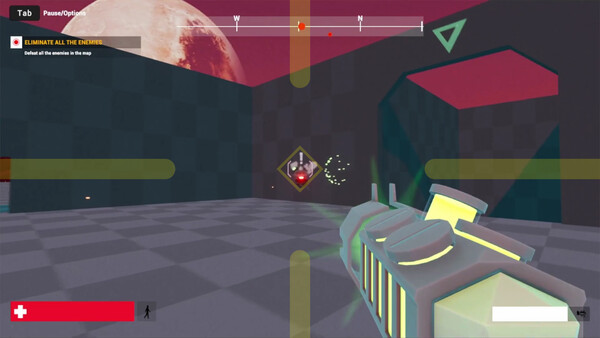
[The world’s FIRST and BEST overlay utility to prevent 3D motion sickness]Find the ideal settings to reduce your 3D motion sickness.Activate this when playing games or watching game streams.Windowed, pin to window, borderless window and borderless fullscreen are all available!
Detailed Description
Introducing the world’s FIRST and BEST overlay utility designed to reduce 3D motion sickness!
My ex-girlfriend—who is now my wife—used to suffer from severe 3D motion sickness.
I couldn't share the games I had loved my entire life with her.
That was the moment I knew I had to do something.
So I built this utility for her. And now, for all of you.
Don't lose the love of your life over something as small as 3D motion sickness.
This program may cover a small part of your screen...
But it just might show you what true happiness looks like!
⚡ Performance Improvements
Added Mulmiyac On/Off button
Added new Overlay types and styles
Greatly expanded Crosshair customization
Added Forced Borderless Fullscreen mode
Added Subtitle Safe Area
Significantly expanded Hotkey functionality
Added UI Themes
1. Overlay
Show/Hide Overlay (Hotkeys can be assigned)
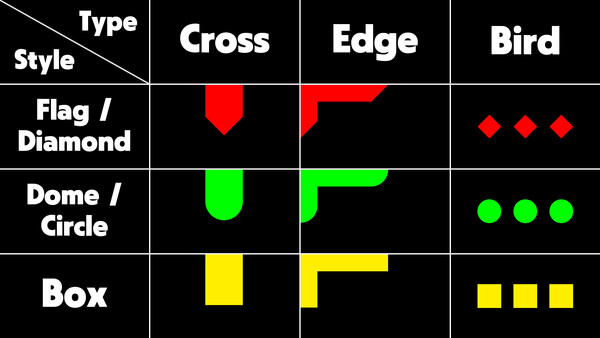
3 Types — Cross, Edge, Bird
3 Styles — Flag(Diamond), Dome(Circle), Box
Size & Length(Spacing) Slider
6 Aspect Ratios — Auto, 4 : 3, 16 : 10, 16 : 9, 21 : 9, 32 : 9
4 Colors — Red, Green, Yellow, Custom (Hotkeys can be assigned)
Opacity Slider (Hotkeys can be assigned)
2. Crosshair
Show/Hide Crosshair (Hotkeys can be assigned)
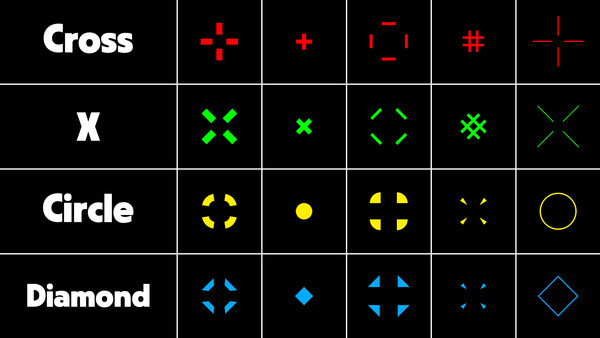
4 Shapes — Cross, X, Circle, Diamond
Size & Length Slider
Thickness & Spacing Slider
Adjust Position — Directly specify X, Y coordinates
4 Colors — Red, Green, Yellow, Custom (Hotkeys can be assigned)
Opacity Slider (Hotkeys can be assigned)
3. Clock
Show/Hide Clock (Hotkeys can be assigned)
3 Time Formats — HH:mm, HH:mm:ss, h:mm am/pm
Font Settings
Color Settings
Adjust Position — Directly specify X, Y coordinates or drag with mouse
Opacity Slider
4. Display
Enable/Disable Split Screen (Hotkeys can be assigned)
12 Split Screen Options — Left, Right, Top, Bottom (Hotkeys can be assigned)
Display Mode — Windowed, Pin to Window (Hotkeys can be assigned)
Window Style — Borderless Window, Borderless Fullscreen (Hotkeys can be assigned)
Enable/Disable Subtitle Safe Area (Hotkeys can be assigned)
Height Slider
5. Hotkeys
10 Enabled / Disabled Hotkeys
8 Color Change Hotkeys — Overlay, Crosshair
8 Settings Adjustment Hotkeys — Opacity, Split Screen
6. Options
Save/Load Profile — Overlay, Crosshair, Clock (Hotkeys are not saved per profile)
Automatic launch at Windows startup option
Minimize to Tray on first launch option
Automatically save settings when closing program option
Show confirmation message before closing program
UI Scale — Auto, 100% ~ 200%
UI Theme — Auto, Light, Dark, Navy, Cyber
Languages — 60 Languages Supported
7. Tray menu
Mulmiyac — On/Off Mulmiyac (Same function as double-clicking the tray icon)
Overlay — Show/Hide Overlay
Crosshair — Show/Hide Crosshair
Clock — Show/Hide Clock
Split Screen — Enable/Disable
Windowed — Enable/Disable
Pin to Window — Enable/Disable
Borderless Window — Enable/Disable
Borderless Fullscreen — Enable/Disable
Subtitle Safe Zone — Enable/Disable
Settings — Open Settings window
Quit Mulmiyac — Exit Software
8. Notes
If the game does not support borderless fullscreen, you can change the window style after pinning the window
If the effect is weak, it is recommended to set the overlay large and find an appropriate opacity
We recommend assigning a hotkey to quickly show or hide Mulmiyac
Settings and profiles can be synchronized through Steam Cloud
May conflict with some anti-cheat software (No conflicts have been reported so far)
Works in most PC environments, including Steam games
If Windows Defender or another antivirus blocks Mulmiyac, add it to the exclusion list before running it