Game overview
FilterMob
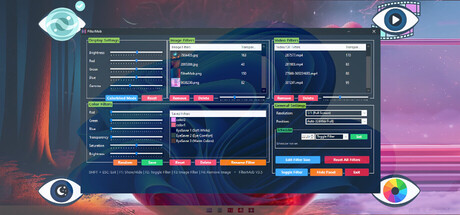
Transform your screen with FilterMob! Perfect for eye protection, gaming/work atmosphere, and accessibility. Easily apply color, image or video filters. Customize RGB, Saturation, Brightness, and Transparency in real time. Save Profiles and Schedule.
- Last tracked players
- 1
- All-time peak
- 6
- 24-hour change
- Unavailable
Delayed observation · last tracked . Values marked unavailable are not estimated.
About this game Read the full description
A powerful and easy-to-use tool to personalize your visual experience.
• 🚀🖱️ Change atmosphere during gaming or work!
• 👁️ Adjust color and brightness as you wish to protect your eyes!
• 🖼️ Use your JPG/PNG images as screen filters!
• 🎥 Use your MP4/WEBM/AVI/MKV/MOV videos as screen filters!
🎨 Color Filters:
Real-time RGB, saturation, brightness adjustment
0-100% transparency control
Save your filters to a list
Easily apply / rename / delete your saved filters
🖼️ Image Filters:
Add JPG/PNG images via drag-and-drop
Image transparency adjustment
Save your images to a list
Easily apply / change opacity / delete your saved images
🎥 Video Filters:
Add MP4/WEBM/AVI/MKV/MOV videos via drag-and-drop
Video transparency adjustment
Save your videos to a list
Easily apply / change opacity / delete your saved videos
🕒 Scheduler System
With the Scheduler tab, you can set a specific time to automatically:
Toggle the All FilterMob filters on/off
Automatically load a saved profile
Shutdown PC
Restart PC
Lock PC
💾 Advanced Profile Management
You can now save every setting (Color, Image, Video, Gamma, and System Brightness) as a named Profile.000
Saved profiles are now listed with visual icons (Color previews or thumbnails).
Switch between "Game Mode," "Reading Mode," or "Night Mode"... (your profiles) with a single click.
💾 Automatic Save Management:
All settings are automatically saved
Last used filters and overlays are remembered and automatically set at startup
Your settings are safe even in unexpected shutdowns
⚡ Performance
Optimized Efficiency:Designed for low resource consumption.
⌨️ Quick Actions:
Instant control via customizable global shortcuts (Shift+Esc, F-keys)
Automatic system language detection (30+ languages).
Media gallery 21 screenshots · 0 videos

Screenshots


Player activity
Concurrent players over the last 48 hours.
Latest news
All news on Steam ↗System requirements Windows
Windows
Minimum
Minimum:- Requires a 64-bit processor and operating system
- OS: Windows 10
- Processor: 1 GHz processor
- Memory: 1 GB RAM
- Graphics: Intel HD 520 / AMD Radeon R3
- Storage: 350 MB available space
- Sound Card: Not required
- VR Support: Not supported
Recommended
Recommended:- Requires a 64-bit processor and operating system
- OS: Windows 11
- Processor: 1.5 GHz or faster processor
- Memory: 2 GB RAM
- Graphics: NVIDIA GT 1030 / AMD Radeon RX 550 or higher
- Storage: 350 MB available space
- Sound Card: Not required
- VR Support: Not supported
Game details Languages, features & support
- Publisher
- istenen
- Brazilian rating
- l
- Steam Germany rating
- 0
- Features
- Camera Comfort, Color Alternatives, Adjustable Difficulty, Keyboard Only Option, Mouse Only Option, Playable without Timed Input, Save Anytime, Touch Only Option
- Languages
- English, French, Italian, German, Spanish - Spain, Arabic, Simplified Chinese, Portuguese - Brazil, Bulgarian, Danish, Indonesian, Dutch, Finnish, Traditional Chinese, Japanese, Korean, Spanish - Latin America, Polish, Hungarian, Norwegian, Portuguese - Portugal, Romanian, Russian, Thai, Turkish, Ukrainian, Vietnamese, Greek, Czech, Swedish
- Support
- [email protected]
More analysis Activity patterns, updates & developer tools
Game Insights
Buy Verdict
Decent deal at 80% off, but might drop further. Watch for better opportunities.
Value Score
Price-to-player ratio ranks in the 100th percentile.
Genre Benchmarks
Developer Analytics
Loading competitors...