
Hotdangle
Hotdangle - Steam Charts & Historical Stats
Hotdangle is a fast-paced hockey training game where real stickhandling meets virtual challenges. Explore historical player activity and pricing for Hotdangle. Player-count data was last observed Sep 27, 2026.
Hotdangle player count and price summary
- Current players
- Unavailable
- All-time peak
- 1
- 24-hour player change
- Unavailable
- Current US price
- $17.99
Player count last observed . Values marked unavailable are not estimated.
Media gallery 5 screenshots · 2 videos
Screenshots



Videos
Hotdangle Gameplay Trailer

Hotdangle Configuration
All-Time Peak
Estimated Owners
Game Insights
Buy Verdict
Wait for upcoming sale in ~3 days for potentially better pricing.
Value Score
Price-to-player ratio ranks in the 100th percentile.
Genre Benchmarks
Activity Heatmap
1 players · 1 samples
No samples
1 players · 2 samples
No samples
1 players · 1 samples
1 players · 1 samples
No samples
1 players · 1 samples
1 players · 1 samples
1 players · 1 samples
No samples
1 players · 1 samples
1 players · 1 samples
No samples
1 players · 2 samples
No samples
No samples
1 players · 2 samples
No samples
1 players · 1 samples
No samples
1 players · 1 samples
1 players · 1 samples
No samples
0 players · 2 samples
No samples
No samples
1 players · 2 samples
No samples
1 players · 1 samples
1 players · 1 samples
No samples
1 players · 1 samples
1 players · 1 samples
1 players · 1 samples
No samples
1 players · 1 samples
1 players · 1 samples
No samples
1 players · 2 samples
No samples
No samples
1 players · 2 samples
No samples
No samples
1 players · 1 samples
1 players · 1 samples
1 players · 1 samples
No samples
1 players · 1 samples
1 players · 1 samples
No samples
1 players · 2 samples
No samples
No samples
1 players · 2 samples
No samples
1 players · 1 samples
1 players · 1 samples
1 players · 1 samples
No samples
1 players · 1 samples
1 players · 1 samples
No samples
1 players · 1 samples
1 players · 1 samples
No samples
1 players · 1 samples
1 players · 1 samples
No samples
No samples
1 players · 2 samples
No samples
No samples
1 players · 1 samples
1 players · 1 samples
1 players · 1 samples
No samples
1 players · 1 samples
1 players · 1 samples
1 players · 1 samples
1 players · 1 samples
No samples
No samples
1 players · 2 samples
No samples
No samples
1 players · 2 samples
No samples
No samples
1 players · 2 samples
No samples
No samples
No samples
1 players · 2 samples
No samples
No samples
1 players · 2 samples
No samples
No samples
1 players · 2 samples
No samples
1 players · 1 samples
1 players · 1 samples
No samples
1 players · 1 samples
1 players · 1 samples
No samples
1 players · 1 samples
No samples
1 players · 1 samples
1 players · 1 samples
No samples
1 players · 1 samples
No samples
1 players · 1 samples
No samples
1 players · 1 samples
1 players · 1 samples
No samples
1 players · 1 samples
1 players · 1 samples
No samples
0 players · 1 samples
No samples
1 players · 1 samples
0 players · 1 samples
No samples
1 players · 1 samples
0 players · 1 samples
1 players · 1 samples
No samples
0 players · 1 samples
No samples
1 players · 1 samples
No samples
0 players · 1 samples
1 players · 1 samples
No samples
1 players · 1 samples
No samples
1 players · 1 samples
0 players · 1 samples
No samples
No samples
1 players · 2 samples
No samples
1 players · 1 samples
1 players · 1 samples
No samples
1 players · 1 samples
1 players · 1 samples
1 players · 1 samples
No samples
1 players · 2 samples
No samples
No samples
1 players · 2 samples
No samples
1 players · 1 samples
1 players · 3 samples
No samples
No samples
1 players · 1 samples
1 players · 1 samples
1 players · 1 samples
No samples
1 players · 1 samples
Price History
No Recent Price History
Price history data will appear here once more pricing information becomes available.
System Requirements
- OS: Windows 10 or newer
- Processor: Intel Core i3 (2.0 GHz) or equivalent
- Memory: 4 GB RAM
- Graphics: Integrated GPU
- DirectX: Version 9.0c
- Storage: 350 MB available space
- Sound Card: Not required
- Additional Notes: A USB webcam is required to play
Additional Information
*languages with full audio support
Current Pricing
Additional Information
Developer Analytics
Loading competitors...
About This Game
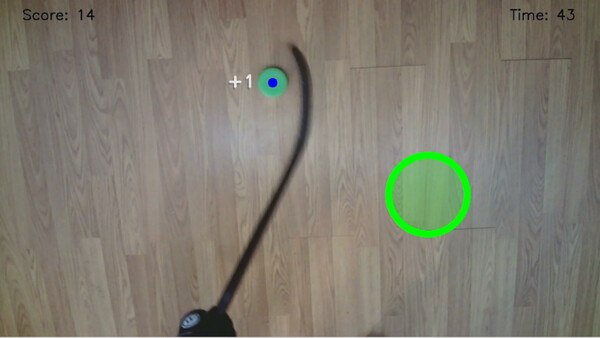
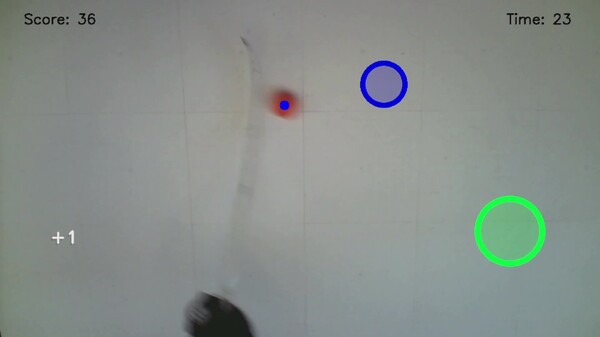
Hotdangle is a fast-paced hockey training game where real stickhandling meets virtual challenges. Dangle a real puck / ball across the floor, hit interactive targets, score points, and improve your stickhandling skills -- all in a fun, augmented reality-style experience.
Detailed Description
Stickhandle like a pro -- keep your head up !
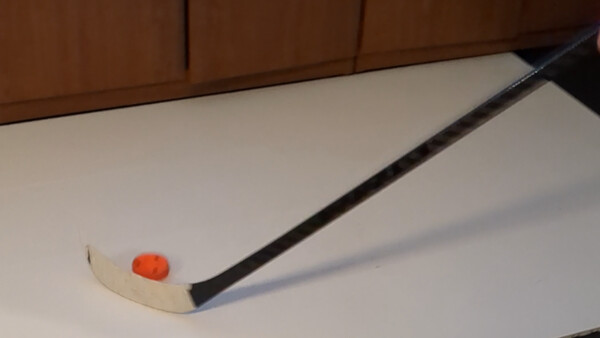
Hotdangle is a fun, interactive hockey game that uses your webcam to track a colored puck/ball and sharpen real stickhandling skills while you play.
Train while playing. Real‑time color tracking turns your floor into a hockey skills arena.
Heads‑up habits. Designed to build control without staring at the puck.
Quick setup. Define a small play zone, plug in a webcam, and start dangling.
What you need (before you buy)
Play zone: ~5 ft x 3 ft on the floor (clear of clutter, even lighting).
Webcam: Any USB webcam aimed ~3.5–4 ft high, angled 75–85° toward the floor.
Gear: Hockey stick + puck or ball. ( Multiple colors help )
Optional: Hockey tiles for smoother movement and more consistent tracking.
Strongly recommended
Watch the “Setup Configuration” video on this page.
Read the full quick‑start guide ( "View the manual" link ) before first launch.
Try the FREE Demo on this page to confirm your camera, play zone, and color detection work on your system.
How tracking works
Color‑based detection via your webcam. Best results come from:
Good, even lighting ( avoid harsh shadows / overexposure ).
Strong contrast between puck / ball, stick, and floor.
Adjusting color choice if detection is weak in your room.
Key features
Real‑time puck / ball tracking for responsive gameplay
Skill‑focused modes to build control and speed
Simple in‑game camera tools ( zoom, toggle camera )
Designed for home use -- set up in minutes
Notes & tips
Larger play zones increase difficulty; smaller zones are easier.
If detection is inconsistent, switch to a more contrasting puck / ball color or improve lighting.