Alt Tab Toolkit - Power Tools
Alt Tab Toolkit - Power Tools - Steam Charts & Historical Stats
Enhance your Productivity and Desktop Customization. Explore historical player activity and pricing for Alt Tab Toolkit - Power Tools. Player-count data was last observed Apr 30, 2026.
Alt Tab Toolkit - Power Tools player count and price summary
- Current players
- Unavailable
- All-time peak
- Unavailable
- 24-hour player change
- Unavailable
- Current US price
- Price unavailable
Player count last observed . Values marked unavailable are not estimated.
Media gallery 3 screenshots · 0 videos
Screenshots

System Requirements
Additional Information
Pricing Information
Developer Analytics
Loading competitors...
About This Game
Enhance your Productivity and Desktop Customization. Power Tools is a direct upgrade for Alt Tab Toolkit. Includes a powerful floating app launcher & manager, on-demand volume sliders, and custom app launch animations. It also enhances the core Alt Tab Toolkit by adding new right-click controls.
Detailed Description
Level up your PC personalization and productivity with Alt Tab Toolkit: Power Tools. These feature additions include a powerful floating App Launcher & Manager, instant per-app Volume Sliders, and customizable App Launch Animations, all seamlessly integrated into the core Alt Tab Toolkit experience.
Transform your Windows experience with this integrated suite designed for enhanced efficiency, personalization, and powerful desktop control. Instantly access your applications from anywhere, or manage audio of individual apps with the click of a button.
Key Capabilities:
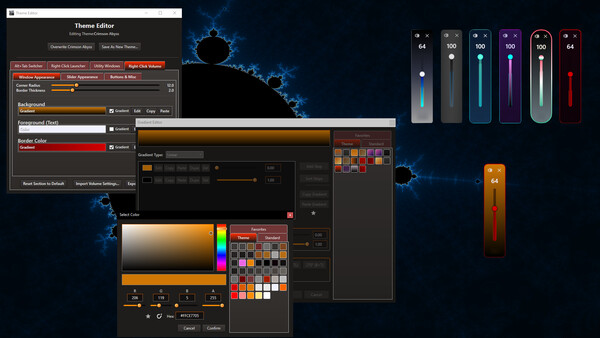
Per-Application Volume Slider
Hotkey + RightClick while hovering over an app window or icon to summon a dedicated volume slider for that specific application.
This adjusts the actual volume levels of the app within the Windows Volume Mixer.
App Launch Animations
Customizable icon animations occur when launching applications (optional). Works with existing custom icons / gifs (same icons used for Alt tab menu, are used for animations and app launcher etc).
Floating App Launcher & Manager
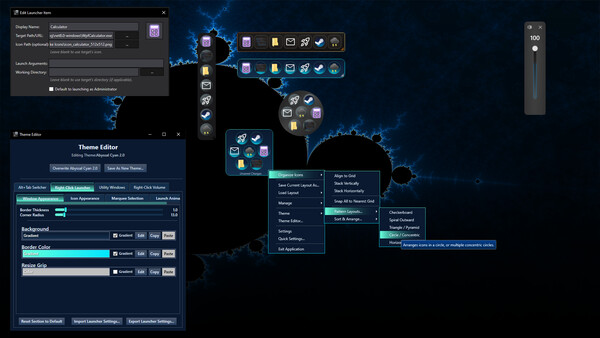
On-Demand Access: A simple hotkey instantly brings a sleek floating app launcher to your mouse cursor (configurable). Launch apps, games, folders, scripts, URLs and more without breaking focus. Create and save different layouts for your various needs (one for work, one for gaming, etc.).
Advanced Process Control: The launcher doubles as an app manager. It can detect and modify running processes of any app in its menu, giving you the ability to close, restart, kill, focus, change opacity, make borderless windowed, and utilize several other functionalities for any given window.
Drag & Drop: Easily add items to the launcher by dragging and dropping icons from anywhere, including dragging an item directly from the Alt Tab Toolkit window.
Custom Icons: Override default icons to use any image or GIF, giving your launcher a unique look. *This icon will be used for the launcher, alt tab menu, animations, and any other place our app talks about a given application
Deeper Alt Tab Toolkit Integration
As a DLC owner, you will see extra options when you right-click on items in the main Alt Tab Toolkit window. This gives you direct access to volume adjustment and advanced process controls (like setting borderless windowed, etc.) right there while alt tabbing.
Full Theming & Steam Workshop Support
The layouts and themes for all components are designed to be as customizable as possible.
Themes can be shared with the community on the Steam Workshop, or directly with others.