
Mouse Portal – Teleport Your Cursor
Mouse Portal – Teleport Your Cursor - Steam Charts & Historical Stats
Teleport your mouse and switch between windows with magical portals—a fun and practical way to warp your cursor instantly across the screen! Explore historical player activity and pricing for Mouse Portal – Teleport Your Cursor. Player-count data was last observed Sep 26, 2026.
Mouse Portal – Teleport Your Cursor player count and price summary
- Current players
- Unavailable
- All-time peak
- 1
- 24-hour player change
- Unavailable
- Current US price
- $4.99
Player count last observed . Values marked unavailable are not estimated.
Media gallery 7 screenshots · 1 videos
Screenshots



Videos
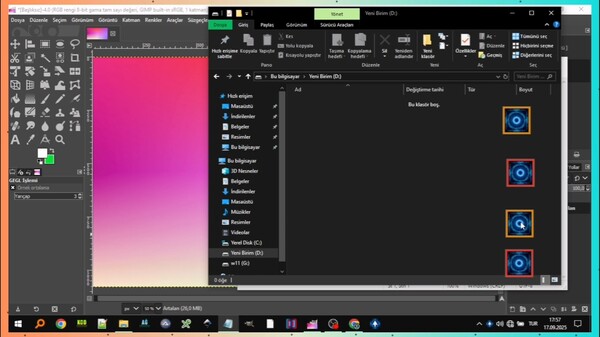
Mouse Portal 1.0 (This video has been sped up and trimmed.)
All-Time Peak
Estimated Owners
Game Insights
Buy Verdict
Wait for upcoming sale in ~3 days for potentially better pricing.
Value Score
Price-to-player ratio ranks in the 100th percentile.
Genre Benchmarks
Activity Heatmap
0 players · 2 samples
No samples
0 players · 3 samples
No samples
0 players · 2 samples
0 players · 2 samples
No samples
0 players · 2 samples
0 players · 1 samples
0 players · 2 samples
0 players · 1 samples
0 players · 1 samples
0 players · 2 samples
No samples
0 players · 3 samples
No samples
1 players · 1 samples
0 players · 2 samples
1 players · 1 samples
0 players · 1 samples
1 players · 1 samples
0 players · 1 samples
0 players · 2 samples
No samples
0 players · 3 samples
No samples
0 players · 1 samples
0 players · 2 samples
0 players · 1 samples
0 players · 2 samples
0 players · 1 samples
0 players · 1 samples
0 players · 1 samples
0 players · 2 samples
0 players · 2 samples
No samples
1 players · 3 samples
No samples
1 players · 1 samples
0 players · 2 samples
1 players · 1 samples
No samples
0 players · 3 samples
No samples
1 players · 1 samples
0 players · 1 samples
0 players · 2 samples
0 players · 1 samples
0 players · 1 samples
0 players · 1 samples
0 players · 2 samples
No samples
0 players · 3 samples
No samples
0 players · 1 samples
0 players · 3 samples
No samples
0 players · 2 samples
0 players · 1 samples
0 players · 2 samples
0 players · 1 samples
0 players · 1 samples
0 players · 1 samples
0 players · 1 samples
0 players · 1 samples
0 players · 2 samples
No samples
0 players · 2 samples
0 players · 1 samples
0 players · 1 samples
No samples
0 players · 3 samples
No samples
0 players · 1 samples
0 players · 1 samples
0 players · 2 samples
0 players · 1 samples
0 players · 1 samples
0 players · 1 samples
0 players · 2 samples
0 players · 1 samples
0 players · 2 samples
0 players · 1 samples
No samples
0 players · 3 samples
No samples
0 players · 1 samples
0 players · 3 samples
No samples
No samples
0 players · 3 samples
No samples
No samples
0 players · 2 samples
0 players · 1 samples
0 players · 1 samples
No samples
0 players · 2 samples
0 players · 1 samples
No samples
0 players · 3 samples
No samples
0 players · 2 samples
0 players · 1 samples
0 players · 1 samples
0 players · 1 samples
0 players · 2 samples
No samples
0 players · 2 samples
No samples
0 players · 1 samples
0 players · 2 samples
No samples
0 players · 2 samples
No samples
0 players · 2 samples
No samples
0 players · 1 samples
0 players · 2 samples
No samples
0 players · 2 samples
0 players · 1 samples
0 players · 1 samples
0 players · 1 samples
No samples
0 players · 2 samples
0 players · 1 samples
0 players · 1 samples
0 players · 1 samples
0 players · 2 samples
0 players · 1 samples
0 players · 1 samples
0 players · 1 samples
No samples
0 players · 2 samples
0 players · 1 samples
0 players · 2 samples
0 players · 2 samples
No samples
0 players · 3 samples
No samples
0 players · 3 samples
0 players · 1 samples
0 players · 1 samples
0 players · 1 samples
0 players · 2 samples
0 players · 1 samples
0 players · 1 samples
0 players · 2 samples
0 players · 1 samples
0 players · 1 samples
0 players · 3 samples
0 players · 1 samples
0 players · 1 samples
0 players · 2 samples
0 players · 1 samples
0 players · 1 samples
0 players · 2 samples
0 players · 1 samples
0 players · 1 samples
0 players · 4 samples
No samples
0 players · 1 samples
0 players · 2 samples
No samples
0 players · 2 samples
0 players · 1 samples
0 players · 1 samples
Price History
System Requirements
- Requires a 64-bit processor and operating system
- OS: Windows 10
- Processor: 1 GHz processor
- Memory: 1 GB RAM
- Graphics: Intel HD 520 / AMD Radeon R3
- Storage: 5 MB available space
- Sound Card: Not required
- VR Support: Not supported
- Requires a 64-bit processor and operating system
- OS: Windows 11
- Processor: 1.5 GHz or faster processor
- Memory: 2 GB RAM
- Graphics: NVIDIA GT 1030 / AMD Radeon RX 550 or higher
- Storage: 10 MB available space
- Sound Card: Not required
- VR Support: Not supported
Additional Information
Current Pricing
Additional Information
Developer Analytics
Loading competitors...
About This Game
Teleport your mouse and switch between windows with magical portals—a fun and practical way to warp your cursor instantly across the screen!
Detailed Description
🚀 Boost your speed with instant mouse teleportation between portals!
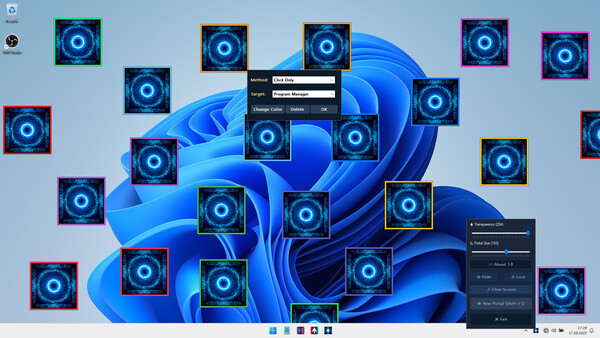
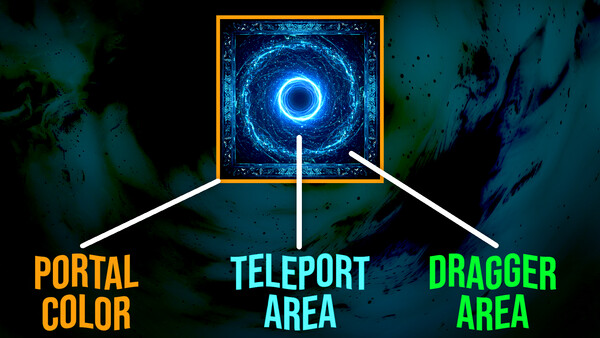
Mouse Portal: Teleport Your Cursor lets you place colorful linked squares on your screen that act as instant teleporters for your mouse. Hover, click, or drag — your cursor will jump between portals in a flash. Both fun and surprisingly useful, it’s like giving your mouse a sci-fi upgrade.
🔑 Core Features
🌀 Add unlimited Portals
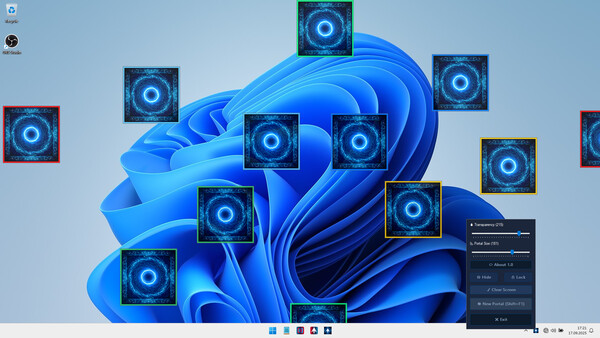
Place pairs of colorful portals anywhere on your desktop.
Each pair is uniquely colored so they never get mixed up.
🎯 Teleport Instantly
Hover your mouse for 250ms on one portal and instantly appear at its partner.
Or left-click a portal for an immediate teleport.
No accidental ping-pong: teleport only once until you exit the portal area.
🖱️ Smart Controls
Right-click a portal to delete its pair instantly.
Drag portals anywhere on screen while lock is disabled.
Shift + F1 hotkey Add a new portal pair at your cursor.
Tray icon left-click also adds a portal pair (auto-adjusted away from taskbar).
🗂️ Save & Load Automatically
Save all your portal placements and restore them automatically next time you start the app.
⚙️ Customizable Settings
🔒 Lock/Unlock: Freeze portals or make them pass-through for clicks.
👁️ Hide/Show: Toggle portal visibility anytime.
💧 Transparency: Adjust portal opacity in real-time.
📐 Portal Size Slider: Resize all portals
💻 Lightweight & Non-Intrusive
Runs quietly in the system tray.
Easy to Use
✨ If you want to speed up your workflow, reduce mouse travel time Mouse Portal makes it fast, simple, and efficient.
Mouse Portal brings a unique, interactive twist to how you use your computer.