Fortiori Wallpaper Editor
Fortiori Wallpaper Editor - Steam Charts & Historical Stats
A wallpaper maker tool for the game Fortiori to bring the aesthetic to your desktop! Requires ownership of fortiori in order to work, wishlist fortiori to get notified when it releases! Explore historical player activity and pricing for Fortiori Wallpaper Editor. Player-count data was last observed Apr 30, 2026.
Fortiori Wallpaper Editor player count and price summary
- Current players
- Unavailable
- All-time peak
- Unavailable
- 24-hour player change
- Unavailable
- Current US price
- Price unavailable
Player count last observed . Values marked unavailable are not estimated.
Media gallery 1 screenshots · 1 videos
Screenshots
Videos

using the dlc
System Requirements
- OS: 10
- Processor: same as game
- Graphics: same as game
- Storage: 300 MB available space
- Sound Card: bruh
- VR Support: no
- Additional Notes: sandwich
- OS: 10
- Processor: same as game
- Graphics: same as game
- Storage: 300 MB available space
- VR Support: noo
- Additional Notes: do not play the game on your smart watch
Additional Information
Additional Information
Developer Analytics
Loading competitors...
About This Game
A wallpaper maker tool for the game Fortiori to bring the aesthetic to your desktop! Requires ownership of fortiori in order to work, wishlist fortiori to get notified when it releases!
Detailed Description
Engine & System Integration
True Desktop Integration: The application runs as a genuine, non-interactive wallpaper layer behind your desktop icons, not just a maximized borderless window.
System Tray Control: A convenient icon in your system tray gives you quick access to pause animations, take screenshots, or exit the application cleanly.
Crash-Proof Restoration: Your original desktop wallpaper is automatically saved upon launch and restored upon exit, even if the application crashes.
Integrated Screenshot Tool: Capture your beautiful creations with a built-in tool that can save directly to your Desktop or your Steam screenshot folder.
Complete Creative Control

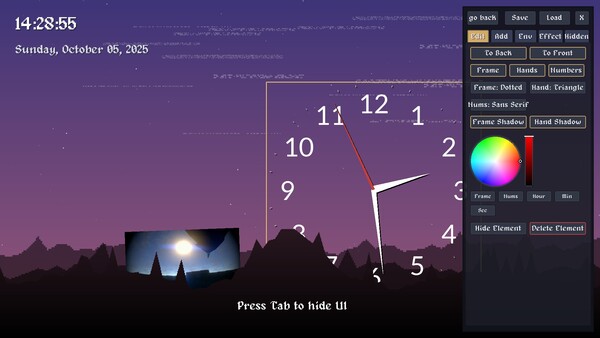
Powerful On-Screen UI Editor: A comprehensive, tab-based user interface allows you to tweak every single aspect of your wallpaper. Simply press Tab to hide or show it.
Save & Load Your Creations: Your entire layout, including every element's position, rotation, size, and settings, can be saved to a local wallpaper_settings.json file to be loaded later.
Smooth, Physics-Based Manipulation: Drag, resize, and rotate any element on screen with a fluid, smoothed motion that makes placement intuitive and satisfying.
Complete Z-Layer Control: Place elements anywhere in the scene, including moving them in front of or behind the individual landscape layers for incredible depth effects.
Customizable On-Screen Elements
Advanced Text & Info:
Add fully editable custom text boxes, digital clocks, and date displays.
Customize fonts, size, color, and add multi-color effects.
Apply adjustable shadows (color, X/Y offset) and borders (color, thickness).
Cycle through multiple time (%H:%M:%S, %I:%M %p, etc.) and date (%Y-%m-%d, %A, %B %d, etc.) formats.
Highly Modular Analog Clock:
Construct your perfect analog clock by individually customizing its components.
Choose from multiple styles for the frame, hands, and numbers
Individually color every component: Frame, Hour Hand, Minute Hand, Second Hand, and Numbers.
Toggle shadows on the frame and hands for added depth.
Image & Animated GIF Support:
Place your own images (.png, .jpg, etc.) and animated GIFs (.gif) directly onto the wallpaper.
Control how the image fits its container with modes like "Contain," "Cover," "Stretch," or "Original Size."
Add adjustable borders and drop shadows with custom colors and offsets.
