
Fixer Toolkit – Window & Layout Manager
Fixer Toolkit – Window & Layout Manager - Steam Charts & Historical Stats
🛠️ FixerToolkit - Our "Fix-It-All" Software (Almost)! 🚀 Automates repetitive workflows and saves you of time. Explore historical player activity and pricing for Fixer Toolkit – Window & Layout Manager. Player-count data was last observed Sep 27, 2026.
Fixer Toolkit – Window & Layout Manager player count and price summary
- Current players
- Unavailable
- All-time peak
- 2
- 24-hour player change
- Unavailable
- Current US price
- $4.99
Player count last observed . Values marked unavailable are not estimated.
Media gallery 7 screenshots · 1 videos
Screenshots
Videos
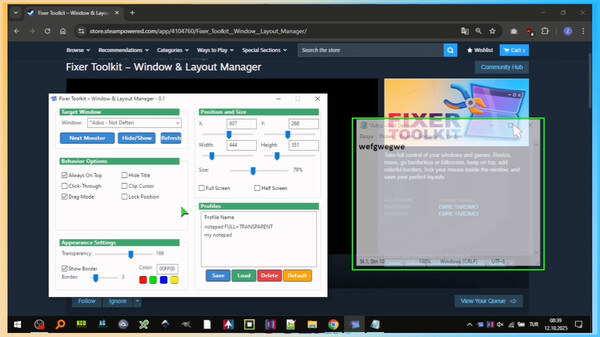
FixerToolkit v0.1
All-Time Peak
Estimated Owners
Game Insights
Buy Verdict
Wait for upcoming sale in ~3 days for potentially better pricing.
Value Score
Price-to-player ratio ranks in the 100th percentile.
Genre Benchmarks
Activity Heatmap
No samples
0 players · 1 samples
No samples
No samples
No samples
0 players · 1 samples
No samples
0 players · 1 samples
No samples
No samples
0 players · 1 samples
No samples
No samples
0 players · 1 samples
No samples
No samples
No samples
0 players · 1 samples
No samples
No samples
0 players · 1 samples
No samples
No samples
0 players · 1 samples
No samples
No samples
1 players · 1 samples
No samples
No samples
1 players · 1 samples
No samples
No samples
1 players · 1 samples
No samples
No samples
1 players · 1 samples
No samples
No samples
0 players · 1 samples
No samples
No samples
No samples
0 players · 1 samples
No samples
No samples
1 players · 1 samples
No samples
1 players · 1 samples
1 players · 1 samples
No samples
1 players · 1 samples
1 players · 1 samples
1 players · 1 samples
No samples
1 players · 2 samples
No samples
No samples
1 players · 2 samples
No samples
1 players · 1 samples
2 players · 1 samples
No samples
1 players · 1 samples
2 players · 1 samples
No samples
1 players · 1 samples
No samples
0 players · 1 samples
1 players · 1 samples
No samples
0 players · 1 samples
0 players · 1 samples
No samples
No samples
0 players · 2 samples
No samples
0 players · 1 samples
0 players · 1 samples
No samples
0 players · 1 samples
0 players · 1 samples
0 players · 1 samples
No samples
0 players · 2 samples
No samples
No samples
0 players · 2 samples
No samples
No samples
0 players · 1 samples
0 players · 1 samples
No samples
No samples
0 players · 1 samples
0 players · 1 samples
No samples
0 players · 1 samples
0 players · 1 samples
No samples
0 players · 1 samples
0 players · 1 samples
No samples
0 players · 1 samples
0 players · 1 samples
0 players · 1 samples
No samples
0 players · 1 samples
0 players · 1 samples
No samples
No samples
0 players · 1 samples
0 players · 1 samples
No samples
1 players · 1 samples
0 players · 1 samples
No samples
No samples
0 players · 2 samples
No samples
No samples
0 players · 1 samples
0 players · 1 samples
No samples
0 players · 1 samples
0 players · 1 samples
No samples
0 players · 1 samples
0 players · 1 samples
No samples
0 players · 1 samples
0 players · 1 samples
No samples
0 players · 1 samples
0 players · 1 samples
No samples
No samples
0 players · 2 samples
No samples
No samples
0 players · 1 samples
1 players · 1 samples
No samples
0 players · 1 samples
No samples
1 players · 1 samples
No samples
No samples
1 players · 1 samples
No samples
No samples
1 players · 1 samples
No samples
No samples
1 players · 1 samples
No samples
No samples
1 players · 1 samples
No samples
No samples
No samples
0 players · 1 samples
No samples
No samples
0 players · 1 samples
No samples
No samples
0 players · 1 samples
No samples
Price History
System Requirements
- Requires a 64-bit processor and operating system
- OS: Windows 10
- Processor: 1 GHz processor
- Memory: 1 GB RAM
- Graphics: Intel HD 520 / AMD Radeon R3
- Storage: 5 MB available space
- Sound Card: Not required
- VR Support: Not supported
- Requires a 64-bit processor and operating system
- OS: Windows 11
- Processor: 1.5 GHz or faster processor
- Memory: 2 GB RAM
- Graphics: NVIDIA GT 1030 / AMD Radeon RX 550 or higher
- DirectX: Version 11
- Storage: 5 MB available space
- Sound Card: Not required
- VR Support: Not supported
Additional Information
Current Pricing
Additional Information
Developer Analytics
Loading competitors...
About This Game
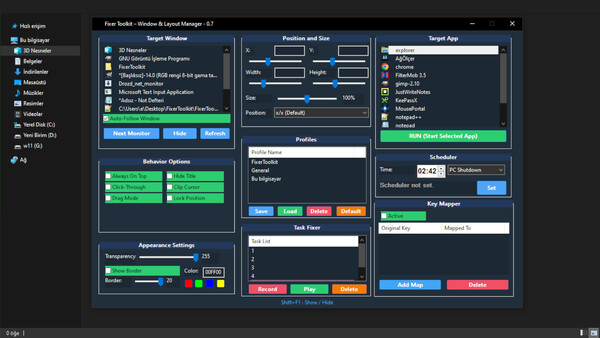
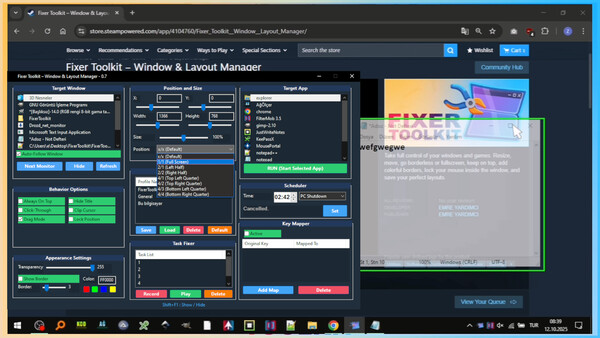
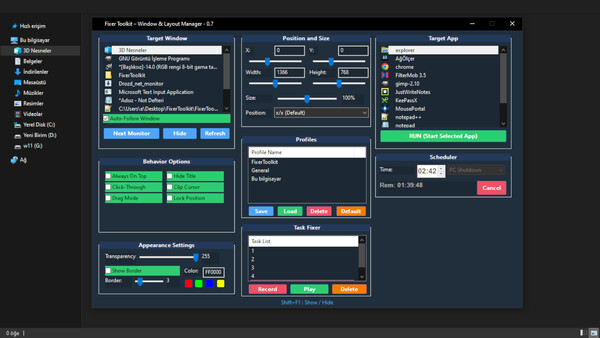
🛠️ FixerToolkit - Our "Fix-It-All" Software (Almost)! 🚀 Automates repetitive workflows and saves you of time. And Take full control of your windows and games. Resize, move, go borderless or fullscreen, keep on top, transparent, lock your mouse inside the window and more! Save your perfect layouts.
Detailed Description
🛑 Task Fixer (Record/Play)
Powerful automation. (Keyboard, Mouse, Windows)
Record and Replay: Record mouse clicks, movements, keyboard inputs, and window focus events.
Intelligent Execution: Tasks are played back reliably, waiting for the target application to become active or visible before execution.
Task List: Recorded tasks are automatically appended to your task list.
⌨️ Advanced Key Mapper
Gain low-level control over your keyboard inputs.
Global Remapping: Intercept and remap any key press to another key or a combination of keys.
Modifier Support: Full support for creating custom shortcuts using Ctrl, Alt, and Shift combinations.
Smart Detection: A simple "Listen" mode allows the system to automatically detect the keys you want to map, making setup intuitive.
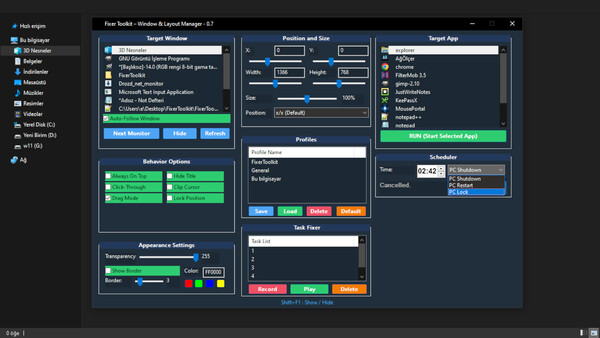
⏰ Scheduler Section
A dedicated Scheduler section has been implemented. Currently, this feature allows you to automate basic power management tasks, enabling you to schedule your PC to shut down, restart, or lock itself at a specified time.
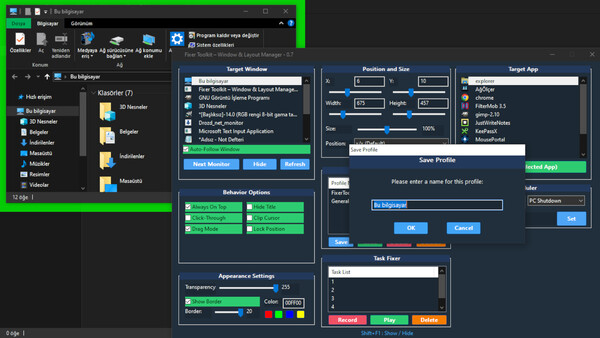
💾 Profiles Section
The Profiles section has received significant upgrades, making profile loading more robust and intuitive:
Intelligent Loading: Profiles can now be loaded even if the target application's window is currently closed. The system will automatically launch the application and apply your saved settings.
Smart Folder Handling: If the profile you saved is a specific folder, the system will now open that exact directory, not just the default file explorer window.
Simple Management: Simply save your profiles once and see for yourself how intelligently the Fixer Toolkit handles the loading process!
🎯 Target App Section
This intelligent list automatically tracks and smartly sorts all recently used applications. You can now quickly select and launch your most frequently used programs directly from this list.
🔧 Happy Fixing! 🔧
Note: Powerful tools like FixerToolkit may violate the rules of some games/applications. Always check their Terms of Service first.
✨ Core Features
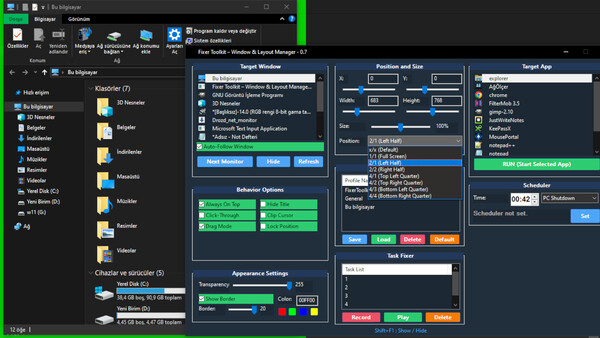
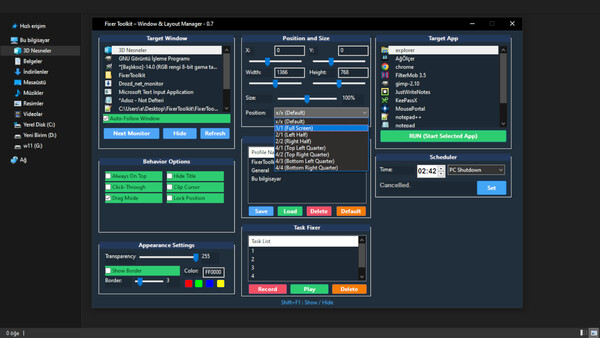
🖥️ Total Position & Size Control
Precise Placement: Set exact pixel coordinates (X, Y) and dimensions (Width, Height) for any window.
Intuitive Sliders: Don't know the exact numbers? Use responsive sliders to adjust on the fly.
Quick Resizing: Instantly snap any window to Full Screen or Half Screen with a single click.
Proportional Scaling: Resize a window while keeping its original aspect ratio using the size slider.
🎮 Gaming & Streaming Power-Ups
True Borderless Fullscreen: Combine the "Hide Caption" and "Full Screen" options to force any windowed application into a seamless, borderless state. Perfect for older games and faster Alt-Tabbing!
Cursor Lock (Clip Cursor): Confine your mouse cursor to a specific window. An essential feature for multi-monitor gamers!
Always On Top: Pin any window (like a guide, chat app, or video) so it stays on top of your game or primary application.
Click-Through Mode: Make a window "transparent" to clicks, allowing you to interact with whatever is behind it. Ideal for overlays and reference images.
🎨 Visual Customization
Adjustable Transparency: Make any window semi-transparent to see what's behind it. Great for multitasking.
Custom Borders: Add a vibrant, colored border around any application. Customize the thickness and color to highlight the active window or simply for aesthetics.
Hide the Title Bar (Hide Caption): Remove the default window caption and borders for a clean, minimalist look.
💾 Save Your Perfect Setups with Profiles
Save Profiles: Found the perfect size, position, and settings for an application? Save it as a profile with a custom name.
Instant Load: Select a window and load a profile to instantly apply all your saved settings.
Unlimited Profiles: Create as many profiles as you need for all your different tasks, games, and applications.
Who is this for?
Gamers: Running older titles that don't support modern display modes or need to prevent cursor spill-over on multi-monitor setups.
Streamers: Managing chat windows, OBS previews, and other tools on a single screen.
Developers & Designers: Organizing IDEs, reference material, and application previews with pixel-perfect precision.
Power Users: Anyone who wants to break free from the standard limitations of window management.
Unlock a new level of control and efficiency on your desktop.