
Game Compressor
Game Compressor - Steam Analytics & Details
Game Compressor maintains a green-rated player base.
Game Compressor player count and price summary
- Current players
- 32
- All-time peak
- 137
- 24-hour player change
- -27.27%
- Current US price
- $5.99
Player count observed . Values marked unavailable are not estimated.
Media gallery 5 screenshots · 1 videos
Screenshots

Videos

Game Compressor
Players Now
All-Time Peak
Estimated Owners
Game Insights
Buy Verdict
Decent deal at 0% off, but might drop further. Watch for better opportunities.
Player Health
Stable player base with low churn risk.
Update Momentum
5 patches and 5 news items in last 180 days. Latest patch effect size: 0.00.
Activity Heatmap
45 players · 1 samples
51 players · 1 samples
56 players · 2 samples
No samples
48 players · 3 samples
40 players · 1 samples
68 players · 1 samples
42 players · 2 samples
73 players · 1 samples
47 players · 1 samples
47 players · 2 samples
78 players · 1 samples
46 players · 1 samples
59 players · 2 samples
49 players · 1 samples
No samples
55 players · 3 samples
No samples
39 players · 1 samples
66 players · 1 samples
53 players · 2 samples
69 players · 1 samples
37 players · 1 samples
52 players · 1 samples
48 players · 2 samples
No samples
46 players · 3 samples
No samples
30 players · 1 samples
43 players · 3 samples
No samples
48 players · 2 samples
42 players · 2 samples
63 players · 1 samples
31 players · 1 samples
44 players · 1 samples
54 players · 2 samples
No samples
51 players · 3 samples
No samples
45 players · 1 samples
57 players · 2 samples
41 players · 1 samples
No samples
54 players · 2 samples
49 players · 1 samples
37 players · 1 samples
60 players · 1 samples
34 players · 2 samples
65 players · 1 samples
36 players · 1 samples
34 players · 1 samples
43 players · 2 samples
No samples
39 players · 3 samples
34 players · 1 samples
52 players · 1 samples
30 players · 2 samples
39 players · 2 samples
No samples
32 players · 2 samples
46 players · 1 samples
34 players · 1 samples
37 players · 1 samples
46 players · 2 samples
No samples
39 players · 2 samples
69 players · 1 samples
37 players · 1 samples
No samples
11 players · 2 samples
36 players · 1 samples
No samples
43 players · 2 samples
37 players · 1 samples
42 players · 2 samples
No samples
33 players · 2 samples
44 players · 1 samples
33 players · 1 samples
37 players · 3 samples
No samples
33 players · 1 samples
37 players · 2 samples
26 players · 1 samples
36 players · 1 samples
36 players · 2 samples
No samples
32 players · 1 samples
46 players · 2 samples
No samples
37 players · 2 samples
56 players · 1 samples
30 players · 1 samples
44 players · 1 samples
No samples
40 players · 2 samples
No samples
36 players · 2 samples
51 players · 1 samples
No samples
30 players · 2 samples
36 players · 1 samples
28 players · 1 samples
38 players · 3 samples
No samples
31 players · 1 samples
44 players · 2 samples
No samples
31 players · 1 samples
44 players · 2 samples
37 players · 1 samples
No samples
38 players · 1 samples
50 players · 2 samples
No samples
31 players · 1 samples
41 players · 2 samples
25 players · 1 samples
No samples
33 players · 2 samples
34 players · 1 samples
No samples
28 players · 1 samples
37 players · 2 samples
28 players · 1 samples
No samples
32 players · 3 samples
No samples
42 players · 2 samples
23 players · 1 samples
25 players · 1 samples
No samples
43 players · 2 samples
35 players · 2 samples
No samples
41 players · 3 samples
46 players · 1 samples
No samples
43 players · 3 samples
49 players · 1 samples
46 players · 1 samples
27 players · 1 samples
46 players · 3 samples
25 players · 1 samples
42 players · 1 samples
36 players · 1 samples
39 players · 2 samples
35 players · 1 samples
26 players · 1 samples
47 players · 2 samples
33 players · 2 samples
No samples
47 players · 2 samples
30 players · 2 samples
No samples
42 players · 3 samples
No samples
34 players · 1 samples
56 players · 2 samples
43 players · 1 samples
No samples
54 players · 2 samples
65 players · 1 samples
47 players · 1 samples
88 players · 1 samples
52 players · 2 samples
75 players · 1 samples
Latest News
Game Compressor v0.9.9.2.1 Hotfix
📝 UpdateGame Compressor v0.9.9.2 — Hotfix
📝 UpdateGame Compressor v0.9.9.1 — Hotfix
📝 UpdatePrice History
No Recent Price History
Price history data will appear here once more pricing information becomes available.
System Requirements
- Requires a 64-bit processor and operating system
- OS: Windows 10 (64-bit)
- Processor: Intel Core i3 or AMD equivalent
- Memory: 4 GB RAM
- Graphics: DirectX 11 compatible graphics card
- Storage: 500 MB available space
- Requires a 64-bit processor and operating system
- OS: Windows 10 / 11 (64-bit)
- Processor: Intel Core i5 / Ryzen 5 or higher (More cores = Faster compression)
- Memory: 8 GB RAM
- Graphics: NVIDIA GeForce GTX 1050 or equivalent
Additional Information
Player-to-Price Ratio
Current Pricing
Additional Information
Developer Analytics
Loading competitors...
About This Game
Free up space without deleting games! Game Compressor uses Windows LZX to reduce game sizes by up to 50%. Preview estimated savings, choose the most efficient games, play without extracting archives, and undo compression anytime.
Detailed Description
GAIN MORE SPACE WITHOUT DELETING GAMES
Modern games keep getting larger, but your storage capacity does not grow at the same rate. Game Compressor optimizes your game files using Windows’ built-in LZX compression technology so they occupy less space on your disk.
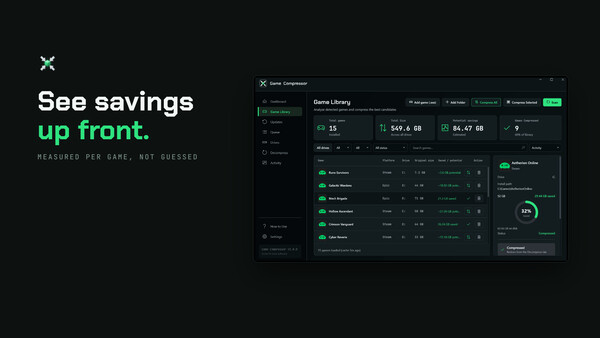
Thanks to the new smart estimation system, you can see approximately how much space you may save before starting to compress a game. This allows you to select only the games worth compressing without spending time on games that would provide minimal savings.
VIEW ESTIMATED SAVINGS BEFORE COMPRESSION
Not every game shrinks by the same amount. The file structure of some games can provide significant space savings, while others may already be heavily compressed by their developers.
Game Compressor uses existing compression data to generate estimated space savings for games. After scanning your library, you can compare the current sizes, potential savings and compression statuses of your games on a single screen.
View the potential savings before starting compression.
Easily identify the games with the highest potential.
Avoid wasting time on operations that would provide minimal savings.
Add multiple games to the queue and compress them one after another.
The displayed potential values are estimates. Actual results may vary depending on the game version, file structure and the game files present on your system.
HOW DOES IT WORK?
Game Compressor does not convert games into ZIP or RAR archives. It uses the transparent LZX compression infrastructure that operates at the Windows file system level.
Reduced Disk Usage: Supported game files physically occupy less space on the disk.
Transparent Access: Windows and your games continue to access the files normally.
No Archive Extraction: You do not need to wait for files to be extracted again each time you launch the game. Once compression is complete, you can run your game normally.
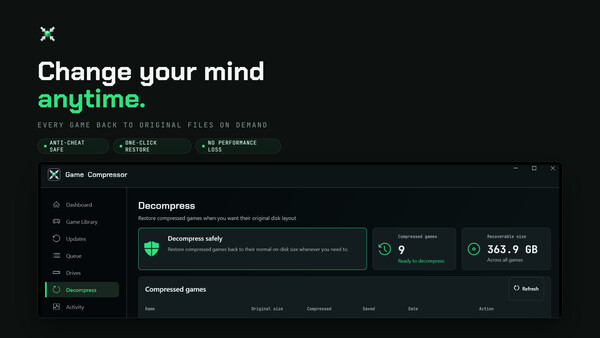
Reversible Operation: You can remove compression at any time and restore the game files to their normal disk usage.
SIMPLE AND CONTROLLED OPERATION
The new version of Game Compressor is designed to help you manage your storage space consciously.
1. Scan Your Library: Open the program and detect your installed games.
2. Review Potential Savings: See approximately how much space you may save from each game.
3. Select Your Games: Identify the games worth compressing and add them to the queue.
4. Compress and Keep Playing: Once the operation is complete, launch your games normally without waiting for archive extraction.
5. Check for Updates: Detect games that require reoptimization after receiving updates.
6. Reverse When Necessary: Remove compression from games that are causing problems or that you want to restore to their normal state.
RECLAIM YOUR SPACE AFTER UPDATES
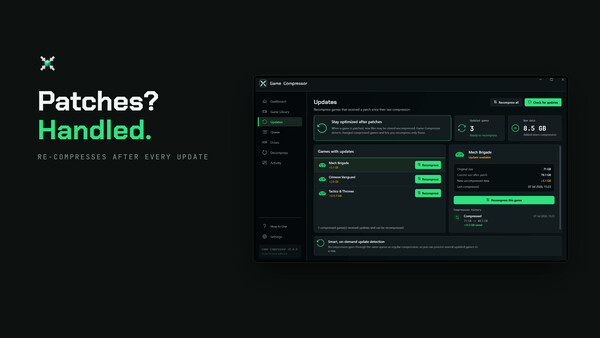
Game updates may add new files or modify files that were previously compressed. As a result, a compressed game may begin using more space again over time.
The Updates screen in Game Compressor lets you view games that have been modified since the last compression operation. You can reclaim the disk space you lost by compressing updated games again.
The program does not need to remain open continuously.
You can check your library again after game updates.
You can focus only on games that require reoptimization.
Rather than being a one-time operation, Game Compressor provides sustainable space management for your game library.
MANAGE ALL OPERATIONS FROM ONE SCREEN
Game Compressor brings together the information you need to control your games and storage space in clear, easy-to-understand screens.
Overview: View the total space saved, potential savings and disk usage.
Games: Compare game sizes, estimated savings and compression statuses.
Queue: Queue multiple games and monitor ongoing operations.
Updates: View games that have received updates and need to be compressed again.
Decompress: Restore previously compressed games to their original state at any time.
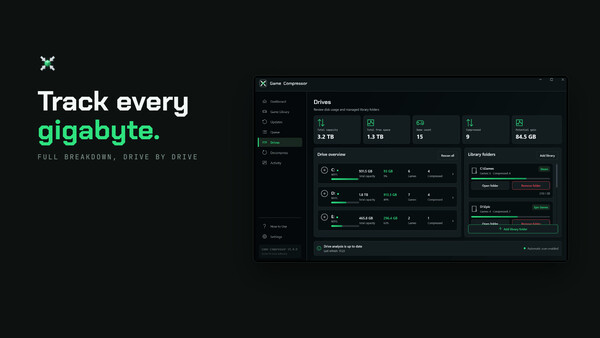
Drives and Libraries: Manage your game libraries and storage drives.
Activity: Review scan, compression, reversal, warning and error records.
REALISTIC AND TRANSPARENT RESULTS
Game Compressor does not promise the same result for every game. The amount of space saved depends entirely on the game’s file structure.
High-Potential Games: AAA and open-world games containing large audio, texture and data files that have not been heavily compressed by their developers may provide greater space savings.
Previously Optimized Games: Games whose files are already highly compressed may provide lower savings.
This is exactly why the new estimation system was developed: It helps you view a game’s potential before the operation begins and make your decision accordingly.
SAFE AND REVERSIBLE COMPRESSION
Game Compressor does not inject code into memory while a game is running and does not interfere with game processes. Operations are performed through the Windows file system.
Does Not Modify Game Code: It does not alter running game processes or game memory.
Uses Windows Technology: It operates with the LZX compression infrastructure integrated into Microsoft’s operating system.
Completely Reversible: You can remove compression from any game through the Decompress screen.
You Remain in Control: You decide which games are compressed or restored and when.
WHO IS IT FOR?
Low-Capacity SSD Users: Keep more games installed on desktop and laptop computers with limited storage space.
Windows Handheld Players: Use the limited storage capacity of Windows-based devices such as ROG Ally and Legion Go more efficiently.
Game Archivists: Instead of deleting games you rarely play, store them so they occupy less space.
Players with Large Game Libraries: Manage multiple drives and game libraries from a single application.
KEY FEATURES
View estimated space savings before compression
Transparent file compression based on Windows LZX
Automatic game library scanning
Compare games based on potential savings
Compression queue for multiple games
Detect games that have received updates
Reoptimize updated games
One-click reversible compression
Disk, library and operation history management
SYSTEM REQUIREMENTS
Windows 10 Version 1507 or newer
Windows 11
NTFS-formatted storage drive that supports LZX compression