Game overview
DockBar
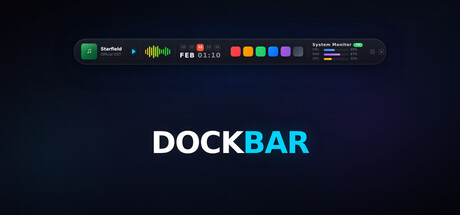
A smart control bar for Windows — like a Dynamic Island for your desktop. Music, system info, timers, notes, Liquid Glass theme, textures, and quick launch — all in one sleek bar. Lightweight, always accessible.
- Last tracked players
- 1
- All-time peak
- 3
- 24-hour change
- Unavailable
Delayed observation · last tracked . Values marked unavailable are not estimated.
About this game Read the full description
One bar on top of your screen. An entire control center.
Think of it as a Dynamic Island for Windows — a slim, elegant bar that lives at the top of your desktop. It has everything you need inside: music controls, system status, timers, notes, a to-do list, and a quick app launcher. No need to close any windows — everything at a glance.
10 Widgets, Endless Control
🎵 Media Player — Control Spotify, YouTube, and all system audio. Song title, album art, progress bar, and elapsed time update in real time.
📊 System Monitor — See CPU, RAM, and disk usage instantly. Always know how your machine is doing.
🎛️ Audio Visualizer — A live equalizer animation that reacts to your music. Works with external audio devices and Bluetooth speakers too.
⏱️ Pomodoro & Stopwatch — Focus sessions or time tracking. Stay in control of your time while you work.
📝 Quick Notes — Jot down anything instantly. No need to open another app.
✅ To-Do List — Add tasks, check them off, stay on track. Simple and effective.
🚀 Quick Launcher — Access your most-used apps with a single click.
📅 Calendar — Keep track of your schedule without leaving your workflow.
🌐 9 Language Support — English, Turkish, German, French, Spanish, Portuguese, Russian, Japanese, and Korean.
Make It Yours
🪟 Liquid Glass Theme — Apple-inspired translucent glass aesthetic powered by Windows Acrylic blur. Your wallpaper shows through the bar.
🎨 Bar Textures — 6 built-in themes (Galaxy, Sakura, Noise, Ocean, Avatar World, Good Bad Souls) or load your own image. Supports JPEG, PNG, WebP, BMP.
🎨 Accent Color System — Choose from 8 preset colors applied instantly across the entire UI.
📐 UI Scale — Adjust bar size from 60% to 115%. Perfect fit for any screen size.
🖥️ Multi-Monitor Support — Per-monitor fullscreen detection. Playing a game on Monitor 1? The bar on Monitor 2 stays visible. Position corrects automatically when switching displays.
Why DockBar?
Your desktop is already cluttered. The taskbar isn't enough, widget panels take up space. DockBar is different: it's like a thin line sitting at the very top of your screen. It's there, but never in your way. When you need it, everything is visible at a glance.
65–75 MB memory usage (may increase with Liquid Glass, textures, or multiple widgets enabled). Low CPU impact. Auto-hides during fullscreen apps and games.
First Time Setup
After installing, open Settings to configure DockBar for your setup. Features like Auto-hide, Glass Effect, UI Scale, and display selection are off or at defaults — adjust them to match your screen size, monitor layout, and preferences. Taking a minute to explore Settings will give you the best experience.
Active Development
DockBar is constantly evolving. New widgets, new features, and improvements based on community feedback are released regularly. When you buy DockBar, you're not just getting today's product — you're getting every future update too.
From the Developer
A solo project I built from scratch. I made DockBar for myself — I wanted one place to reach everything I constantly need on my desktop. Then I thought, maybe others want that too. I read every piece of feedback and do my best to act on what makes sense. Thanks for the support.
Media gallery 10 screenshots · 0 videos

Screenshots


Player activity
Concurrent players over the last 48 hours.
System requirements Windows
Windows
Minimum
Minimum:- Requires a 64-bit processor and operating system
- OS: Windows 10 or Windows 11
- Processor: Dual-core 1.5 GHz
- Memory: 4 GB RAM
- Graphics: Integrated graphics
Recommended
Recommended:- Requires a 64-bit processor and operating system
Game details Languages, features & support
- Publisher
- Wapkain
- Brazilian rating
- l
- Steam Germany rating
- 0
- Features
- Keyboard Only Option, #category_playable_at_your_own_pace, Playable without Timed Input, Save Anytime
- Languages
- English, French, German, Japanese, Korean, Russian, Turkish, Simplified Chinese, Spanish - Latin America
- Support
- [email protected]
More analysis Activity patterns, updates & developer tools
Game Insights
Buy Verdict
Wait for upcoming sale in ~13 days for potentially better pricing.
Developer Analytics
Loading competitors...