
Game overview
Aylix: Linux Aiming Crosshair Overlay
Aylix is the only customizable crosshair overlay that integrates reliably and natively with modern Linux Distros and Steam Deck. Renders in its own context without hooking into other graphics pipelines or processes. Powerful crosshair controls with layers of customization. Zero CPU overhead at idle.
- Last tracked players
- 8
- All-time peak
- 13
- 24-hour change
- Unavailable
Delayed observation · last tracked . Values marked unavailable are not estimated.
About this game Read the full description
Put your crosshair anywhere on a modern Linux system. KDE or Gnome. Desktop, Laptop, or Steam Deck. Yours to design. Fedora, Mint, Debian, CachyOS, Arch or Bazzite? It just works.
Aylix is the customizable crosshair overlay that Linux and Steam Deck users have been waiting for. Aylix overlays a crosshair on any game. Use this tool to customize and maintain a consistent crosshair across all of your games. Improve your aim by using a stable aiming interface rather than shifting to presets that the developers chose. Most overlay tools are built with other platforms in mind. Aylix was built from the ground up for Linux with two primary goals in mind: compatibility and performance.
Compatibility. The program is the equivalent of rendering a window or another separate application on top of your game. Aylix never hooks into games, other processes, game rendering pipelines, Vulkan, or Mangohud. It simply uses techniques native to the OS and Linux environments. This makes it compatible across almost everything running Linux from Debian to Arch to Steam Deck. It runs completely independently from your games so it is completely anticheat friendly.
Performance. Aylix reserves a small amount of resources on the GPU for the overlay. And the CPU is completely asleep while in game. So there is no performance impact while gaming. This is especially important in esports titles where the CPU is often the system bottleneck. Keep the competition in-game since Aylix never competes with your game for resources like overlays on other platforms do.
Linux without compromise, clean by design. Just click run and Aylix will run in the background on top of your game without having to reconfigure or worrying about dependencies. No workarounds. No fragile overlays. No modification of game files. No code injection. No interference with game processes. You will always have your personalized crosshair across games when you need it.
Precision personalized. Adjust size, color, shape, position, style, and so much more. The possibilities are endless. If the presets do not work out for you, try the custom editor with fully layered designs. And if that still doesn’t work? Move over to image mode and import your own crosshair image with full control over how and where it is displayed on screen. Scales cleanly across different resolutions and setups.
Take it anywhere. Bring your fully customized crosshair to Steam Deck Game or Desktop Mode or create one with a UI designed specifically for it. Live on the edge with Arch or take it easy with Debian. Take the middle of the road with Fedora. X11 or Wayland. The choice of tools should be entirely dependent on your terms not on the distro you chose.
Constantly evolving. Planned improvements include expanded desktop environment support. Even more customization options. And community-inspired direction.
Media gallery 5 screenshots · 0 videos

Screenshots

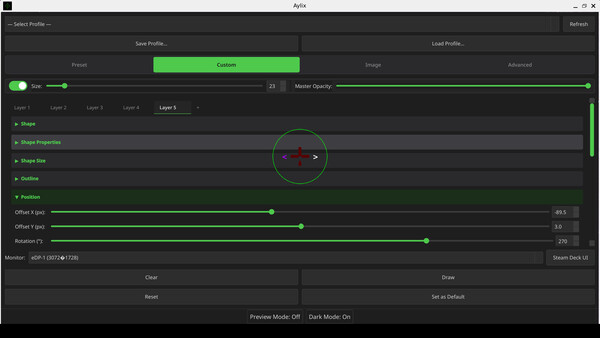

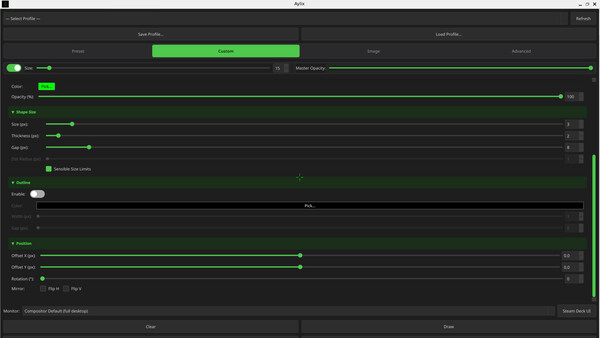
Player activity
Concurrent players over the last 48 hours.
System requirements Linux
Linux
Minimum
Minimum:- OS: Linux: SteamOS, Wayland, X11
- Processor: Intel Core i3-2100 / AMD FX-4300 or equivalent
- Memory: 512 MB RAM
- Graphics: Integrated Graphics
- Storage: 150 MB available space
- Sound Card: None
- Additional Notes: Only works on Steam Deck in Desktop Mode
Recommended
Recommended:- OS: Linux: Fedora, Debian, Arch, CachyOS, Manjaro, Endeavor, Bazzite, openSUSE, Ubuntu, Mint, SteamOS
- Processor: Intel Core i5-4460 / AMD Ryzen 3 1200 or equivalent
- Memory: 1 GB RAM
- Graphics: Nvidia, AMD, Intel Arc
- Storage: 1024 MB available space
- Sound Card: Any
- Additional Notes: Compatible with modern X11 and Wayland Distros
Game details Languages, features & support
- Publisher
- Aylix
- Brazilian rating
- l
- Steam Germany rating
- 0
- Features
- Color Alternatives, #category_contrast_controls, Mouse Only Option, #category_playable_at_your_own_pace, Playable without Timed Input, Save Anytime, Touch Only Option
- Languages
- English*, French*, Italian*, German*, Bulgarian*, Czech*, Danish*, Dutch*, Finnish*, Greek*, Hungarian*, Albanian*, Belarusian*, Bosnian*, Catalan*, Croatian*, Estonian*, Icelandic*, Irish*, Latvian*, Lithuanian*, Norwegian*, Portuguese - Brazil*, Portuguese - Portugal*, Luxembourgish*, Macedonian*, Maltese*, Spanish - Spain*, Arabic*, Polish*, Romanian*, Russian*, Spanish - Latin America*, Swedish*, Ukrainian*, Hebrew*, Persian*, Serbian*, Slovak*, Slovenian*, Bangla*, Gujarati*, Hindi*, Kannada*, Malayalam*, Urdu*, Marathi*, Nepali*, Odia*, Punjabi (Gurmukhi)*, Sindhi*, Sinhala*, Tamil*, Telugu*, Indonesian*, Japanese*, Korean*, Simplified Chinese*, Traditional Chinese*, Filipino*, Malay*, Thai*, Turkish*, Vietnamese*, Khmer*, Armenian*, Azerbaijani*, Georgian*, Kazakh*, Tajik*, Uzbek*, Afrikaans*, Amharic*, Hausa*, Igbo*, Swahili*, Yoruba*, Zulu*
*languages with full audio support - Support
- [email protected] Support site ↗
More analysis Activity patterns, updates & developer tools
Game Insights
Buy Verdict
Wait for upcoming sale in ~13 days for potentially better pricing.
Developer Analytics
Loading competitors...