
Moonchild - Super Savefiles
Aldorlea Games · Aldorlea Games · Apr 22, 2016
Delayed observation
Observed
0
Last tracked
0
All-time peak
n/a
Δ 24h
Player count last observed
Live player data is temporarily unavailable; historical values remain visible for context.
Moonchild - Super Savefiles - Steam Charts & Historical Stats
The SSF (Super Save Files) pack features 3 amazing savefiles for the RPG Moonchild to boost your adventure! Explore historical player activity and pricing for Moonchild - Super Savefiles. Player-count data was last observed May 2, 2026.
Price
$0.79
Genre
Adventure
Developer
Aldorlea Games
Moonchild - Super Savefiles player count and price summary
- Current players
- Unavailable
- All-time peak
- Unavailable
- 24-hour player change
- Unavailable
- Current US price
- $0.79
Player count last observed . Values marked unavailable are not estimated.
Media gallery 2 screenshots · 0 videos
Screenshots
Game Insights
Buy Verdict
Watch — $0.79.
Decent deal at 20% off, but might drop further. Watch for better opportunities.
▲
~1 days until next sale
Value Score
Great Value — 100th percentile.
Price-to-player ratio ranks in the 100th percentile.
▲
Market pricing tier
Genre Benchmarks
Value Ratio
Top 0%
Player count
Price History
Lowest Price
$0.79
Feb 2026 across all regions
Current Price
$0.79
US region
No Recent Price History
Price history data will appear here once more pricing information becomes available.
System Requirements
Platform Support
Windows
Windows Requirements
Minimum:
Minimum:
- OS *: Windows XP/Windows Vista/Windows 7/8/10
- Processor: 1.6 GHz
- Memory: 128 MB RAM
- Graphics: DirectX 9.0 Compatible
- DirectX: Version 9.0
- Storage: 5 MB available space
- Sound Card: DirectX 9.0 Compatible Sound
Controller Support
full
Pricing
Paid Game
Sale: 20% off
$0.99 $0.79
$0.99 $0.79
Additional Information
Categories
Single-player
Downloadable Content
Steam Achievements
Full controller support
Steam Trading Cards
Steam Cloud
Family Sharing
Supported Languages
English
Official Website
https://www.aldorlea.org/moonchild.php
Current Pricing
🏷️
20% OFF SALE!
$0.99
$0.79
Additional Information
🆘
Support
🎁
Purchase Options
1
package options
Developer Analytics
Loading competitors...
About This Game
The SSF (Super Save Files) pack features 3 amazing savefiles for the RPG Moonchild to boost your adventure!
Detailed Description
The SSF (Super Save Files) pack features 3 amazing savefiles for the RPG Moonchild to boost your adventure!
From your computer, go to:
C:\Program Files (x86)\Steam\steamapps\common
Then select the game folder.
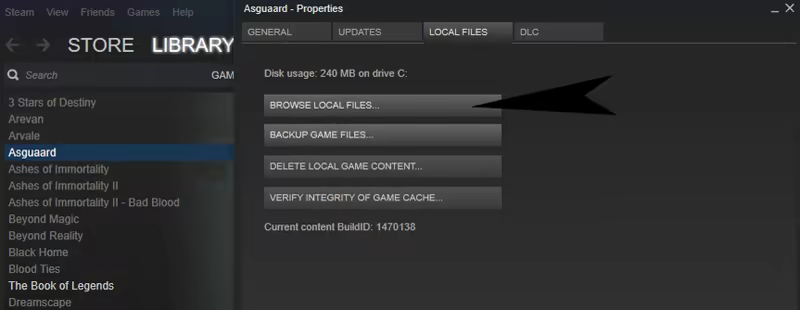
Or directly from the Steam Client, first right-click on the game, then select:
Properties > Local Files > Browse Local Files
C:\Users[Your Name]\AppData\Roaming\Moonchild_Saves
If asked to overwrite, either make sure the savefile you're going to replace with the new
one is not an important one, or else change the number of your savefile to a free one.
If you receive a warning message about achievements, ignore it.
Calypso Super Queen (Save3.rxdata)
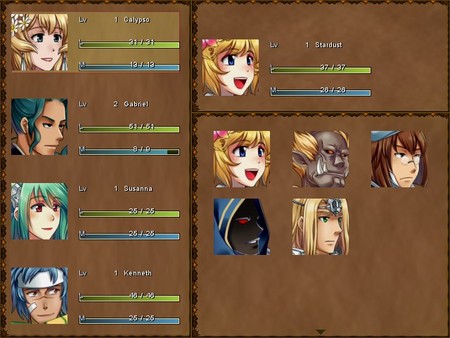
Have Queen Calypso and Gabriel start at Lv20 and with a boost in gold.We are an Army (Save4.rxdata)
Start the game with ALL the characters in your party, including hidden ones.We are an Army and Susanna is our Leader (Save5.rxdata)
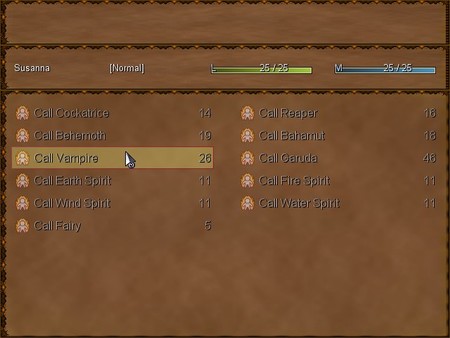
Play the game in Hard Mode with ALL the characters in your party, and your Caller Susanna also has all her summonings from the beginning.How to find the super save files
From your computer, go to:
C:\Program Files (x86)\Steam\steamapps\common
Then select the game folder.
Or directly from the Steam Client, first right-click on the game, then select:
Properties > Local Files > Browse Local Files
EXAMPLE
How to use the super save files
Copy/paste any of the provided savefile to:C:\Users[Your Name]\AppData\Roaming\Moonchild_Saves
If asked to overwrite, either make sure the savefile you're going to replace with the new
one is not an important one, or else change the number of your savefile to a free one.
If you receive a warning message about achievements, ignore it.
Frequently Asked Questions
Is Moonchild - Super Savefiles worth buying right now?
Watch — $0.79. Decent deal at 20% off, but might drop further. Watch for better opportunities.
When does Moonchild - Super Savefiles go on sale?
Decent deal at 20% off, but might drop further. Watch for better opportunities.
Is Moonchild - Super Savefiles free to play?
Moonchild - Super Savefiles costs $0.79 on Steam.
What genre is Moonchild - Super Savefiles?
Moonchild - Super Savefiles is a Adventure, Casual, Indie, RPG game.
Who developed Moonchild - Super Savefiles?
Moonchild - Super Savefiles was developed by Aldorlea Games and published by Aldorlea Games.
What platforms does Moonchild - Super Savefiles support?
Available on Steam for Windows.