Game overview
Textvas
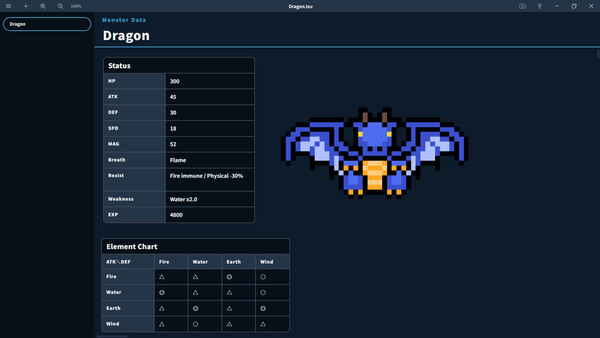
Textvas is an intuitive note app for everyone, from creators to everyday users. Freely arrange text and images to gather and organize your ideas and materials. Theme switching, touch operation, UI scaling support, and local operation.
- Last tracked players
- 5
- Recorded peak
- 9
- 24-hour change
- Unavailable
Delayed observation · last tracked . Values marked unavailable are not estimated. Recorded peak is the highest player count observed by SteamIQHQ; earlier records may be outside our coverage.
About this game Read the full description
Textvas is a note app for arranging text and images freely on a board.
From brainstorming to game strategy notes, it fits any purpose.
Double-click to start writing right away, and paste both text and images straight from the clipboard.
We built it out of frustration with the poor readability and cloud dependence of existing apps.
Place text and images anywhere you like on the board.
Double-click to start typing, and paste images and text from the clipboard.
You can also drag them to reposition after placing.
Manage multiple boards with tabs and organize them into folders.
Tabs can be duplicated and reordered, so you can sort them by purpose.
Comes with basic themes such as dark, monochrome, sakura, and notebook.
Freely choose from the fonts installed on your PC, and adjust the size too.
Customize the look to match your task or preference.
The UI size can be adjusted from 100% to 200%. Board zoom is controlled separately from this.
From 4K monitors to compact laptops, it adjusts appropriately to your screen size.
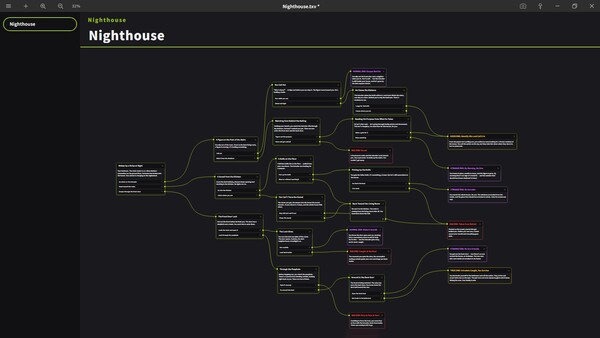
Line up conversations and lines as nodes to organize the flow.
Useful for managing branching choices and story development.
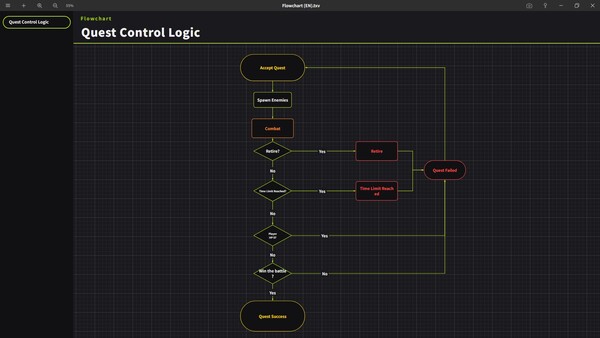
Connect processes and branches with nodes such as rectangles and diamonds to build a diagram.
Visually organize ideas and design specifications.
Export a finished board as an image (png) or text (txt).
Exporting and importing the settings themselves is also supported.
Supports swiping and pinch in/out. You can use operations such as zoom, pan, and scroll.
Touch operation with your fingers works on tablet PCs and touch-enabled monitors too.
Save projects with the original .txv extension.
Register a project on an external device to open it instantly.
An icon is included.
Set an image of your choice as the board background.
Freely specify game characters, your own illustrations, and more.
Supports 29 languages (UI only).
Switch from the settings inside the app.
and the number of implemented features is greater than what is listed on this page.
If you want to check in more detail, you can view the website linked on the right side of this page.
you can quickly find the spot you are looking for.
so you can revert to a past state.
Pin the window on top from the button in the upper right.
■ Examples of use
Combine screenshots and text to lay them out.
Adjust font size and UI size to your environment for appropriate readability.
you can check recipes with swipe gestures while cooking.
you can keep records without sharing them externally.
idea memos with images and task organization by process. The developer uses this tool for its own development management as well.
Manage workflows such as production steps with the sequential number feature, and rearrange them later.
and camera settings with images.
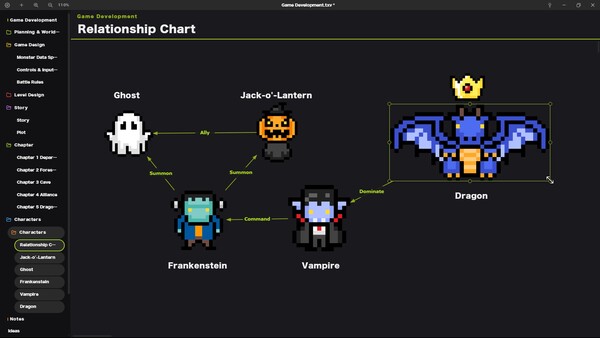
Organize setting materials in fine detail, and create relationship charts with card connections.
From brainstorming to game strategy notes, it fits any purpose.
Double-click to start writing right away, and paste both text and images straight from the clipboard.
We built it out of frustration with the poor readability and cloud dependence of existing apps.
・Free placement
Place text and images anywhere you like on the board.
Double-click to start typing, and paste images and text from the clipboard.
You can also drag them to reposition after placing.
・Management with tabs and folders
Manage multiple boards with tabs and organize them into folders.
Tabs can be duplicated and reordered, so you can sort them by purpose.
・Highly customizable UI
Comes with basic themes such as dark, monochrome, sakura, and notebook.
Freely choose from the fonts installed on your PC, and adjust the size too.
Customize the look to match your task or preference.
・UI scale and zoom
The UI size can be adjusted from 100% to 200%. Board zoom is controlled separately from this.
From 4K monitors to compact laptops, it adjusts appropriately to your screen size.
・Dialogue nodes
Line up conversations and lines as nodes to organize the flow.
Useful for managing branching choices and story development.
・Flowchart nodes
Connect processes and branches with nodes such as rectangles and diamonds to build a diagram.
Visually organize ideas and design specifications.
・Export function
Export a finished board as an image (png) or text (txt).
Exporting and importing the settings themselves is also supported.
・Touch panel support
Supports swiping and pinch in/out. You can use operations such as zoom, pan, and scroll.
Touch operation with your fingers works on tablet PCs and touch-enabled monitors too.
・Launch from external devices
Save projects with the original .txv extension.
Register a project on an external device to open it instantly.
An icon is included.
・Display your favorite image as the background
Set an image of your choice as the board background.
Freely specify game characters, your own illustrations, and more.
・Multilingual support
Supports 29 languages (UI only).
Switch from the settings inside the app.
■Other features
New features keep being added through updates,and the number of implemented features is greater than what is listed on this page.
If you want to check in more detail, you can view the website linked on the right side of this page.
・Local operation
The app itself runs locally, and project data is saved on your PC.・Search function
Search text within a board. Even from long passages or content scattered across multiple cards,you can quickly find the spot you are looking for.
・Text decoration
Supports formatting such as text color, underline, borders, and alignment.・Card connection
Connect placed text and image cards to each other with arrows.・Auto-save / timestamped backups
Auto-saves at the interval you specify. It keeps up to 50 timestamped histories,so you can revert to a past state.
・Automatic sequential number / timestamp
Automatically add a sequential number or timestamp to board names. You can also change it manually later.・Notes and icons
Add notes on the board. You can also place preset icons on the board.・Full-screen mode / always on top
Use shortcut keys to hide the top tabs and side panels.Pin the window on top from the button in the upper right.
・Merging boards
Load another project file and merge it with the current board.・Shortcut keys
Major shortcut keys can be changed by the user.■ Examples of use
・Brainstorming / organizing notes
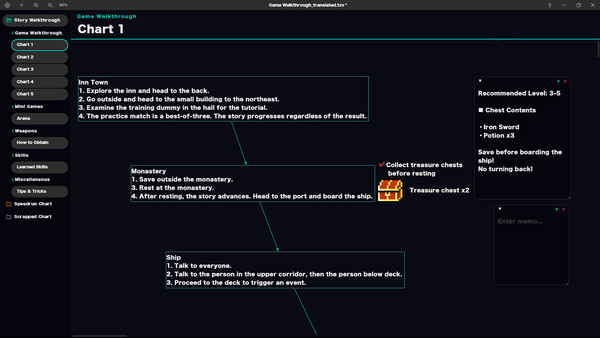
Place text and images as cards and rearrange them freely.・Game walkthroughs
Organize strategy notes and charts.Combine screenshots and text to lay them out.
・Streamers / VTubers
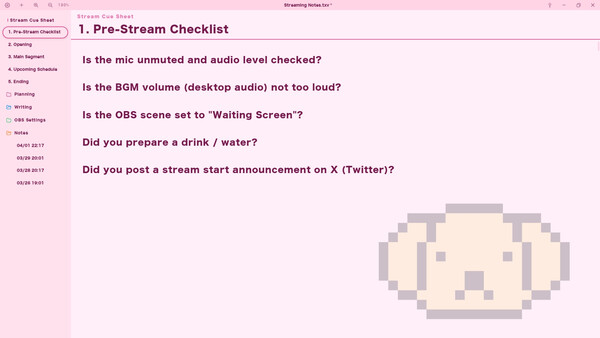
Use it to manage rundowns and OBS setting notes.Adjust font size and UI size to your environment for appropriate readability.
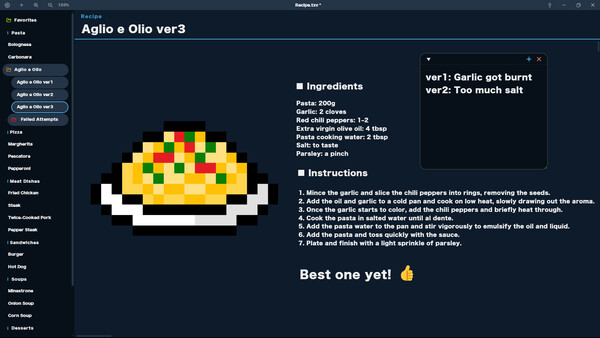
・Cooking streams / recipe management
Organize ingredients and steps with images. In a touch panel environment,you can check recipes with swipe gestures while cooking.
・Personal diary
Record your impressions of movies, books, and games. Since data is saved locally,you can keep records without sharing them externally.
・Solo development
Manage planning, specifications, and bug lists together in a single file. You can also use it foridea memos with images and task organization by process. The developer uses this tool for its own development management as well.
・Illustrators / manga artists / designers
Organize references and character settings with images.Manage workflows such as production steps with the sequential number feature, and rearrange them later.
・Video / photographers
Organize and back up equipment settings, shooting notes, video export settings,and camera settings with images.
・Novels / screenplays
Manage by chapter or scene. The sequential number feature lets you renumber as well.Organize setting materials in fine detail, and create relationship charts with card connections.
・Task management
By using the completion-check feature, you can use it for task management.Media gallery 10 screenshots · 0 videos

Screenshots

And 2 more screenshots...
Player activity
Concurrent players over the last 48 hours.
Loading player history?
System requirements Windows · Linux
Windows
Minimum
Minimum:- Requires a 64-bit processor and operating system
- OS: Windows 11 64-bit
- Processor: 64-bit dual-core CPU
- Memory: 4 GB RAM
- Graphics: DirectX 11 compatible
- Storage: 300 MB available space
Recommended
Recommended:- Requires a 64-bit processor and operating system
- OS: Windows 11 64-bit
- Processor: Intel Core i5 (8th gen or later)
- Memory: 8 GB RAM
- Graphics: Intel UHD Graphics 630 or better
- Storage: 1 GB available space
Linux
Minimum
Minimum:Recommended
Recommended:Game details Languages, features & support
- Publisher
- typocraft
- Languages
- English, Japanese, French, Italian, German, Spanish - Spain, Portuguese - Brazil, Russian, Simplified Chinese, Traditional Chinese, Korean, Polish, Indonesian, Ukrainian, Dutch, Greek, Swedish, Spanish - Latin America, Thai, Czech, Danish, Turkish, Norwegian, Hungarian, Finnish, Bulgarian, Vietnamese, Portuguese - Portugal, Romanian
- Website
- Official website ↗
- Support
- [email protected] Support site ↗
More analysis Activity patterns, updates & developer tools
Genre Benchmarks
Player Count
Top 0%
Value Ratio
Top 17%
Early Access Active
Time in EA
116 days
Current Players
5
Activity Heatmap
UTC+0 (Your Timezone)
5
Peak Activity
5
Avg Activity
1
Active Hours
1%
Sample coverage
Less Active
More Active
0
1
2
3
4
5
6
7
8
9
10
11
12
13
14
15
16
17
18
19
20
21
22
23
Sun
Sunday 0:00
No samples
No samples
Sunday 1:00
No samples
No samples
Sunday 2:00
No samples
No samples
Sunday 3:00
No samples
No samples
Sunday 4:00
No samples
No samples
Sunday 5:00
No samples
No samples
Sunday 6:00
No samples
No samples
Sunday 7:00
No samples
No samples
Sunday 8:00
No samples
No samples
Sunday 9:00
No samples
No samples
Sunday 10:00
No samples
No samples
Sunday 11:00
No samples
No samples
Sunday 12:00
No samples
No samples
Sunday 13:00
No samples
No samples
Sunday 14:00
No samples
No samples
Sunday 15:00
No samples
No samples
Sunday 16:00
No samples
No samples
Sunday 17:00
No samples
No samples
Sunday 18:00
No samples
No samples
Sunday 19:00
No samples
No samples
Sunday 20:00
No samples
No samples
Sunday 21:00
No samples
No samples
Sunday 22:00
No samples
No samples
Sunday 23:00
No samples
No samples
Mon
Monday 0:00
No samples
No samples
Monday 1:00
No samples
No samples
Monday 2:00
No samples
No samples
Monday 3:00
No samples
No samples
Monday 4:00
No samples
No samples
Monday 5:00
No samples
No samples
Monday 6:00
No samples
No samples
Monday 7:00
No samples
No samples
Monday 8:00
No samples
No samples
Monday 9:00
No samples
No samples
Monday 10:00
No samples
No samples
Monday 11:00
No samples
No samples
Monday 12:00
No samples
No samples
Monday 13:00
No samples
No samples
Monday 14:00
No samples
No samples
Monday 15:00
No samples
No samples
Monday 16:00
No samples
No samples
Monday 17:00
No samples
No samples
Monday 18:00
No samples
No samples
Monday 19:00
No samples
No samples
Monday 20:00
No samples
No samples
Monday 21:00
No samples
No samples
Monday 22:00
No samples
No samples
Monday 23:00
No samples
No samples
Tue
Tuesday 0:00
No samples
No samples
Tuesday 1:00
No samples
No samples
Tuesday 2:00
No samples
No samples
Tuesday 3:00
No samples
No samples
Tuesday 4:00
No samples
No samples
Tuesday 5:00
No samples
No samples
Tuesday 6:00
No samples
No samples
Tuesday 7:00
No samples
No samples
Tuesday 8:00
No samples
No samples
Tuesday 9:00
No samples
No samples
Tuesday 10:00
No samples
No samples
Tuesday 11:00
No samples
No samples
Tuesday 12:00
No samples
No samples
Tuesday 13:00
No samples
No samples
Tuesday 14:00
No samples
No samples
Tuesday 15:00
No samples
No samples
Tuesday 16:00
No samples
No samples
Tuesday 17:00
No samples
No samples
Tuesday 18:00
No samples
No samples
Tuesday 19:00
No samples
No samples
Tuesday 20:00
No samples
No samples
Tuesday 21:00
No samples
No samples
Tuesday 22:00
No samples
No samples
Tuesday 23:00
No samples
No samples
Wed
Wednesday 0:00
No samples
No samples
Wednesday 1:00
No samples
No samples
Wednesday 2:00
No samples
No samples
Wednesday 3:00
No samples
No samples
Wednesday 4:00
No samples
No samples
Wednesday 5:00
No samples
No samples
Wednesday 6:00
No samples
No samples
Wednesday 7:00
No samples
No samples
Wednesday 8:00
No samples
No samples
Wednesday 9:00
No samples
No samples
Wednesday 10:00
No samples
No samples
Wednesday 11:00
No samples
No samples
Wednesday 12:00
No samples
No samples
Wednesday 13:00
No samples
No samples
Wednesday 14:00
No samples
No samples
Wednesday 15:00
No samples
No samples
Wednesday 16:00
No samples
No samples
Wednesday 17:00
No samples
No samples
Wednesday 18:00
No samples
No samples
Wednesday 19:00
No samples
No samples
Wednesday 20:00
No samples
No samples
Wednesday 21:00
No samples
No samples
Wednesday 22:00
No samples
No samples
Wednesday 23:00
No samples
No samples
Thu
📍
Thursday 0:00
No samples
No samples
Thursday 1:00
No samples
No samples
Thursday 2:00
No samples
No samples
Thursday 3:00
No samples
No samples
Thursday 4:00
No samples
No samples
Thursday 5:00
No samples
No samples
Thursday 6:00
No samples
No samples
Thursday 7:00
No samples
No samples
Thursday 8:00
No samples
No samples
Thursday 9:00
No samples
No samples
Thursday 10:00
No samples
No samples
Thursday 11:00
No samples
No samples
Thursday 12:00
No samples
No samples
Thursday 13:00
No samples
No samples
Thursday 14:00
No samples
No samples
Thursday 15:00
No samples
No samples
Thursday 16:00
No samples
No samples
Thursday 17:00
No samples
No samples
Thursday 18:00
No samples
No samples
Thursday 19:00
No samples
No samples
Thursday 20:00
No samples
No samples
Thursday 21:00
No samples
No samples
Thursday 22:00
No samples
No samples
Thursday 23:00
No samples
No samples
Fri
Friday 0:00
No samples
No samples
Friday 1:00
No samples
No samples
Friday 2:00
No samples
No samples
Friday 3:00
No samples
No samples
Friday 4:00
No samples
No samples
Friday 5:00
No samples
No samples
Friday 6:00
No samples
No samples
Friday 7:00
No samples
No samples
Friday 8:00
No samples
No samples
Friday 9:00
No samples
No samples
Friday 10:00
No samples
No samples
Friday 11:00
No samples
No samples
Friday 12:00
No samples
No samples
Friday 13:00
5 players · 1 samples
5 players · 1 samples
Friday 14:00
No samples
No samples
Friday 15:00
No samples
No samples
Friday 16:00
No samples
No samples
Friday 17:00
No samples
No samples
Friday 18:00
No samples
No samples
Friday 19:00
No samples
No samples
Friday 20:00
No samples
No samples
Friday 21:00
No samples
No samples
Friday 22:00
No samples
No samples
Friday 23:00
No samples
No samples
Sat
Saturday 0:00
No samples
No samples
Saturday 1:00
No samples
No samples
Saturday 2:00
No samples
No samples
Saturday 3:00
No samples
No samples
Saturday 4:00
No samples
No samples
Saturday 5:00
No samples
No samples
Saturday 6:00
No samples
No samples
Saturday 7:00
No samples
No samples
Saturday 8:00
No samples
No samples
Saturday 9:00
No samples
No samples
Saturday 10:00
No samples
No samples
Saturday 11:00
No samples
No samples
Saturday 12:00
No samples
No samples
Saturday 13:00
No samples
No samples
Saturday 14:00
No samples
No samples
Saturday 15:00
No samples
No samples
Saturday 16:00
No samples
No samples
Saturday 17:00
No samples
No samples
Saturday 18:00
No samples
No samples
Saturday 19:00
No samples
No samples
Saturday 20:00
No samples
No samples
Saturday 21:00
No samples
No samples
Saturday 22:00
No samples
No samples
Saturday 23:00
No samples
No samples
Developer Analytics
Loading competitors...
Frequently Asked Questions
What is the recorded Steam price for Textvas?
The last observed Steam price for Textvas is $19.99. Check Steam for current pricing and availability.
What genre is Textvas?
Textvas is a Indie, Animation & Modeling, Audio Production, Design & Illustration, Education, Utilities, Video Production, Game Development game.
Who developed Textvas?
Textvas was developed by typocraft and published by typocraft.
What platforms does Textvas support?
Available on Steam for Windows, Linux.
Related Games
5 tags in common
#!/bin/bash
0 last tracked
4 tags in common
Wordeous
0 last tracked
4 tags in common
(square)
0 last tracked
4 tags in common
(the) Gnorp Apologue
101 last tracked
4 tags in common
+1x2
0 last tracked
3 tags in common
Hard Hero
0 last tracked
3 tags in common
Lost Gray
0 last tracked
3 tags in common
! Shakabula *
0 last tracked