DeskForge - Tomato Clock and Advanced
DeskForge - Tomato Clock and Advanced - Steam Charts & Historical Stats
A focus Pomodoro that eats a tomato as your session burns down, plus five time tools on your desktop: timer, countdown, stopwatch, alarm with daily and weekday repeats, and a 20-zone world clock. Explore historical player activity and pricing for DeskForge - Tomato Clock and Advanced. A current player-count observation is unavailable.
DeskForge - Tomato Clock and Advanced player count and price summary
- Current players
- Unavailable
- All-time peak
- Unavailable
- 24-hour player change
- Unavailable
- Current US price
- Price unavailable
No current player-count observation is available; unavailable values are not estimated.
Media gallery 1 screenshots · 0 videos
Screenshots
System Requirements
- OS: Windows 10 (1903+) / 11 (64-bit)
- Processor: Intel Core i3 / AMD equivalent
- Graphics: Integrated Graphics (Intel HD Graphics / AMD Radeon Graphics)
- OS: Windows 10 / 11 (64-bit)
- Processor: Intel Core i5 / AMD Ryzen 5 or better
- Graphics: Integrated or Dedicated Graphics
Additional Information
Current Pricing
Additional Information
Developer Analytics
Loading competitors...
About This Game
A focus Pomodoro that eats a tomato as your session burns down, plus five time tools on your desktop: timer, countdown, stopwatch, alarm with daily and weekday repeats, and a 20-zone world clock. Sits at the very back of the desktop and never steals your focus. Requires DeskForge.
Detailed Description
 Time you can see without opening anything
A timer in a browser tab is a timer you forget. This pack puts a focus Pomodoro and a full set of time tools directly onto your wallpaper, where they sit in plain sight, keep running while you work, and never pull the cursor out of whatever you're typing in.
A Pomodoro you can read from across the room
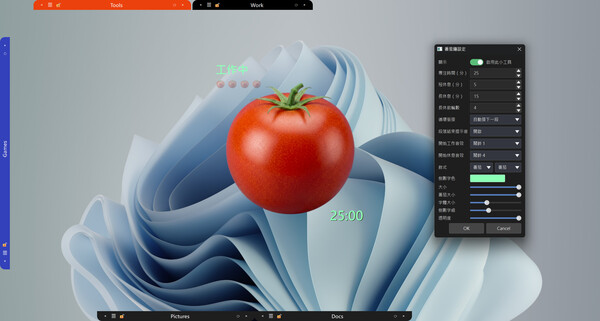
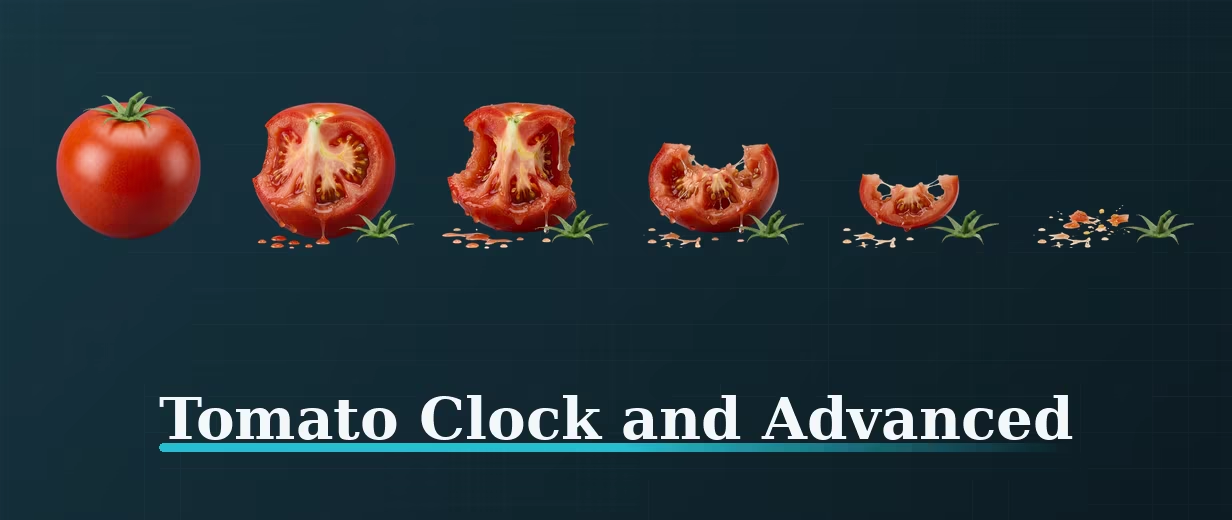
The tomato gets eaten. A whole tomato at the start of a focus block, down to a core by the end — six stages of hand-drawn art that tell you how much of the session is left before you've read a single number.
One tomato per round. Finished rounds are tallied as small tomatoes, six to a row, wrapping to the next row when it fills — the day's work at a glance.
Work is red, rest is blue. The status text changes colour between the two, and during a break the finished tomatoes pick up a yellow rim — you can tell which mode you're in from across the room.
Your durations, not ours. Focus, short break and long break are each adjustable from 1 to 120 minutes, with 1 to 12 focus rounds before a long break. Defaults are 25 / 5 / 15 and four rounds if you'd rather not think about it.
Two sounds, not one. Pick a different alert for entering work and entering rest, from a library of 20. Or let it roll straight into the next block silently.
Sized to your desk. 120 to 480 px, with the countdown digits, the upper and lower zones, and the tomato itself each scalable on their own. Opacity from 30% to fully solid.
Five more time tools in the same pack
Timer — counts up, so you find out what a task actually costs you instead of guessing.
Countdown — set a target and watch it fall. Laundry, a call, something on the stove.
Stopwatch — start, lap, stop.
Alarm — once, every day, or weekdays only (Monday to Friday). It lives on the desktop, so you can see the next alarm without unlocking a phone.
World clock — 20 zones covering UTC, Taipei, Tokyo, Seoul, Beijing, Singapore, Bangkok, Kolkata, Dubai, Moscow, Paris, London, New York, Chicago, Denver, Los Angeles, Sydney, Auckland, Honolulu and São Paulo. Seconds optional. Put three on the desktop and stop doing timezone arithmetic in your head.
It upgrades your sticky notes too — in the base app each note reminder fires once. With this pack, any reminder can repeat daily, or on weekdays only.
It stays out of your way
Every tool is its own widget. Drag it anywhere, put several on the desktop at once, or keep just the one.
They sit at the very back of the desktop — no taskbar entry, no Alt-Tab clutter, and clicking one never steals focus from what you're typing in.
They keep running while other windows cover them, and they're there again the moment you clear the desk.
Want the desktop to look good too
Dial Packs — 28 mechanical watch faces across Dress, Pilot, Diver, Sport and Vintage pocket watches, with a smooth sweeping second hand and a carousel that rotates your favourites on a schedule.
Watch Strap Pack — 16 straps in leather, steel, rubber and NATO nylon, laid flat under the dial or wrapped around it in 3D.
What you need
This is a tool pack for DeskForge and needs the base app. DeskForge turns a cluttered Windows desktop into something you run your day from: drawers that hold your icons and folders, a right-click in Explorer that sends files straight in, real folders opened right on the wallpaper, and live widgets like this one.
Specifications
Windows 10 (version 1903 or later) and Windows 11
Correct scaling at 100%, 125%, 150%, 175%, 200%, 250%, 300% and 400% DPI
Works across multiple monitors
Stored locally — no account, no network needed
One-time purchase, no subscription