
Game overview
Gamepan
A customizable desktop workspace for your games. Give each game its own space and track quests, builds, loot, maps, and notes with 20+ drag-and-drop modules. Now with Steam Workshop: publish and share workspaces, modules, and map sets, and import what other players make. Local-first, buy once.
- Last tracked players
- 1
- All-time peak
- 4
- 24-hour change
- Unavailable
Delayed observation · last tracked . Values marked unavailable are not estimated.
About this game Read the full description
Every game you play deserves a better companion than a dozen browser tabs.
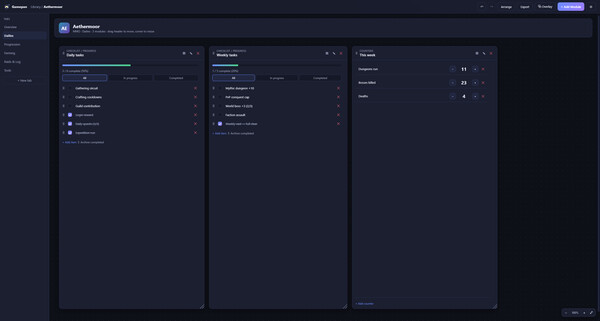
Gamepan is a customizable desktop workspace for your games. Give each game its own workspace, then fill it with exactly the tools you need: a checklist for dailies, a table for your inventory, a map for secrets, a calculator for crafting costs, a notepad for that one boss strategy. Drag them around a free-form canvas, size them how you like, and make it yours.No ads interrupting you. No subscription draining your wallet every month. No sign-up to bother with, no login to forget. You buy it once, it runs on your PC, and everything you make stays on your machine.
One workspace, every game
Give each game its own workspace and build a layout that fits how you play, with unlimited tabs and modules to organize it all however you want. Group your tabs into collapsible categories to keep big setups tidy. Whether it is a sprawling RPG, a competitive shooter, an MMO grind, a cozy farming sim, or a tabletop campaign, Gamepan adapts to it, not the other way around.And it isn't just for video games. It's great for tabletop RPGs, too. Keep your D&D character sheets, campaign notes, NPCs, loot, initiative, and session logs in one place, then pull them up at the table on a tablet with view-only sharing.
20+ modules, mix and match
Drop in exactly what a game needs:- Notes & Session Journal: rich text for strategies, lore, and to-dos
- Checklists: dailies, weeklies, achievement hunts
- Kanban & Goal boards: plan grinds and track long-term goals
- Tables & Inventory: drop tables, gear, resources
- Calculator: crafting and upgrade cost math
- Map / Pin board: pin teardrops or category icons on your own map images, grouped and filterable
- Gallery: screenshot albums with a full-size lightbox
- Builds: loadouts and skill setups with linked items
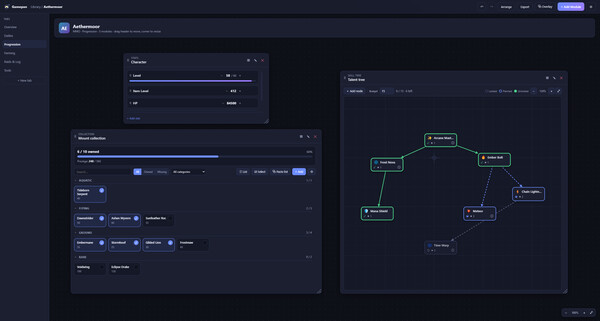
- Collection tracker: complete a set (mounts, mastery, Pokedex, cosmetics) with owned/total, % progress, and optional summed values
- Stats & Counters: track anything with a number
- Timers: respawns, buffs, and cooldowns with alerts
- Calendar: events, resets, and raid nights
- Skill Tree: plan talent & tech trees with prerequisites, unlock states, and a point budget
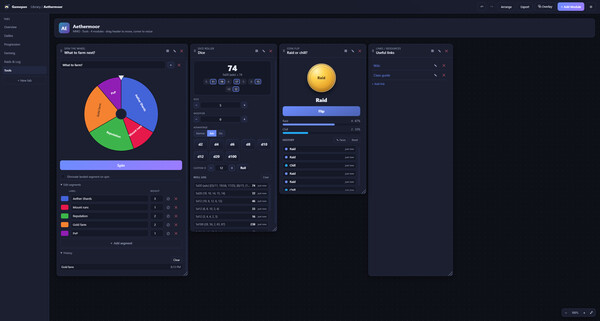
- Whiteboard, Links, Dice, Coin flip, Spin-the-Wheel, and more
Share it on the Steam Workshop
Built something good? Put it on the Workshop and let other players use it. Publish a whole workspace, a single module, or a map set, then browse, subscribe, and import what everyone else has made, all without leaving the app. Search by trending, newest, or top rated, and see votes and subscriber counts before you grab something. Publishing stays Private until you choose otherwise, and imported items go through the same one-click safety review, so nothing loads unseen.Yours, and private
Gamepan is local-first. It has no account system and no tracking of any kind, and nothing you do ever leaves your computer. Your workspaces live on your PC as plain files you fully control, so you can export them, back them up, or wipe them anytime.Sharing setups is safe, too. When you import a workspace from someone else, Gamepan treats its images and links as untrusted and keeps them hidden behind a one-click review, so nothing unexpected loads until you say so. Anything you add yourself stays visible.
Share to the couch, on your terms
Turn on optional local-network sharing to mirror any module, view-only, to a phone or tablet on your Wi-Fi. Perfect for glancing at a checklist or map on a second screen while you play. It's off by default, stays on your local network, and never touches the internet.A companion that shows up
A floating overlay keeps your tools on top of the action, and Gamepan can auto-detect when a game you've set up starts and open its companion for you.Make it look how you want
Restyle everything with built-in themes, custom color palettes, and per-game accents. Save any layout as a reusable template, or import ones you like. And there's a command palette, keyboard shortcuts, and workspace undo/redo throughout.Never lose your work
Saves are written safely to protect against corruption, and Gamepan keeps an automatic version history of your whole library, so a bad edit or accident is always recoverable. Your setups also sync across Windows, Linux, and Steam Deck through Steam Cloud.Media gallery 6 screenshots · 0 videos

Screenshots



Player activity
Concurrent players over the last 48 hours.
Loading player history?
Latest news
All news on Steam ↗System requirements Windows · Linux
Windows
Minimum
Minimum:- OS: Windows 10 (64-bit)
- Processor: Any 64-bit dual-core
- Memory: 4 GB RAM
- Graphics: Integrated graphics
- Storage: 500 MB available space
- Additional Notes: 1280×720 display
Recommended
Recommended:- OS: Windows 11 (64-bit)
- Processor: Quad-core
- Memory: 8 GB RAM
- Graphics: Integrated graphics (hardware acceleration on)
- Storage: 2 GB available space
- Additional Notes: 1920×1080 display; local network for LAN sharing
Linux
Minimum
Minimum:- OS: Ubuntu 20.04 / Debian 11 / Fedora 36 (64-bit)
- Processor: Any 64-bit dual-core
- Memory: 4 GB RAM
- Graphics: Integrated graphics
- Storage: 500 MB available space
- Additional Notes: 1280×720 display; AppImage requires libfuse2
Recommended
Recommended:- OS: Ubuntu 22.04 LTS or newer (64-bit)
- Processor: Quad-core
- Memory: 8 GB RAM
- Graphics: Integrated graphics
- Storage: 2 GB available space
- Additional Notes: 1920×1080; local network for LAN sharing
Game details Languages, features & support
- Publisher
- devonzimmi
- Brazilian rating
- l
- Steam Germany rating
- 0
- Achievements
- 15
- Features
- Steam Achievements, Steam Workshop, Adjustable Text Size, Camera Comfort, Color Alternatives, #category_contrast_controls, Keyboard Only Option, Mouse Only Option, #category_playable_at_your_own_pace, Playable without Timed Input, Save Anytime, Steam Cloud
- Languages
- English
- Website
- Official website ↗
- Support
- [email protected] Support site ↗
More analysis Activity patterns, updates & developer tools
Game Insights
Buy Verdict
Watch — $14.99.
Decent deal at 0% off, but might drop further. Watch for better opportunities.
▲
~13 days until next sale
Update Momentum
Moderate Updates — 0 patches in last 30 days.
17 patches and 17 news items in last 180 days. Latest patch effect size: 0.00.
▼
No recent patches
Developer Analytics
Loading competitors...
Frequently Asked Questions
Is Gamepan worth buying right now?
Watch — $14.99. Decent deal at 0% off, but might drop further. Watch for better opportunities.
When does Gamepan go on sale?
Decent deal at 0% off, but might drop further. Watch for better opportunities.
Is Gamepan still getting updates?
Moderate Updates — 0 patches in last 30 days. 17 patches and 17 news items in last 180 days. Latest patch effect size: 0.00.
Is Gamepan free to play?
Gamepan costs $14.99 on Steam.
What genre is Gamepan?
Gamepan is a Indie, Strategy, Utilities game.
Who developed Gamepan?
Gamepan was developed by devonzimmi and published by devonzimmi.
What platforms does Gamepan support?
Available on Steam for Windows, Linux.