
RPG Maker MV - MADO
Gotcha Gotcha Games, KADOKAWA · Gotcha Gotcha Games · Sep 6, 2017
Delayed observation
Observed
0
Last tracked
0
All-time peak
n/a
Δ 24h
Player count last observed
Live player data is temporarily unavailable; historical values remain visible for context.
RPG Maker MV - MADO - Steam Charts & Historical Stats
Ultimate tool to easily customize your windows. Explore historical player activity and pricing for RPG Maker MV - MADO. Player-count data was last observed May 1, 2026.
Price
$1.99
Genre
Design & Illustration
Developer
Gotcha Gotcha Games
RPG Maker MV - MADO player count and price summary
- Current players
- Unavailable
- All-time peak
- Unavailable
- 24-hour player change
- Unavailable
- Current US price
- $1.99
Player count last observed . Values marked unavailable are not estimated.
Media gallery 5 screenshots · 0 videos
Screenshots
Game Insights
Buy Verdict
Watch — $1.99.
Decent deal at 80% off, but might drop further. Watch for better opportunities.
▲
~0 days until next sale
Value Score
Great Value — 100th percentile.
Price-to-player ratio ranks in the 100th percentile.
▲
Market pricing tier
Genre Benchmarks
Value Ratio
Top 0%
Player count
Price History
Lowest Price
$1.99
Jul 2026 across all regions
Current Price
$1.99
US region
No Recent Price History
Price history data will appear here once more pricing information becomes available.
System Requirements
Platform Support
Windows
macOS
Windows Requirements
Minimum:
Minimum:
- OS *: WindowsR 7/8/8.1/10 (32bit/64bit)
- Processor: Intel Core2 Duo or better
- Memory: 2 GB RAM
- Graphics: DirectX 9/OpenGL 4.1 capable GPU
- Storage: 500 MB available space
- Additional Notes: 1280x768 or better Display
Recommended:
Recommended:
- Graphics: OpenGL ES 2.0 hardware driver support required for WebGL acceleration. (AMD Catalyst 10.9, nVidia 358.50), iOS 8.0, Android 4.4.4*
macOS Requirements
Minimum:
Minimum:
- OS: Mac OSX 10.10 or better
- Processor: Intel Core2 Duo or better
- Graphics: Compatible OpenGLR
Pricing
Paid Game
Sale: 80% off
CDN$ 12.99 CDN$ 2.59
CDN$ 12.99 CDN$ 2.59
Additional Information
Categories
Downloadable Content
Partial Controller Support
Supported Languages
English, Japanese, French, Italian, German, Spanish - Spain, Arabic, Korean, Portuguese - Brazil, Russian, Simplified Chinese, Traditional Chinese
Official Website
http://www.rpgmakerweb.com/
Current Pricing
🏷️
80% OFF SALE!
CDN$ 12.99
CDN$ 2.59
Historical low: $1.99
(Jul 2026)
Additional Information
🆘
Support
🎁
Purchase Options
1
package options
Developer Analytics
Loading competitors...
About This Game
Ultimate tool to easily customize your windows.
Detailed Description
The Ultimate tool to easily customize your windows
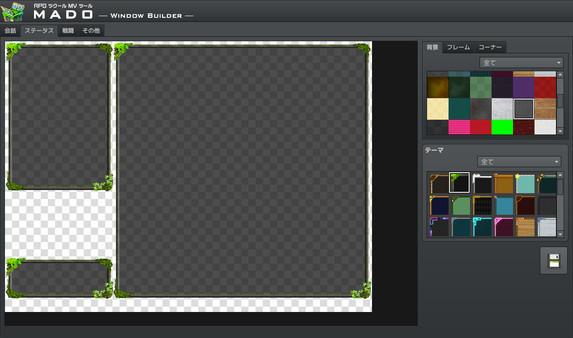
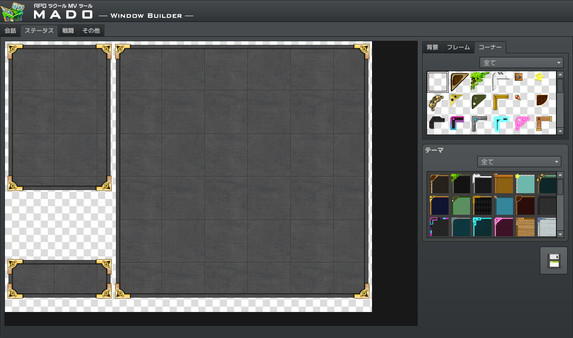
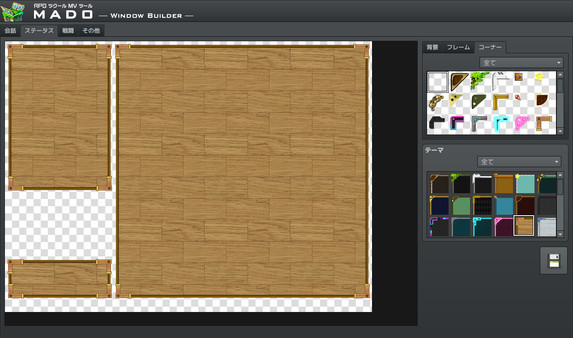
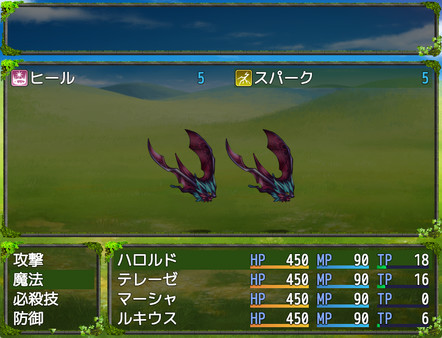
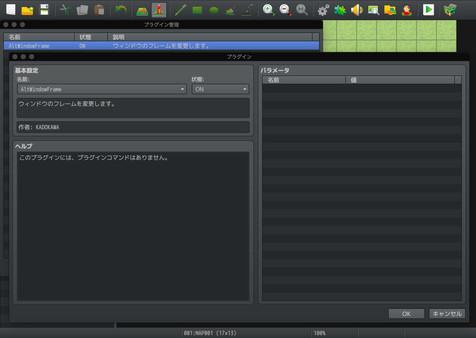
MADO is tool created for the RPG Maker MV series. It lets you customize the window graphic used in your game. MADO includes, 50 themes for frame, corners and background patterns! You're just a few clicks away from making the perfect windows to match your game world! These include:- Standard
- Modern
- Pop
- Material
- Machine
- Other
With that much choices, you can customize your game windows to fit several game themes such as the classic fantasy RPG, futuristic worlds, high-school romance, horror and much more.
Installing MADO
- Open RPG Maker MV and your Project.
- Select Tools -> RPG Maker MV Tools...
- Select Window Maker -> Add
- Press OK.
- Press the newly added icon to start using MADO! There is a guide to help you use it in the Help Tab.
NOTE: MADO installs a plugin to your desired project. This is how it will modify the windows of your game.
Customizing MADO
You can also add your own original window graphic parts!- Go to the Root Folder of the Tool. Normally this is in Steam\steamapps\common\RPG Maker MV\tool\MADO\Parts
- You will see an img folder. This is where you will place the new Window Graphics you wish to use. Window_ID050 is a template that you can follow.
- Once you are done, simply name your new graphic as "Window_ID0XX" 0XX being the new number. This is the unique ID of your graphic.
- The thumbs folder is a small preview of your newly made window graphic to display on the tool itself. Make sure to add a thumb image on your newly created graphic as well!
- Go back to parts folder and open setting.json.
- At the very end of "category": "All" add your newest window graphic such as "051"
- Then add the same ID based on which category you want to set it to. If your new window graphic classifies as fantasy, go to "category": "Standard" and add the latest id at the very end of the id. It would look like something like this:
"id": ["001","006","007","009","011","012","017","018","036","037", "051"] - Congrats! You have added your own custom graphic!
Frequently Asked Questions
Is RPG Maker MV - MADO worth buying right now?
Watch — $1.99. Decent deal at 80% off, but might drop further. Watch for better opportunities.
When does RPG Maker MV - MADO go on sale?
Decent deal at 80% off, but might drop further. Watch for better opportunities.
Is RPG Maker MV - MADO free to play?
RPG Maker MV - MADO costs $1.99 on Steam.
What genre is RPG Maker MV - MADO?
RPG Maker MV - MADO is a Design & Illustration, Web Publishing game.
Who developed RPG Maker MV - MADO?
RPG Maker MV - MADO was developed by Gotcha Gotcha Games and published by Gotcha Gotcha Games.
What platforms does RPG Maker MV - MADO support?
Available on Steam for Windows, macOS.