
MAGIX Audio Cleaning Lab 2017 Steam Edition
MAGIX Software GmbH · MAGIX Software GmbH · Jul 21, 2017
Delayed observation
Observed
0
Last tracked
0
All-time peak
n/a
Δ 24h
Player count last observed
Live player data is temporarily unavailable; historical values remain visible for context.
MAGIX Audio Cleaning Lab 2017 Steam Edition - Steam Charts & Historical Stats
Your music, digitally remastered. Explore historical player activity and pricing for MAGIX Audio Cleaning Lab 2017 Steam Edition. Player-count data was last observed May 1, 2026.
Genre
Audio Production
Developer
MAGIX Software GmbH
MAGIX Audio Cleaning Lab 2017 Steam Edition player count and price summary
- Current players
- Unavailable
- All-time peak
- Unavailable
- 24-hour player change
- Unavailable
- Current US price
- Price unavailable
Player count last observed . Values marked unavailable are not estimated.
Media gallery 5 screenshots · 1 videos
Screenshots
Videos

INT Audio Cleaning Lab 2017 Steam Edition Trailer
Game Insights
Community Sentiment
Mixed Positive — score 43/100.
Top praised area: gameplay (0 positive mentions).
▬
Stable
Value Score
Fair Value — 50th percentile.
Price-to-player ratio ranks in the 50th percentile.
▬
Market pricing tier
Player count
System Requirements
Platform Support
Windows
Windows Requirements
Minimum:
Minimum:
- OS *: For Microsoft Windows Vista | 7 | 8 | 8.1
- Processor: 1 GHz
- Memory: 2 GB RAM
- Graphics: Onboard, min. resolution 1024 x 768
- Storage: 1 GB available space
- Sound Card: Onboard
- Additional Notes: Supported import formats Disc: Audio CD/DVD, data CD/DVD Audio: WAV, MP3, AAC², WMA, OGG Vorbis, FLAC, AIFF, M3U, CUE | Supported export formats: Disc: Audio CD, data CD/DVD Audio: WAV, MP3¹, AAC², WMA, OGG Vorbis, FLAC, AIFF, M3U | ¹Requires Microsoft Media Player ²Fee-based activation
Pricing
Paid Game
Additional Information
Tags
Audio Production
Supported Languages
English, French, Italian, German, Spanish - Spain
Official Website
http://www.magix.com
Pricing Information
❓
Price Unavailable
Pricing information not currently available
Additional Information
🆘
Support
Developer Analytics
Loading competitors...
About This Game
Your music, digitally remastered. Transfer records to your computer, remove noise automatically and optimize your recordings.
Detailed Description
MAGIX Audio Cleaning Lab 2017 – Steam Edition offers everything for recording, editing, cutting and converting your audio files.
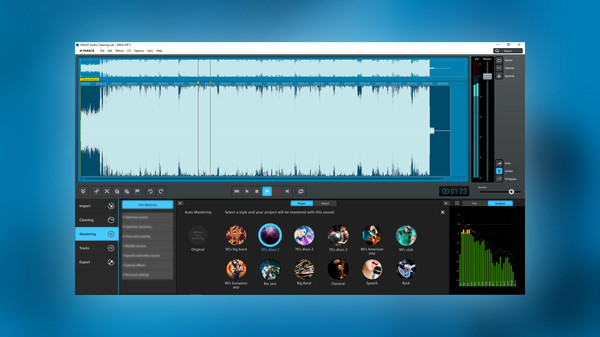
Restore and perfect your own recordings, old records and more. Easy operation, thematic sound settings with high-quality effects, automatic audio restoration and professional tools such as spectral display make this software the top choice for achieving an outstanding sound experience.
Simply connect a microphone and record your own audio commentaries for videos and podcasts. With a range of filters, you can improve vocal clarity, minimize "s" sounds and reduce clipping - fully automatically if you like.
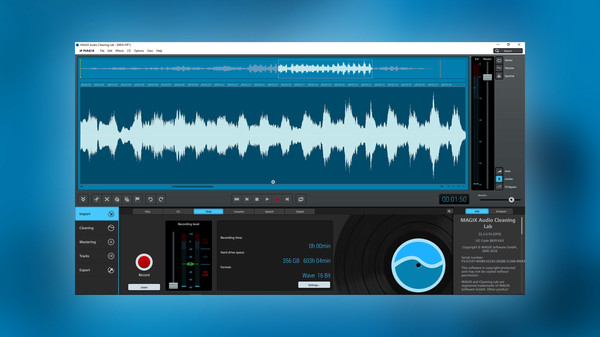
Record Audio Media
Easily record vinyl, cassettes and other media to your computer. On import, the title information and CD cover will automatically be added through the Internet.
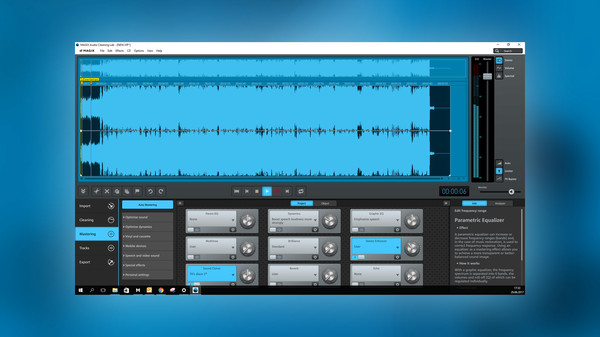
Audio Editing
Professional tools, editing functions, effects, filters and automations make editing and restoring audio easier than ever before.
Sound Optimization
Easily remove hissing, crackling, wind noise and other disturbances using one of over 290 presets. Remove noise with the wide range of precise and effective presets. The search function always helps you to find the right tool.
Convert Audio Files
Easily convert audio files into any standard format and save them on a smartphone, tablet, hard drive or CD.
Optimize Smartphone Recordings
Settings for specific devices, conversion from mono to stereo or freshening up vocals: You can optimize audio recordings from mobile devices quickly and easily.
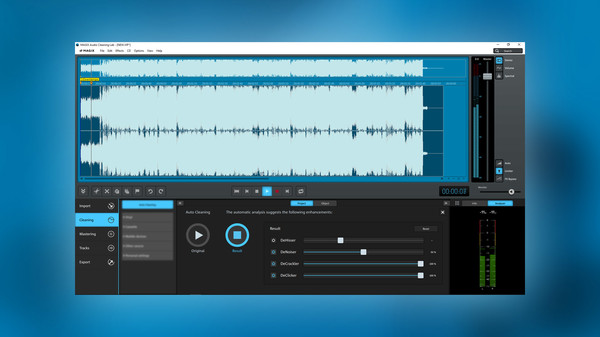
Automatic Audio Restauration
The Auto Cleaning feature analyzes the audio quality of music and speech recordings and improves them automatically.
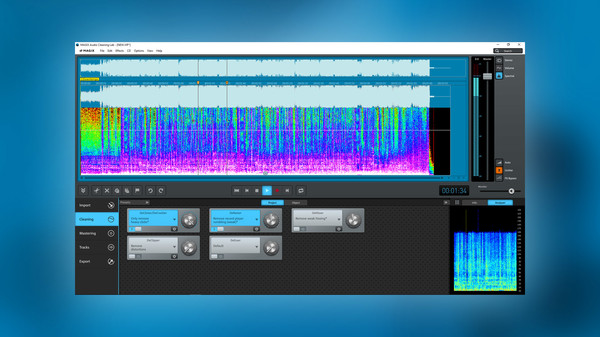
Visualizations for Audio Analysis
Visual aids help you identify problem areas when working with frequencies or volume levels.
Easily Share Recordings Online
Direct export to YouTube, Facebook, SoundCloud and showfy.
Intelligent Search Function
Search and find straight away: Enter a search term and relevant help texts, templates and effects will be displayed.
Restore and perfect your own recordings, old records and more. Easy operation, thematic sound settings with high-quality effects, automatic audio restoration and professional tools such as spectral display make this software the top choice for achieving an outstanding sound experience.
The Multitool For Your Audio Data
Speech RecordingsSimply connect a microphone and record your own audio commentaries for videos and podcasts. With a range of filters, you can improve vocal clarity, minimize "s" sounds and reduce clipping - fully automatically if you like.
Record Audio Media
Easily record vinyl, cassettes and other media to your computer. On import, the title information and CD cover will automatically be added through the Internet.
Audio Editing
Professional tools, editing functions, effects, filters and automations make editing and restoring audio easier than ever before.
Sound Optimization
Easily remove hissing, crackling, wind noise and other disturbances using one of over 290 presets. Remove noise with the wide range of precise and effective presets. The search function always helps you to find the right tool.
Convert Audio Files
Easily convert audio files into any standard format and save them on a smartphone, tablet, hard drive or CD.
Optimize Smartphone Recordings
Settings for specific devices, conversion from mono to stereo or freshening up vocals: You can optimize audio recordings from mobile devices quickly and easily.
Highlights:
- Noise removal: With the help of over 290 presets
- Detailed editing: Direct access to all effects settings
- Digitize music: Record music from vinyl, cassettes & CDs
- Digitize audio media: Easily transfer music to your computer
- Spectral display: Correct noise precisely
- 4K & HD monitors: For brilliant display on high-resolution devices
- Audio converter: For all standard formats
- Music titles & CD covers: Automatic retrieval over the Internet
Automatic Audio Restauration
The Auto Cleaning feature analyzes the audio quality of music and speech recordings and improves them automatically.
Visualizations for Audio Analysis
Visual aids help you identify problem areas when working with frequencies or volume levels.
Easily Share Recordings Online
Direct export to YouTube, Facebook, SoundCloud and showfy.
Intelligent Search Function
Search and find straight away: Enter a search term and relevant help texts, templates and effects will be displayed.
This program is specifically designed for easy audio editing and sound optimization. For creative music production or complex recording sessions, we recommend MAGIX Music Maker or Samplitude Music Studio. These products are also available on Steam.
Frequently Asked Questions
What do players think of MAGIX Audio Cleaning Lab 2017 Steam Edition?
Mixed Positive — score 43/100. Top praised area: gameplay (0 positive mentions).
Is MAGIX Audio Cleaning Lab 2017 Steam Edition free to play?
Yes, MAGIX Audio Cleaning Lab 2017 Steam Edition is free to play on Steam.
What genre is MAGIX Audio Cleaning Lab 2017 Steam Edition?
MAGIX Audio Cleaning Lab 2017 Steam Edition is a Audio Production game.
Who developed MAGIX Audio Cleaning Lab 2017 Steam Edition?
MAGIX Audio Cleaning Lab 2017 Steam Edition was developed by MAGIX Software GmbH and published by MAGIX Software GmbH.
What platforms does MAGIX Audio Cleaning Lab 2017 Steam Edition support?
Available on Steam for Windows.
Related Games
1 tag in common
Mixcraft 8 Home Studio
19 last tracked
1 tag in common
Action! - Gameplay Recording and Streaming
240 last tracked
1 tag in common
PlayClaw 5
3 last tracked
1 tag in common
Z3TA+ 2
0 last tracked
1 tag in common
Ohm Studio
88 last tracked
1 tag in common
Mosaico
0 last tracked
1 tag in common
Odesi Music Composition
0 last tracked
1 tag in common
Liquid Rhythm
0 last tracked