![Desktop Autostarships [Intergalactic Traveler: The Omega Sector]](https://shared.akamai.steamstatic.com/store_item_assets/steam/apps/994660/capsule_231x87.jpg?t=1544162324)
Desktop Autostarships [Intergalactic Traveler: The Omega Sector]
Desktop Autostarships [Intergalactic Traveler: The Omega Sector] - Steam Charts & Historical Stats
Give life to your desktop with some animated gadgets of the Intergalactic Space of The Omega Sector, there are more than 10 models to choose from. Explore historical player activity and pricing for Desktop Autostarships [Intergalactic Traveler: The Omega Sector]. Player-count data was last observed May 26, 2026.
Desktop Autostarships [Intergalactic Traveler: The Omega Sector] player count and price summary
- Current players
- Unavailable
- All-time peak
- Unavailable
- 24-hour player change
- Unavailable
- Current US price
- $0.49
Player count last observed . Values marked unavailable are not estimated.
Media gallery 4 screenshots · 1 videos
Screenshots
![Desktop Autostarships [Intergalactic Traveler: The Omega Sector] screenshot 1](https://shared.akamai.steamstatic.com/store_item_assets/steam/apps/994660/ss_9c97bb6208a3686e888f3dc695404e74a54a1374.600x338.jpg?t=1544162324)
![Desktop Autostarships [Intergalactic Traveler: The Omega Sector] screenshot 2](https://shared.akamai.steamstatic.com/store_item_assets/steam/apps/994660/ss_1427c30fa6801351377e3a334479eb0bbfe32fb0.600x338.jpg?t=1544162324)
![Desktop Autostarships [Intergalactic Traveler: The Omega Sector] screenshot 3](https://shared.akamai.steamstatic.com/store_item_assets/steam/apps/994660/ss_9ee09349432ffe5bdb112f00ed10b3b4d548ae59.600x338.jpg?t=1544162324)
![Desktop Autostarships [Intergalactic Traveler: The Omega Sector] screenshot 4](https://shared.akamai.steamstatic.com/store_item_assets/steam/apps/994660/ss_cbd7a79fae1bb68a232d18685545ba572b9a5f87.600x338.jpg?t=1544162324)
Videos
![Showcase_DLC_Autostarships video thumbnail for Desktop Autostarships [Intergalactic Traveler: The Omega Sector]](https://shared.akamai.steamstatic.com/store_item_assets/steam/apps/256737358/movie.293x165.jpg?t=1544161007)
Showcase_DLC_Autostarships
Game Insights
Buy Verdict
Decent deal at 51% off, but might drop further. Watch for better opportunities.
Value Score
Price-to-player ratio ranks in the 100th percentile.
Genre Benchmarks
Price History
No Recent Price History
Price history data will appear here once more pricing information becomes available.
System Requirements
- OS *: WindowsR 7/8/8.1 (32bit/64bit)
- Memory: 2 GB RAM
- Storage: 15 MB available space
Additional Information
Current Pricing
Additional Information
Developer Analytics
Loading competitors...
About This Game
Give life to your desktop with some animated gadgets of the Intergalactic Space of The Omega Sector, there are more than 10 models to choose from.
Detailed Description
There is a total of 15 Autostarships to choose from, taken from the stages 1 to 4, 19, 21, 22, 23 and 24.
You can see them flying around your PC, if some of those go rouge and try to scape your screen resolution it will reappear automatically.
Each one of the Gadgets has a function to give them priority, of that way they can go over any other window in the desktop.
You can set up around 20 of them and fill your computer with intergalactic Autostarships! (Is possible to make more of them, however, you must take into account your RAM capacity)
Take into account that most of these Autostarships are founded in a later game so it is spoilers.
Guideline:
* Each Autostarship has different types of animation and movement speed, in general, they all move in a random pattern.
* Once you launch an Autostarship it will detect the width and Height of the screen resolution of your computer, so it will set up the navigation limits (If an Autostarship goes off the screen you can see it reappear automatically -even if you drag them out)
* They have a contextual menu , activated by the right click of the mouse button; that consists on:
"*" = This option randomizes the position of the Autostarship.
"?" = Launch an "about this gadget" window.
"X" = Close the Application
* When double left Click with the mouse button it activates the Window Priority option:
+ The Autostarship will be displayed on top of each other window of your desktop.
+ This option is to make them visible at all times.
+ A taskbar notification will appear so you can track the gadget better.
* When single click with the left button of the mouse, the top priority option will disappear.
Other:
This type of gadgets goes very good with the DLC Desktop Wallpapers for Intergalactic Traveler: The Omega Sector.
You could technically make shortcuts and send them to the desktop or other places be more accessible when needed.
It is possible to send them over the Starting Folder to launch them automatically after your computer start, but that needs to be done manually by you.
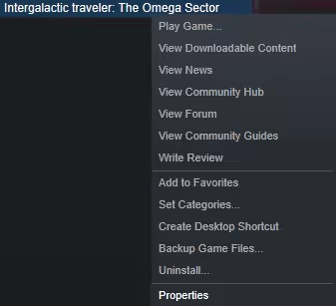
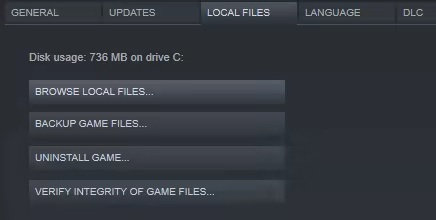
Rember that in order to acces to your DLC go to the Game file folder using the Browse Local Files tab. You can found it in the folder "DLC_Desktop Autostarships".