Game overview
Containers
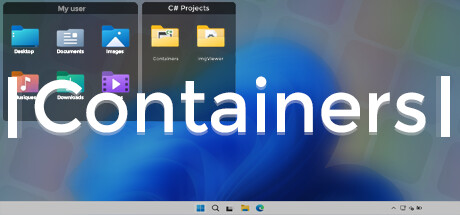
Containers enhance your Windows experience by providing virtual boxes to store your files and directories.
- Last tracked players
- 0
- Recorded peak
- 2
- 24-hour change
- Unavailable
- Steam reviews
- 53.8% positive 13 reviews · via SteamSpy
Delayed observation · last tracked . Values marked unavailable are not estimated. Recorded peak is the highest player count observed by SteamIQHQ; earlier records may be outside our coverage.
Thinking of returning to Containers?
See recorded Steam news, player activity and price changes since your last visit.
See what changed in ContainersAbout this game Read the full description
Enhance your Windows experience with Containers
Containers allows the storage of your files and folders in boxes called “Container”, these boxes can be accessed at any time on your desktop or called thanks to built-in shortcuts or with the help of the “Containers Tab” menu.
Containers
Containers are sticked to your desktop when you don't use them.
Mirror Containers
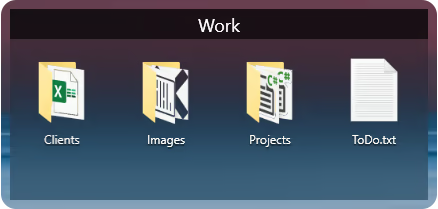
“Mirror” Containers are representations of files and folders in a selected folder on your computer.
Container Customization
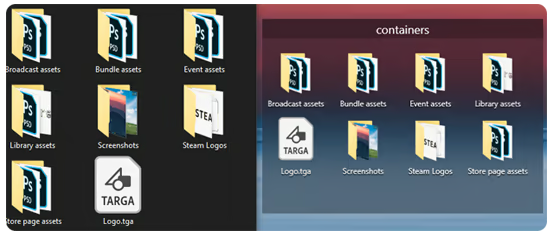
Containers can have different colored backgrounds or a background with an image.
You can also set the transparency method of your Containers.
If you are on Windows 11 you can also choose between Containers with rounded or squared edges.
Containers Tab Menu
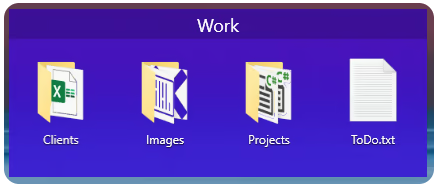
The Containers Tab menu allows you to call the Container of your choice without leaving the application in the foreground, it works similarly to the Alt-Tab menu in Windows.

Closing Containers
Containers can be independently closed manually or automatically to save space.

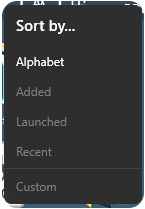
Sorting Containers content
You can independently sort the contents of your Containers according to your choice.
Container content size
You can change the size of your Container icons at any time.
Shortcuts
The Containers application has shortcuts to help you manipulate your Containers, each shortcut can be modified and disabled.
Containers allows the storage of your files and folders in boxes called “Container”, these boxes can be accessed at any time on your desktop or called thanks to built-in shortcuts or with the help of the “Containers Tab” menu.
Containers
Containers are sticked to your desktop when you don't use them.
Mirror Containers
“Mirror” Containers are representations of files and folders in a selected folder on your computer.
Container Customization
Containers can have different colored backgrounds or a background with an image.
You can also set the transparency method of your Containers.
If you are on Windows 11 you can also choose between Containers with rounded or squared edges.
Containers Tab Menu
The Containers Tab menu allows you to call the Container of your choice without leaving the application in the foreground, it works similarly to the Alt-Tab menu in Windows.
Closing Containers
Containers can be independently closed manually or automatically to save space.
Sorting Containers content
You can independently sort the contents of your Containers according to your choice.
Container content size
You can change the size of your Container icons at any time.
Shortcuts
The Containers application has shortcuts to help you manipulate your Containers, each shortcut can be modified and disabled.
Media gallery 7 screenshots · 0 videos

Screenshots


Player activity
Concurrent players over the last 48 hours.
Loading player history?
System requirements Windows
Windows
Minimum
Minimum:- OS: Windows 10 1703 (2017) / Windows 11
- Memory: 2 GB RAM
Recommended
Recommended:- OS: Windows 10 1703 (2017) / Windows 11
- Memory: 4 GB RAM
Game details Languages, features & support
- Publisher
- Containers Team
- Brazilian rating
- l
- Steam Germany rating
- 0
- Achievements
- 3
- Features
- Steam Achievements, Steam Cloud
- Languages
- English, French, Spanish - Spain, Simplified Chinese, Russian
- Support
- [email protected]
Compatibility & accessibility Steam Deck, controllers & access features
Can I Play This?
Steam declarations and Valve's Steam Deck compatibility result. Missing data is shown as unknown, never unsupported.
Native Steam builds
Windows: unknown
macOS: unknown
Linux: unknown
Steam Deck
unknown
Valve compatibility test
Input
Controller support: unknown
Structured language support (5)
| Language | Interface | Full audio | Subtitles |
|---|---|---|---|
| English | Yes | No | No |
| French | Yes | No | No |
| Spanish - Spain | Yes | No | No |
| Simplified Chinese | Yes | No | No |
| Russian | Yes | No | No |
Steam store page
stale · checked 2026-09-28
PCGamingWiki technical notes
External link only; SteamIQHQ does not ingest PCGamingWiki content.
More analysis Activity patterns, updates & developer tools
Genre Benchmarks
Player Count
Top 0%
Value Ratio
Top 9%
Developer Analytics
Loading competitors...
Frequently Asked Questions
What is the recorded Steam price for Containers?
The last observed Steam price for Containers is $4.99. Check Steam for current pricing and availability.
What genre is Containers?
Containers is a Utilities game.
Who developed Containers?
Containers was developed by Containers Team and published by Containers Team.
What platforms does Containers support?
Available on Steam for Windows.
Related Games
2 tags in common
1001 TVs
4 last tracked
2 tags in common
1BITDRAGON
2 last tracked
2 tags in common
360 Photo Viewer
0 last tracked
2 tags in common
3D Earth Time Lapse PC Live Wallpaper
4 last tracked
2 tags in common
3DMark
357 last tracked
2 tags in common
3DMark 11
1 last tracked
2 tags in common
3DMark Vantage
0 last tracked
2 tags in common
3dRudder Driver for SteamVR
0 last tracked