
VEGAS Edit 20 Steam Edition
VEGAS Edit 20 Steam Edition - Steam Charts & Historical Stats
VEGAS Edit 20 Steam Edition. Explore historical player activity and pricing for VEGAS Edit 20 Steam Edition. Player-count data was last observed Aug 2, 2026.
VEGAS Edit 20 Steam Edition player count and price summary
- Current players
- Unavailable
- All-time peak
- 11
- 24-hour player change
- Unavailable
- Current US price
- $249.00
Player count last observed . Values marked unavailable are not estimated.
Media gallery 9 screenshots · 1 videos
Screenshots
Videos

VEGAS 20 Edit Steam Edition - Trailer
Last Tracked Players
All-Time Peak
Estimated Owners
Game Insights
Buy Verdict
Decent deal at 0% off, but might drop further. Watch for better opportunities.
Community Sentiment
Top praised area: gameplay (0 positive mentions).
Value Score
Price-to-player ratio ranks in the 62th percentile. Priced as Premium at $249.00.
Genre Benchmarks
Activity Heatmap
2 players · 1 samples
4 players · 3 samples
No samples
3 players · 1 samples
3 players · 2 samples
0 players · 1 samples
4 players · 1 samples
5 players · 2 samples
4 players · 1 samples
No samples
6 players · 2 samples
No samples
4 players · 2 samples
No samples
4 players · 1 samples
6 players · 1 samples
3 players · 1 samples
No samples
3 players · 1 samples
No samples
No samples
6 players · 1 samples
4 players · 2 samples
5 players · 1 samples
9 players · 1 samples
No samples
2 players · 1 samples
7 players · 1 samples
6 players · 1 samples
No samples
4 players · 2 samples
No samples
No samples
No samples
4 players · 1 samples
No samples
No samples
5 players · 2 samples
5 players · 1 samples
6 players · 2 samples
No samples
6 players · 2 samples
7 players · 2 samples
7 players · 2 samples
9 players · 1 samples
6 players · 2 samples
6 players · 3 samples
5 players · 1 samples
No samples
5 players · 3 samples
4 players · 2 samples
No samples
3 players · 1 samples
4 players · 2 samples
4 players · 1 samples
2 players · 1 samples
5 players · 1 samples
4 players · 1 samples
4 players · 1 samples
4 players · 1 samples
5 players · 1 samples
4 players · 2 samples
No samples
4 players · 2 samples
3 players · 1 samples
4 players · 1 samples
6 players · 3 samples
No samples
7 players · 1 samples
No samples
4 players · 2 samples
5 players · 1 samples
No samples
2 players · 2 samples
No samples
2 players · 1 samples
No samples
4 players · 2 samples
No samples
5 players · 1 samples
8 players · 1 samples
7 players · 1 samples
3 players · 1 samples
3 players · 1 samples
4 players · 2 samples
No samples
6 players · 2 samples
6 players · 2 samples
4 players · 2 samples
No samples
3 players · 1 samples
8 players · 1 samples
6 players · 2 samples
No samples
4 players · 2 samples
No samples
4 players · 2 samples
No samples
6 players · 2 samples
No samples
6 players · 2 samples
No samples
4 players · 2 samples
No samples
No samples
5 players · 1 samples
No samples
3 players · 1 samples
No samples
4 players · 2 samples
6 players · 1 samples
4 players · 1 samples
No samples
5 players · 1 samples
4 players · 1 samples
No samples
6 players · 2 samples
6 players · 1 samples
7 players · 1 samples
No samples
3 players · 1 samples
2 players · 1 samples
4 players · 1 samples
4 players · 1 samples
No samples
No samples
1 players · 1 samples
No samples
4 players · 1 samples
No samples
4 players · 1 samples
No samples
4 players · 2 samples
6 players · 3 samples
No samples
6 players · 2 samples
No samples
No samples
7 players · 2 samples
5 players · 1 samples
8 players · 2 samples
6 players · 1 samples
No samples
5 players · 1 samples
6 players · 1 samples
No samples
5 players · 1 samples
3 players · 2 samples
3 players · 1 samples
No samples
No samples
4 players · 2 samples
5 players · 1 samples
5 players · 2 samples
3 players · 1 samples
No samples
5 players · 1 samples
6 players · 1 samples
4 players · 1 samples
No samples
No samples
7 players · 1 samples
No samples
No samples
6 players · 2 samples
No samples
4 players · 2 samples
No samples
Latest News
VEGAS Edit 20 UPDATE 3
📝 UpdateVEGAS Edit 20 UPDATE 2
📝 UpdateVEGAS Edit 20 UPDATE 1
📝 UpdatePrice History
No Recent Price History
Price history data will appear here once more pricing information becomes available.
System Requirements
- Requires a 64-bit processor and operating system
- OS: Microsoft® Windows 10 | 11
- Processor: 6th Generation Intel Core i5 (or AMD equivalent) or better with 2.5 Ghz and 4 Cores
- Memory: 16 GB RAM
- Graphics: NVIDIA® GeForce RTX or GTX 9XX series or higher with 4GB | AMD/ATI® Radeon with 4GB and VCE 3.0 or higher (Radeon Pro series with 8GB for HDR and 32 bit projects) | Intel® GPU HD Graphics 530 series or higher
- Storage: 2 GB available space
- Additional Notes: Internet connection Required for downloading, registering and validating the program, as well as for some program functions. | Supported formats: Import Video: Apple ProRes, Blackmagic RAW, HEVC/H.265, AVC/H.264, MP4, MPEG-2, MPEG-1, AVI, WMV, M4V, Sony XAVC / XAVC-S / XDCAM EX / HD 422 / MXF / ProDisc / HDCAM SR, MPEG IMX, DV, HDV, AVCHD, Panasonic P2, RED RAW Audio: AIFF, AAC, MP2, MP3, M4A, OGG Vorbis, WAV, WMA, FLAC Image: BMP, GIF, PNG, JPG, TIFF, DPX, OpenEXR, WDP, DNG Other: Premiere/After Effects (*.prproj), Final Cut Pro 7/ DaVinci Resolve (*.xml), Final Cut Pro X (*.fcpxml), EDL Text File (*.txt), Broadcast Wave Format, Closed Captioning (SRT) Resolutions: SD, HD, 4K, 8K | Export Video: Apple ProRes, HEVC/H.265, AVC/H.264, MPEG-2, MPEG-1, MP4, AVI, WMV, Sony XAVC / XAVC-S / MXF / HDCAM SR, Panasonic P2, XDCAM EX Audio: AIFF, AAC, MP3, OGG Vorbis, WAV, WMA, FLAC Image: BMP, PNG, JPG, TIFF, DPX, OpenEXR Other: VEGAS Project Archive (*.veg, *.vf), Premiere/After Effects (*.prproj), Final Cut Pro 7/DaVinci Resolve (*.xml), Final Cut Pro X (*.fcpxml), EDL Text File (*.txt), XDCAM Disc Resolutions: SD, HD, 4K, 8K
- Requires a 64-bit processor and operating system
- OS: Microsoft® Windows 10 | 11
- Processor: 7th Generation Intel Core i7 (or AMD equivalent) or better with 3.0 Ghz and 8 Cores
- Memory: 32 GB RAM
- Graphics: NVIDIA® GeForce RTX or GTX 9XX series or higher with 4GB (8GB RTX series recommended for 8K) | AMD/ATI® Radeon with 4GB and VCE 3.0 or higher (Radeon Pro series with 8GB for HDR and 32 bit projects) | Intel® GPU HD Graphics 630 series or higher
- Storage: 2 GB available space
- Additional Notes: 4K & 8K editing: Proxy workflow can be used to expedite 4K & 8K editing on all machines with recommended specs for HD. | Internet connection Required for downloading, registering and validating the program, as well as for some program functions. | Supported formats: Import Video: Apple ProRes, Blackmagic RAW, HEVC/H.265, AVC/H.264, MP4, MPEG-2, MPEG-1, AVI, WMV, M4V, Sony XAVC / XAVC-S / XDCAM EX / HD 422 / MXF / ProDisc / HDCAM SR, MPEG IMX, DV, HDV, AVCHD, Panasonic P2, RED RAW Audio: AIFF, AAC, MP2, MP3, M4A, OGG Vorbis, WAV, WMA, FLAC Image: BMP, GIF, PNG, JPG, TIFF, DPX, OpenEXR, WDP, DNG Other: Premiere/After Effects (*.prproj), Final Cut Pro 7/ DaVinci Resolve (*.xml), Final Cut Pro X (*.fcpxml), EDL Text File (*.txt), Broadcast Wave Format, Closed Captioning (SRT) Resolutions: SD, HD, 4K, 8K | Export Video: Apple ProRes, HEVC/H.265, AVC/H.264, MPEG-2, MPEG-1, MP4, AVI, WMV, Sony XAVC / XAVC-S / MXF / HDCAM SR, Panasonic P2, XDCAM EX Audio: AIFF, AAC, MP3, OGG Vorbis, WAV, WMA, FLAC Image: BMP, PNG, JPG, TIFF, DPX, OpenEXR Other: VEGAS Project Archive (*.veg, *.vf), Premiere/After Effects (*.prproj), Final Cut Pro 7/DaVinci Resolve (*.xml), Final Cut Pro X (*.fcpxml), EDL Text File (*.txt), XDCAM Disc Resolutions: SD, HD, 4K, 8K
Additional Information
Player-to-Price Ratio
Current Pricing
Additional Information
Developer Analytics
Loading competitors...
About This Game
VEGAS Edit 20 Steam Edition. Fast, easy editing to turn your stream highlights and gameplays into engaging and entertaining videos. Then share on your social media to grow your audience.
Detailed Description
New Version
About the Software
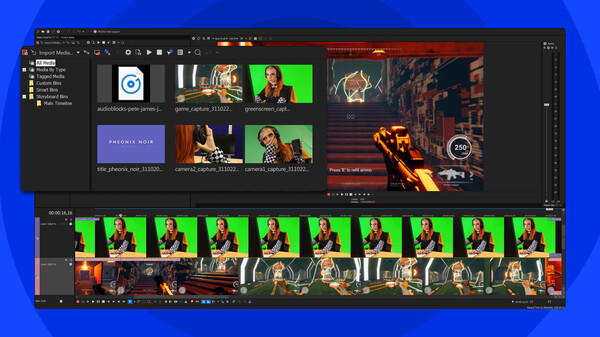
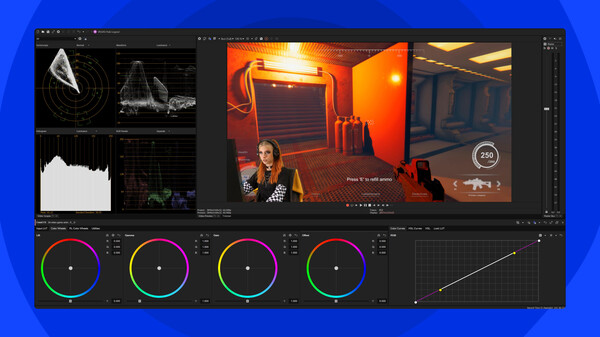
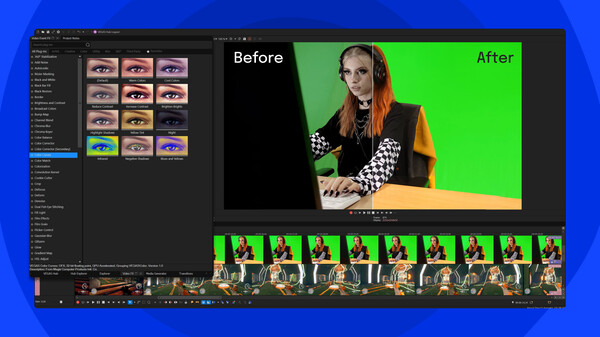
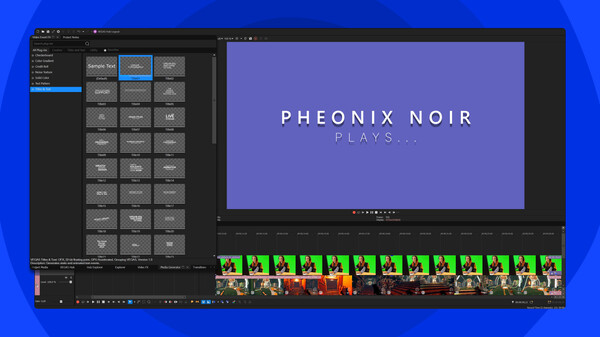
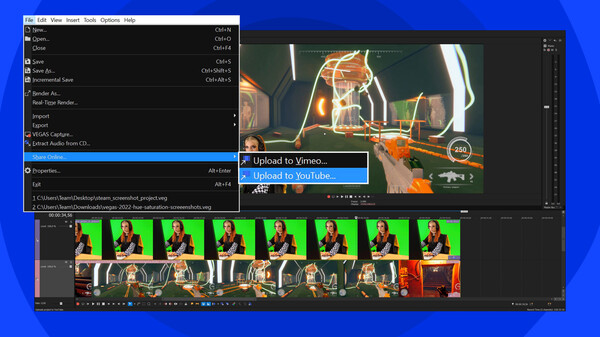
VEGAS Edit 20 Steam Edition is everything you need to edit your gaming videos, from stream highlights to gameplays. Capture your gameplay excitement and edit it into a professional video to showcase your skills and strategies or share your tips. Edit the most exciting parts of the game together and leave out dead scenes or uninteresting parts. Record commentary to add your personality. Splice in footage of yourself or other players reacting to the gameplay to build up the drama.Highlight key moments with special effects like glitches, shaking, or slow motion. Keep your viewers’ attention with jump cuts, transitions, and slow-motion sequences. Write titles and captions to identify players, locations, and key gameplay moments. Create striking looks with powerful HDR color correction and grading. Give viewers different perspectives with multiple camera views. Then, match video with music and sound effects for a complete experience. When you're happy with your edit, export with GPU acceleration and upload to YouTube or other destinations.
Highlights
- Record multiple video and audio sources
- Work with a wide range of professional formats, including Apple ProRes and BRAW
- Edit clips: trim, shuffle, slip, slide, time stretch, reverse, and more
- Add effects, filters, transitions, and titles
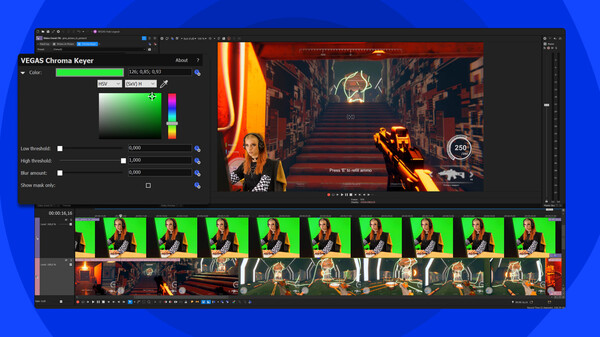
- Easily remove green screen
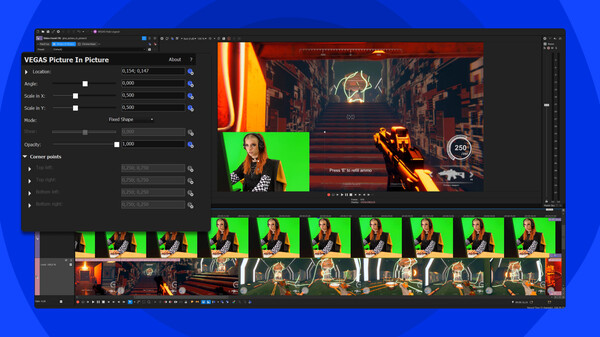
- Splice yourself into the game with picture in picture
- Create your signature look with HDR color correction and grading
- Edit effects with adjustment tracks
- Apply multi-region motion tracking to spice up your production
- Use audio to enhance your video with a multichannel mixer, reverbs and echoes, equalization tools, and VST3 support
- Use audio synchronization for multicam editing
- Use comprehensive built-in screen capture
- Work fast with GPU acceleration for decoding/encoding for Nvidia®, AMD® and Intel®
- Choose from a wide range of output formats
- Upload directly to YouTube and Vimeo
What’s new?
- Audio production with support for the latest VST3 plug-ins for reverbs, delays, EQs, and more
- Optical Flow motion: create smooth slow motion, and fluid warp-flow movement along with seamless resampling
- Motion Blur FX: create a natural feel for motion sequences and target specific areas of your footage.
- Animated transitions and effects: build dynamic animation into your transitions and effects with complete Bézier curve control
- Automatic project collections: easily access all of your projects and their media files with automatic file organization
- Scene detection: automatically detect scenes from rendered video. Mark them as regions or break them up to work with them individually
- Modern flexible transitions: create your own transitions or choose from dozens of presets to spice up the story
- Hue vs Saturation color curve: target a specific color then change the saturation
- Saturation vs Saturation color curve: target a specific saturation then pump it or mute it
- Curves color picker: sample the exact colors or ranges to adjust in the color curves
- Zoomable Preview: get up close to your footage in the Video Preview window
About the Game
Highlight key moments with special effects like glitches, shaking, or slow motion. Keep your viewers’ attention with jump cuts, transitions, and slow-motion sequences. Write titles and captions to identify players, locations, and key gameplay moments. Create striking looks with powerful HDR color correction and grading. Give viewers different perspectives with multiple camera views. Then, match video with music and sound effects for a complete experience. When you're happy with your edit, export with GPU acceleration and upload to YouTube or other destinations.
Highlights
- Record multiple video and audio sources
- Work with a wide range of professional formats, including Apple ProRes and BRAW
- Edit clips: trim, shuffle, slip, slide, time stretch, reverse, and more
- Add effects, filters, transitions, and titles
- Easily remove green screen
- Splice yourself into the game with picture in picture
- Create your signature look with HDR color correction and grading
- Edit effects with adjustment tracks
- Apply multi-region motion tracking to spice up your production
- Use audio to enhance your video with a multichannel mixer, reverbs and echoes, equalization tools, and VST3 support
- Use audio synchronization for multicam editing
- Use comprehensive built-in screen capture
- Work fast with GPU acceleration for decoding/encoding for Nvidia®, AMD® and Intel®
- Choose from a wide range of output formats
- Upload directly to YouTube and Vimeo
What’s new?
- Audio production with support for the latest VST3 plug-ins for reverbs, delays, EQs, and more
- Optical Flow motion: create smooth slow motion, and fluid warp-flow movement along with seamless resampling
- Motion Blur FX: create a natural feel for motion sequences and target specific areas of your footage.
- Animated transitions and effects: build dynamic animation into your transitions and effects with complete Bézier curve control
- Automatic project collections: easily access all of your projects and their media files with automatic file organization
- Scene detection: automatically detect scenes from rendered video. Mark them as regions or break them up to work with them individually
- Modern flexible transitions: create your own transitions or choose from dozens of presets to spice up the story
- Hue vs Saturation color curve: target a specific color then change the saturation
- Saturation vs Saturation color curve: target a specific saturation then pump it or mute it
- Curves color picker: sample the exact colors or ranges to adjust in the color curves
- Zoomable Preview: get up close to your footage in the Video Preview window